> ## Documentation Index
> Fetch the complete documentation index at: https://docs.cove.trade/llms.txt
> Use this file to discover all available pages before exploring further.
# Auto alerts after buys
> Create notifications at multiples of a purchase's market cap.
Auto alerts create targets after each **real Cove token purchase**. They notify you without trading and apply across profiles.
## Set up future-buy alerts
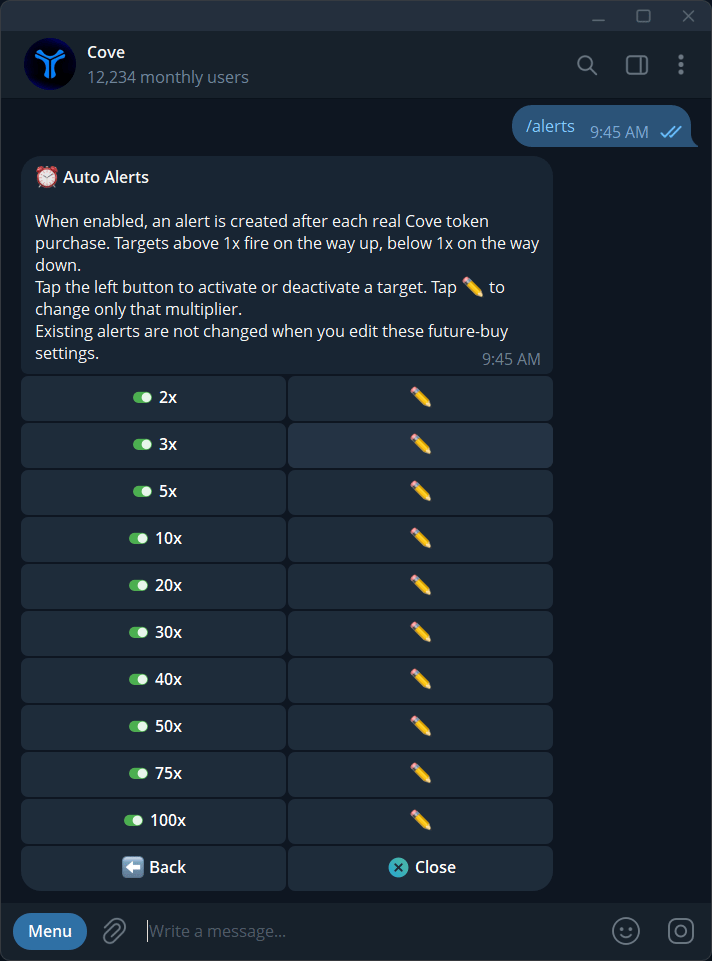
Send `/alerts` and open **Auto alerts**.
Turn **Auto alerts** on.
Toggle or edit the target multiples. The default target list is **2×, 3×, 5×, 10×, 20×, 30×, 40×, 50×, 75×, 100×**.
Above **1×** means an upward target; below **1×** means a downward target. Inputs can include **7x**, **0.7x**, **+50%**, or **-30%**.
An illustrative purchase at **100k** market cap has a **2× target at 200k** and a **0.7× target at 70k**.
## Existing versus future alerts
Changing future-buy settings does **not** change alerts already created. Inspect existing token alerts separately.
For a token you want to rebase, choose **Reset from current MC** in its auto-alert controls. The notification will then refer to the reset rather than the original buy.
## Expiry and cleanup
Auto alerts expire after **5 days** and cover up to **30 tokens**. When that token limit is exceeded, the oldest token's ladder is dropped. The token's auto alerts retire after you fully exit the position.
Turning off Auto alerts stops future automatic creation; manage existing alerts in `/alerts` as needed. Use [manual price alerts](/features/price-alerts) when you want a specific independent target.