> ## Documentation Index
> Fetch the complete documentation index at: https://docs.cove.trade/llms.txt
> Use this file to discover all available pages before exploring further.
# DCA Orders
> Create buy and sell DCA ladders from the trading panel
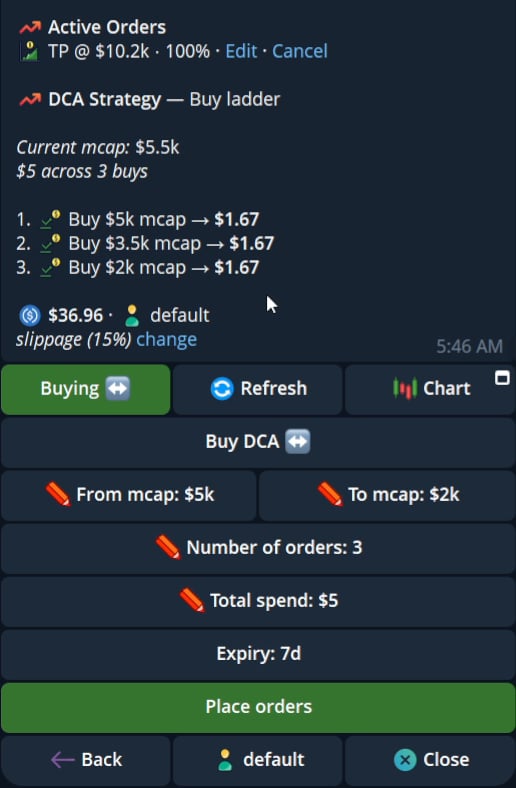
DCA orders create a ladder of planned orders between two market-cap values.
## Create a ladder
1. Open a token's Buy or Sell panel.
2. Select `Limit` and then the DCA flow.
3. Enter the starting market cap and ending market cap.
4. Enter the number of orders.
5. Enter the total spend for a buy ladder or the total sell amount for a sell ladder.
6. Review the preview and expiry.
7. Select `Place orders`.
The preview lists the generated ladder, amount per order, and expiry.
 ## Buy and sell DCA
Buy DCA uses a total spend. Sell DCA uses a total sell amount. Active DCA orders appear in the position card and active order views.
Review the generated ladder, per-order amount, and expiry before placing the orders.
## Buy and sell DCA
Buy DCA uses a total spend. Sell DCA uses a total sell amount. Active DCA orders appear in the position card and active order views.
Review the generated ladder, per-order amount, and expiry before placing the orders.