> ## Documentation Index
> Fetch the complete documentation index at: https://docs.cove.trade/llms.txt
> Use this file to discover all available pages before exploring further.
# Export trade history
> Download real trades as Generic CSV or a tax-tool CSV.
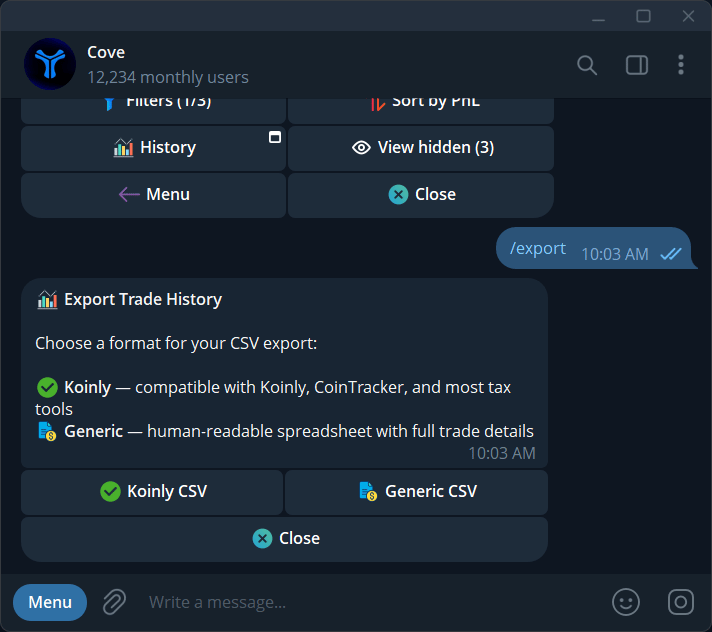
Send `/export` to download real trading history. Paper trades are excluded.
## Download a file
If you are practicing, switch from Paper to a real profile first.
Send `/export` and choose a format.
Select **Generic CSV** for a spreadsheet or **Koinly CSV** for a compatible tax-tool import.
Download the Telegram file named like **cove-trades-generic-YYYY-MM-DD.csv**. Check its date range, wallet coverage, and values before relying on it.
## What is included?
**Generic CSV** includes Date, Side, Token, Chain, Amount, Price (USD), Total (USD), USDC Amount, Fee (USD), Cost Basis (USD), Realized PnL (USD), Order Type, and TX Hash.
**Koinly CSV** uses fields such as Date, Sent/Received amounts and currencies, Fee, Net Worth, Label, Description, and TxHash.
The file is an activity record, not a determination of tax treatment. Check the receiving tool's import mapping and avoid importing the same rows twice.
## Check the export scope
Check which profiles and dates your downloaded file includes. If you need a complete account export, including archived profiles, confirm the scope with [Support](/features/support) before assuming nothing is missing.
**No trades found to export** can mean no eligible real trade history. Check Paper mode and the intended account. For visual results, use [History](/features/history).