> ## Documentation Index
> Fetch the complete documentation index at: https://docs.cove.trade/llms.txt
> Use this file to discover all available pages before exploring further.
# Multi-wallet Trading
> Execute buys from multiple Cove accounts with account selection, spend mode, variance, and transaction delay
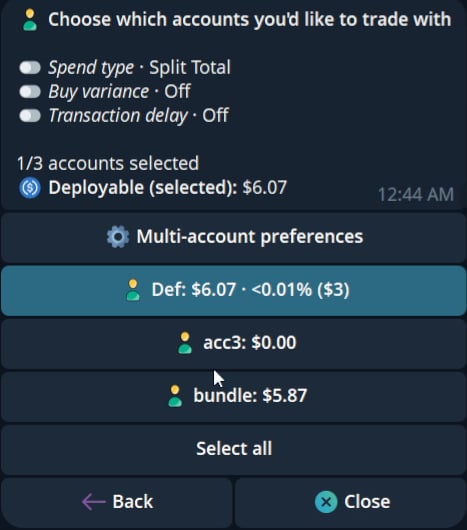 Multi-wallet trading lets you execute token buys across more than one Cove account from the same trading panel. It is useful when you want to distribute entries, keep account behavior separated, or avoid every buy looking identical.
## How it works
Paste a token address or open a token link to bring up the trading panel.
Tap the account selector at the bottom of the panel, then choose one or more accounts to trade with.
Configure spend type, buy variance, and transaction delay before submitting the trade.
Cove sends one transaction per selected account and reports the result back in Telegram.
## Account selection
The account selector shows the selected account count and the deployable total for the selected accounts.
In the selector, you can:
* Select or deselect individual accounts.
* Use **Select all** or **Deselect all**.
* See total deployable balance for the selected accounts.
* Open **Multi-account preferences** before executing.
Only selected accounts participate in the trade. If one account is selected, the flow behaves like a normal single-account trade.
## Multi-account settings
Open **Multi-account preferences** to configure how Cove spreads the buy across accounts.
Multi-wallet trading lets you execute token buys across more than one Cove account from the same trading panel. It is useful when you want to distribute entries, keep account behavior separated, or avoid every buy looking identical.
## How it works
Paste a token address or open a token link to bring up the trading panel.
Tap the account selector at the bottom of the panel, then choose one or more accounts to trade with.
Configure spend type, buy variance, and transaction delay before submitting the trade.
Cove sends one transaction per selected account and reports the result back in Telegram.
## Account selection
The account selector shows the selected account count and the deployable total for the selected accounts.
In the selector, you can:
* Select or deselect individual accounts.
* Use **Select all** or **Deselect all**.
* See total deployable balance for the selected accounts.
* Open **Multi-account preferences** before executing.
Only selected accounts participate in the trade. If one account is selected, the flow behaves like a normal single-account trade.
## Multi-account settings
Open **Multi-account preferences** to configure how Cove spreads the buy across accounts.
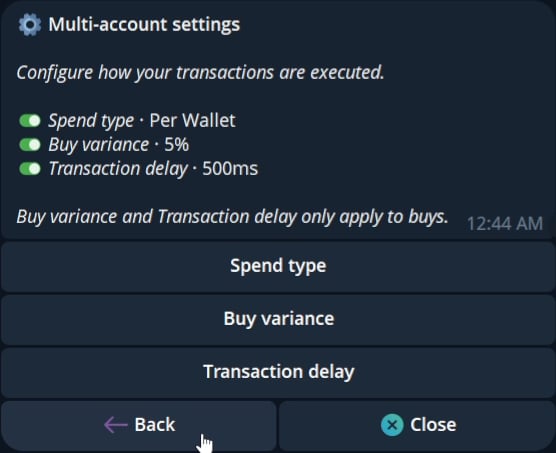 Spend type controls how the amount on the buy panel is interpreted across selected accounts.
| Mode | Behavior |
| ----------- | -------------------------------------------------------------------------------------------------------------------------------- |
| Split Total | The panel amount is divided across selected accounts. With **\$50** across 2 accounts, each spends **\$25** plus any variance. |
| Per Wallet | Every selected account spends the full panel amount. With **\$50** across 2 accounts, each spends **\$50**, for **\$100** total. |
Buy variance is ignored in **Per Wallet** mode.
Buy variance adds randomness to how buys are split across selected accounts.
Spend type controls how the amount on the buy panel is interpreted across selected accounts.
| Mode | Behavior |
| ----------- | -------------------------------------------------------------------------------------------------------------------------------- |
| Split Total | The panel amount is divided across selected accounts. With **\$50** across 2 accounts, each spends **\$25** plus any variance. |
| Per Wallet | Every selected account spends the full panel amount. With **\$50** across 2 accounts, each spends **\$50**, for **\$100** total. |
Buy variance is ignored in **Per Wallet** mode.
Buy variance adds randomness to how buys are split across selected accounts.
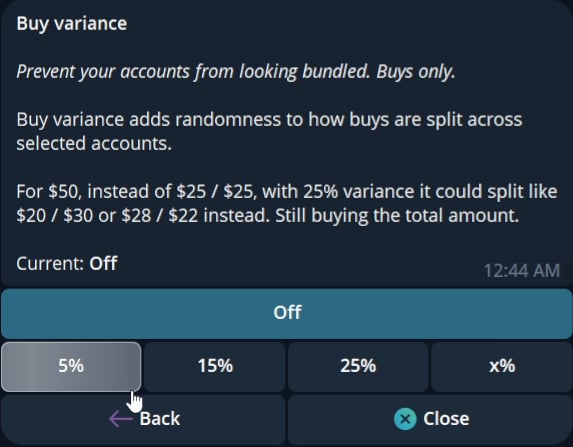 Buy variance changes account-level amounts in Split Total mode.
Transaction delay spaces account transactions apart so they are not all sent at the same instant.
Presets include **Off**, **250ms**, **500ms**, **1000ms**, and a custom delay.
Buy variance and transaction delay apply to buys only.
## Executing a multi-wallet buy
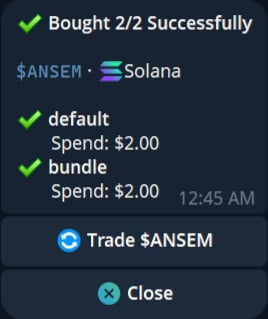
After accounts and settings are selected, return to the trading panel and submit the buy. Cove shows a multi-wallet receipt with the number of selected wallets that bought successfully.
Buy variance changes account-level amounts in Split Total mode.
Transaction delay spaces account transactions apart so they are not all sent at the same instant.
Presets include **Off**, **250ms**, **500ms**, **1000ms**, and a custom delay.
Buy variance and transaction delay apply to buys only.
## Executing a multi-wallet buy
After accounts and settings are selected, return to the trading panel and submit the buy. Cove shows a multi-wallet receipt with the number of selected wallets that bought successfully.
 Use this when you want the selected accounts to share one total buy amount.
Use this when you want every selected account to place the same-sized buy.
Use this to make account-level buy amounts less uniform.
Use this to space transactions apart by a fixed interval.
Multi-wallet execution increases total exposure when **Per Wallet** is selected. Always check the deployable total and selected account count before confirming.
Use this when you want the selected accounts to share one total buy amount.
Use this when you want every selected account to place the same-sized buy.
Use this to make account-level buy amounts less uniform.
Use this to space transactions apart by a fixed interval.
Multi-wallet execution increases total exposure when **Per Wallet** is selected. Always check the deployable total and selected account count before confirming.