> ## Documentation Index
> Fetch the complete documentation index at: https://docs.cove.trade/llms.txt
> Use this file to discover all available pages before exploring further.
# Positions
> Filter, sort, hide, and manage token positions across accounts
Open `Positions` from the home screen to view holdings across your selected accounts.
 ## Position view
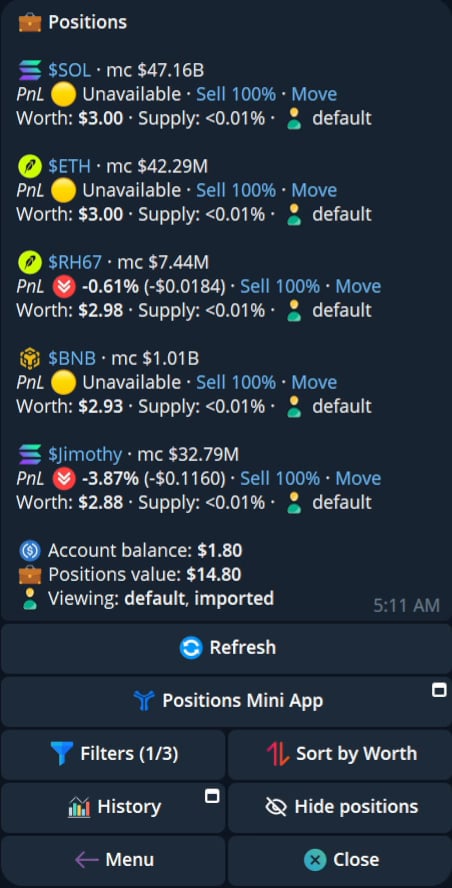
Each row can show the token, chain, market cap, PnL, worth, and account context. The panel also exposes total balance and position value.
## Filter and sort
The current panel includes:
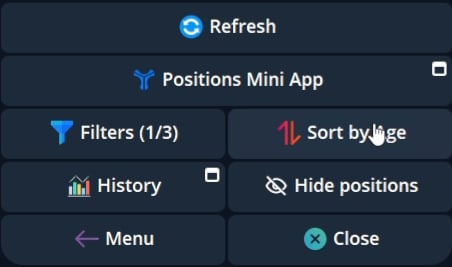
* Sort by Worth.
* Sort by Age.
* Account filters.
* Chain filters.
* Other filters shown in the filter menu.
* Pagination.
* History.
* Refresh.
## Position view
Each row can show the token, chain, market cap, PnL, worth, and account context. The panel also exposes total balance and position value.
## Filter and sort
The current panel includes:
* Sort by Worth.
* Sort by Age.
* Account filters.
* Chain filters.
* Other filters shown in the filter menu.
* Pagination.
* History.
* Refresh.
 ## Hide and show positions
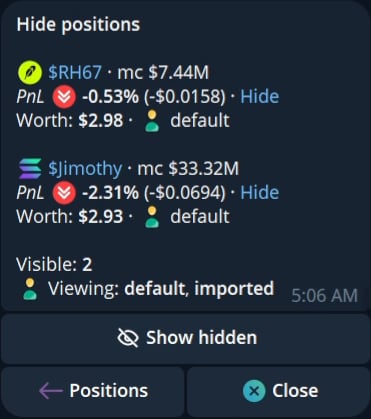
Use `Hide positions` to remove a position from the default list. Use `Show hidden` to view hidden positions, then unhide a position when you want it back in the main list.
## Hide and show positions
Use `Hide positions` to remove a position from the default list. Use `Show hidden` to view hidden positions, then unhide a position when you want it back in the main list.
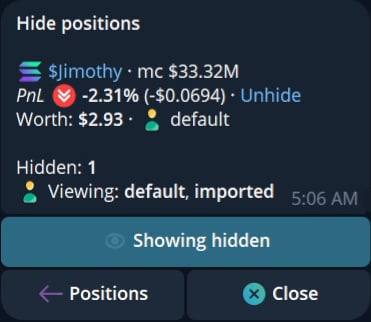 Hiding a position does not sell or move it.
## Position actions
Depending on the settings and current position, the row can expose:
* Sell 100%.
* Sell 100% across selected wallets when the position spans selected accounts.
* Move.
* View detailed.
* Generate PnL.
* Open the Positions Mini App.
`Sell 100%` and `Sell 100% Links` are controlled from Settings, Position panel settings. Confirm the selected accounts and final amount before a full sell.
See [PnL Cards](/features/pnl-cards) for the generated image workflow.
Hiding a position does not sell or move it.
## Position actions
Depending on the settings and current position, the row can expose:
* Sell 100%.
* Sell 100% across selected wallets when the position spans selected accounts.
* Move.
* View detailed.
* Generate PnL.
* Open the Positions Mini App.
`Sell 100%` and `Sell 100% Links` are controlled from Settings, Position panel settings. Confirm the selected accounts and final amount before a full sell.
See [PnL Cards](/features/pnl-cards) for the generated image workflow.