> ## Documentation Index
> Fetch the complete documentation index at: https://docs.cove.trade/llms.txt
> Use this file to discover all available pages before exploring further.
# Create price alerts
> Get notified at a market-cap target without placing a trade.
A price alert sends a notification; it does not buy or sell. Alerts use **market-cap targets**. Percentage inputs are converted into fixed market-cap targets when created.
Alerts are **shared across your account**, not limited to the active profile. Native and wrapped-native panels do not offer these alerts.
## Create from a token panel
Paste its address, then tap **Add Alert** beside **Mcap**, or **My Alerts** if you already have alerts.
In **Add alert**, choose **Market cap** or **% change**.
Use a market cap such as **500k** or **1.2m**, or a change such as **+50%** or **-20%**. The target must differ from the current market cap.
**Add step** creates up to **four alerts** at once. Remove unwanted steps with **Delete Alert**. Choose an expiry such as **30m**, **2h**, or **7d**.
Tap **Create alert** or **Create N alerts**. Look for the success message, then send `/alerts`.
Manual alerts default to **7 days**, within **1 minute–30 days**. You can have up to **100 active manual alerts**.
## Create one alert with a reply
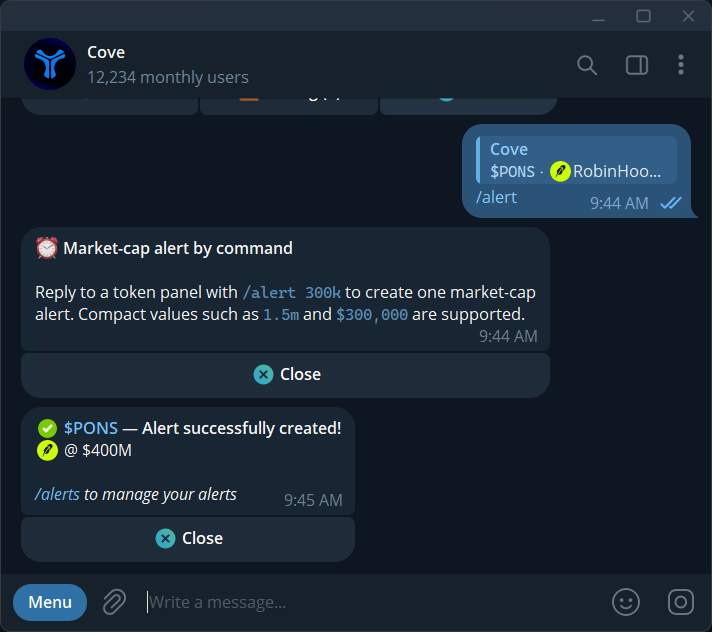
Reply to a fresh token panel:
```text theme={null}
/alert 300k
```
This creates one market-cap alert with the default **7-day** expiry. **1.5m** and **\$300,000** are also accepted. The command does not accept percentage targets or custom expiry.
Sending the command creates the alert immediately. Use the panel flow for multiple targets or other expiry settings.
## Manage and cancel
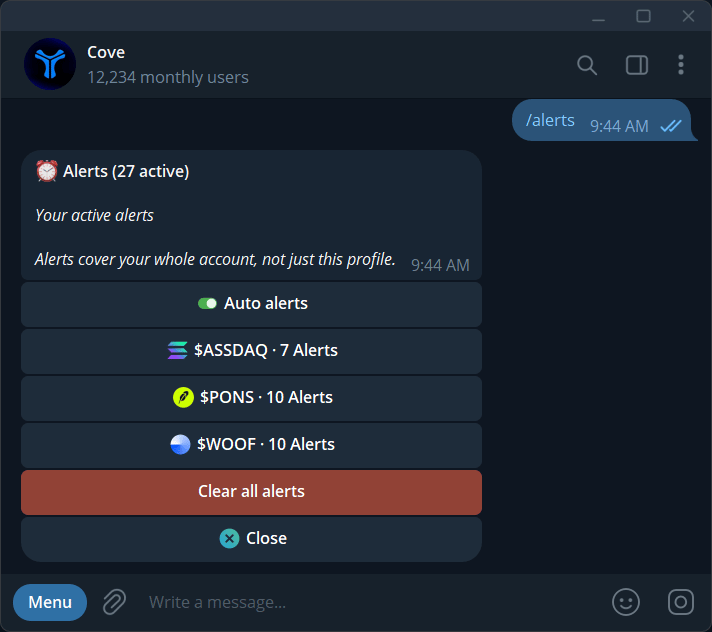
1. Send `/alerts`.
2. Choose a token; the list shows ten tokens per page.
3. Select an alert to inspect its trigger and market cap when set.
4. Use **Cancel alert**, **Cancel all alerts** for the token, or **Clear all alerts** for the whole account.
5. Read and confirm the cancellation scope.
## Read the notification
The message reports the token, direction, change, and target market cap. It can arrive after the market has moved further; the reported trigger level is not an executable quote.
Checks are typically about 30 seconds apart. [Pushover](/features/settings/notifications) can mirror alerts to your phone where available.
Opening an alert's ticker can take you to a profile holding the token or offer a profile choice. If a reply command reports it was already received, check `/alerts` before resending.
For automatic targets after purchases, use [Auto alerts](/features/auto-alerts).