> ## Documentation Index
> Fetch the complete documentation index at: https://docs.cove.trade/llms.txt
> Use this file to discover all available pages before exploring further.
# Settings
> Configure guardrails, trade panels, positions, group links, and language
Settings follow the same five sections shown in the Cove UI.
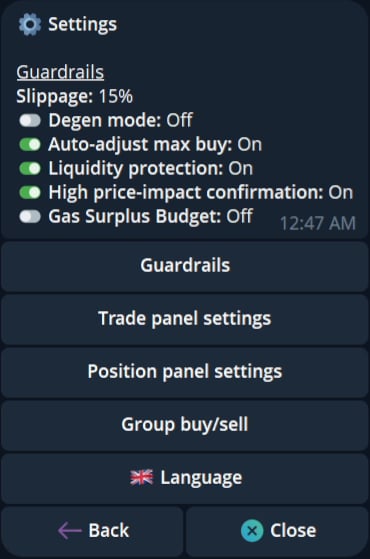 Set slippage, liquidity protection, max-buy adjustment, price-impact confirmation, Degen mode, and the gas surplus budget.
Change buy and sell presets, confirmations, panel defaults, links, and Auto TP/SL.
Control full-sell actions in Positions and position links.
Set the instant group-buy limit and control group-sell links.
Open the language selector and choose an available interface language.
## Find a setting
| UI section | Use it for |
| ----------------------- | ---------------------------------------------------------------- |
| Guardrails | Reduce avoidable execution risk and approve gas surplus behavior |
| Trade panel settings | Change the controls and defaults shown while trading |
| Position panel settings | Choose quick full-sell actions |
| Group buy/sell | Control shared buy and sell links |
| Language | Change the interface language when available |
The current UI label is `Always open on Buy`. The older label `Stay on buy after buying` no longer matches the product and does not appear in the current Settings pages.
Set slippage, liquidity protection, max-buy adjustment, price-impact confirmation, Degen mode, and the gas surplus budget.
Change buy and sell presets, confirmations, panel defaults, links, and Auto TP/SL.
Control full-sell actions in Positions and position links.
Set the instant group-buy limit and control group-sell links.
Open the language selector and choose an available interface language.
## Find a setting
| UI section | Use it for |
| ----------------------- | ---------------------------------------------------------------- |
| Guardrails | Reduce avoidable execution risk and approve gas surplus behavior |
| Trade panel settings | Change the controls and defaults shown while trading |
| Position panel settings | Choose quick full-sell actions |
| Group buy/sell | Control shared buy and sell links |
| Language | Change the interface language when available |
The current UI label is `Always open on Buy`. The older label `Stay on buy after buying` no longer matches the product and does not appear in the current Settings pages.