> ## Documentation Index
> Fetch the complete documentation index at: https://docs.cove.trade/llms.txt
> Use this file to discover all available pages before exploring further.
# Auto-buy on paste
> Choose a fixed amount to buy immediately when you paste a token.
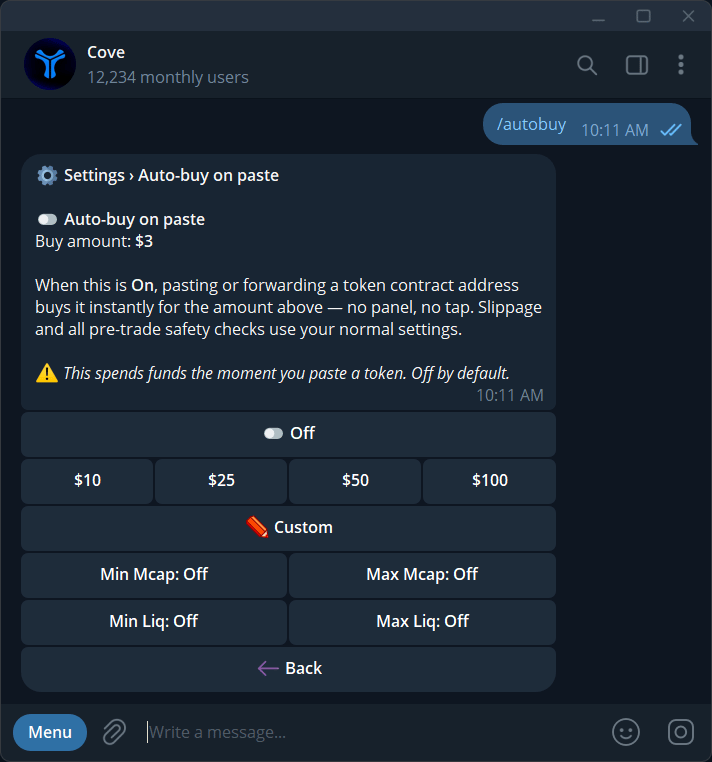
Auto-buy on paste starts a buy when you paste or forward a token contract into Cove. It is **off by default**, with no amount set.
When enabled, pasting the token is a trading action. Funds can be spent immediately using the active profile and selected wallets.
## Configure auto-buy
Send `/autobuy`, or open **Settings → Trade panel settings → Auto-buy on paste**.
Choose an offered preset such as **\$10 / \$25 / \$50 / \$100**, or **Custom**. Check whether selected wallets use Split Total or Per Wallet.
Set the market-cap or liquidity safeguards offered in the panel. Review the saved values and any validation before enabling.
Check the active profile and toggle **Auto-buy on paste** on. The next eligible token paste can start a purchase.
Some accounts offer market-cap or liquidity limits for auto-buy. Read each field's description and accepted range in the current panel. These filters do not screen every risk.
## What still applies?
Slippage and pre-trade checks still apply. If **Scam warning** is on, a flagged token is refused rather than bought without a panel confirmation. The message can say the auto-buy amount was not spent.
If a trade is pending or fails, check the receipt before pasting again. Repeated deliberate submissions can be new trading instructions.
## Turn it off
Open `/autobuy` and switch the feature off. Verify the state in each profile where you used it. This stops future paste-triggered buys; it does not cancel existing automated orders.
See [Trading](/features/trading) and [Guardrails](/features/settings/guardrails).