> ## Documentation Index
> Fetch the complete documentation index at: https://docs.cove.trade/llms.txt
> Use this file to discover all available pages before exploring further.
# Auto TP/SL
> Add automatic take-profit and stop-loss levels to future market buys
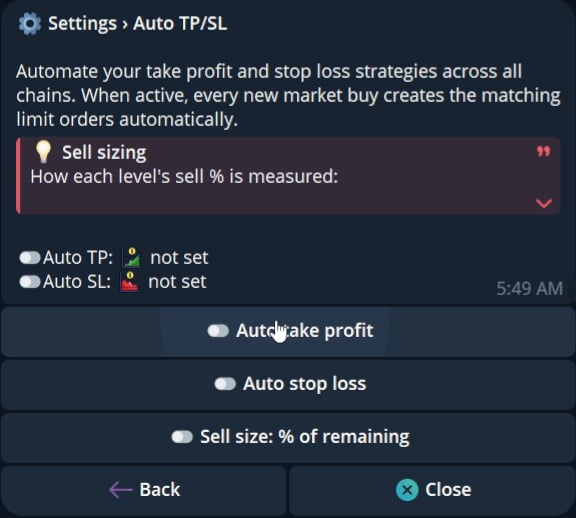
Auto TP/SL adds configured exit orders to future market buys.
 ## How it works
1. Open Trade panel settings and choose Auto TP/SL.
2. Enable Auto take profit, Auto stop loss, or both.
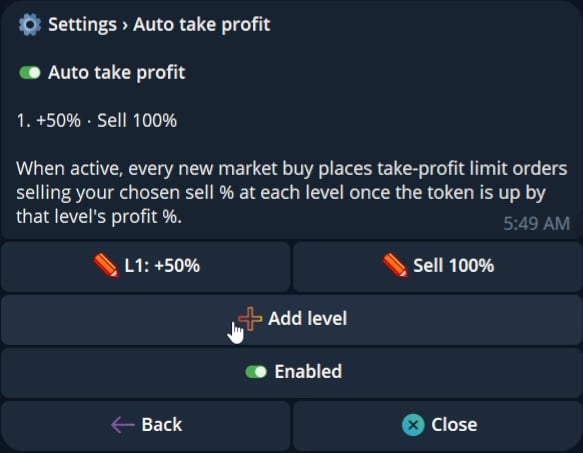
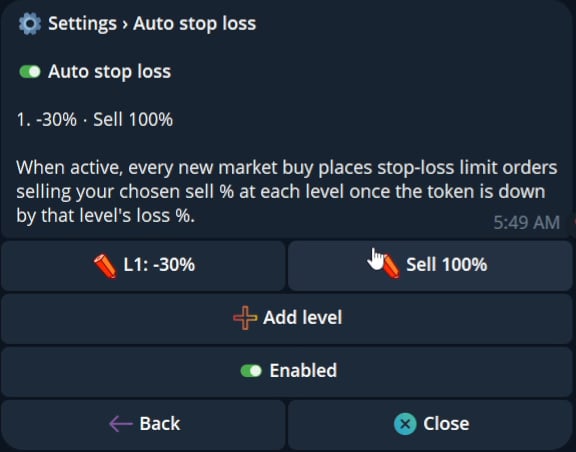
3. Add one or more levels for each side.
4. Set a trigger percentage and the percentage to sell.
5. Save the levels.
Auto take profit triggers after the configured gain. Auto stop loss triggers after the configured loss.
## How it works
1. Open Trade panel settings and choose Auto TP/SL.
2. Enable Auto take profit, Auto stop loss, or both.
3. Add one or more levels for each side.
4. Set a trigger percentage and the percentage to sell.
5. Save the levels.
Auto take profit triggers after the configured gain. Auto stop loss triggers after the configured loss.
 ## Sell sizing
The current UI offers two sizing modes.
| Mode | Meaning |
| ---------------- | -------------------------------------------------------------------------- |
| `% of entry` | Each level sells a fixed percentage of the original position |
| `% of remaining` | Each level sells a percentage of the position left when the level triggers |
The UI warns that `% of entry` levels cannot total more than 100%. Levels can be added and deleted. Auto take profit and Auto stop loss can be enabled independently.
## Scope
Auto TP/SL applies to new market buys. Existing positions are not changed retroactively. Manual limit sells remain available separately.
## Sell sizing
The current UI offers two sizing modes.
| Mode | Meaning |
| ---------------- | -------------------------------------------------------------------------- |
| `% of entry` | Each level sells a fixed percentage of the original position |
| `% of remaining` | Each level sells a percentage of the position left when the level triggers |
The UI warns that `% of entry` levels cannot total more than 100%. Levels can be added and deleted. Auto take profit and Auto stop loss can be enabled independently.
## Scope
Auto TP/SL applies to new market buys. Existing positions are not changed retroactively. Manual limit sells remain available separately.