> ## Documentation Index
> Fetch the complete documentation index at: https://docs.cove.trade/llms.txt
> Use this file to discover all available pages before exploring further.
# Notifications and Pushover
> Follow Telegram receipts and optionally receive order and price alerts on your phone.
Cove sends trade, deposit, transfer, withdrawal, reward, and support updates in Telegram. Some progress messages update in place instead of creating new messages.
Cove does not offer individual switches for these Telegram message categories. You can manage Telegram chat notifications in Telegram itself.
## Optional phone alerts
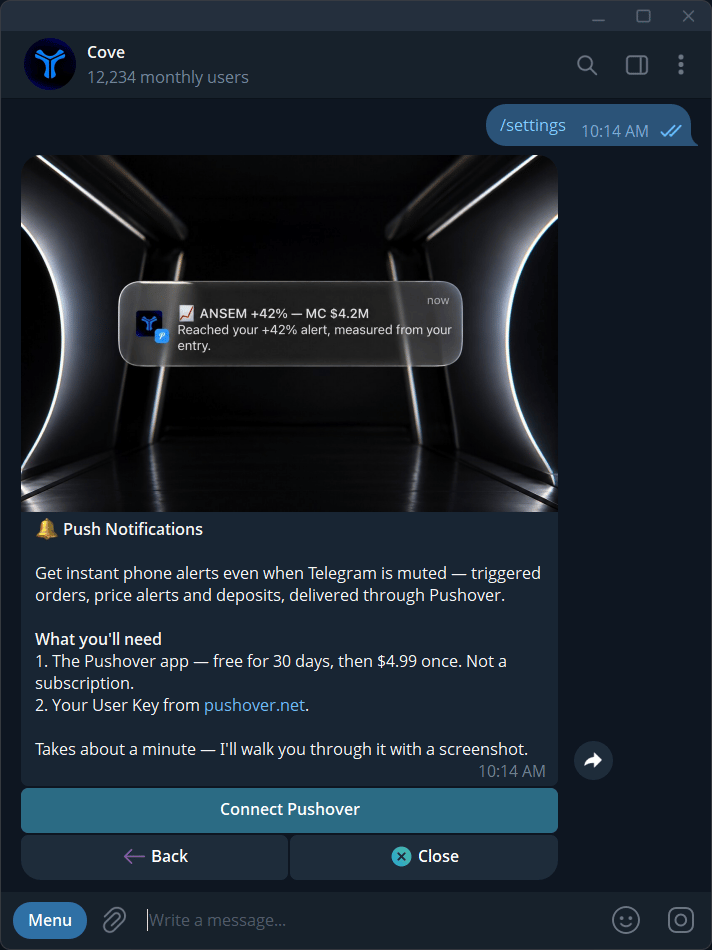
Where **Settings → Notifications → Push Notifications** is available, Pushover can mirror order and price-alert events to your phone.
Install the Pushover app, create or open your account, and copy its **User Key**. Check Pushover's current purchase/trial terms in its app.
Open **Settings → Notifications → Push Notifications → Connect Pushover**.
Paste your 30-character User Key when prompted. Do not share it in screenshots. Cove removes the submitted message from the chat.
Check for **Cove connected** on your phone. Use **Send test notification** if needed.
## Push settings
| Control | Default | Effect |
| ------------------------------- | ------- | ----------------------------------------------------------------------------------------------- |
| **Limit & DCA orders** | On | Mirror supported order events, including fills, expiry, cancellation, and impact-blocked events |
| **Price alerts** | On | Mirror manual and automatic price alerts |
| **Urgent — ignore quiet hours** | Off | Request urgent delivery through quiet hours |
| **Send test notification** | Action | Check device delivery |
| **Reconnect Pushover** | Action | Replace an invalid or changed key |
| **Disconnect** | Action | Remove the saved connection from Cove |
Preferences are account-wide. Push delivery is capped at **10 pushes per minute per user** and is additional to Telegram. Do not assume every deposit or support message is mirrored.
## Know where to look
| Event | Primary place to check |
| ---------------------------------------- | ---------------------------------------------- |
| Buy/sell or bulk-sell result | Trade receipt in Telegram |
| Automated order event | Telegram and `/orders`; optional order push |
| Price alert | Telegram and optional alert push |
| Deposit / bridge / transfer / withdrawal | Telegram receipt and relevant funds panel |
| Private payment or marketplace purchase | Telegram plus the run/purchase in Cove Wallets |
| Reward payout | Telegram and Refer & Earn |
| Support reply | Telegram and My Tickets |
## Missing pushes
If the setting is absent, the integration is not currently available in your account. For **invalid key**, copy the complete User Key and check that your Pushover account has an active device. If the provider is unavailable, try connecting later.
Check the category toggle, phone notification permissions, quiet hours, and **Send test notification**. Telegram remains the place to review the underlying event.