> ## Documentation Index
> Fetch the complete documentation index at: https://docs.cove.trade/llms.txt
> Use this file to discover all available pages before exploring further.
# Create a trailing stop
> Follow a token's peak and sell if it falls by your chosen percentage.
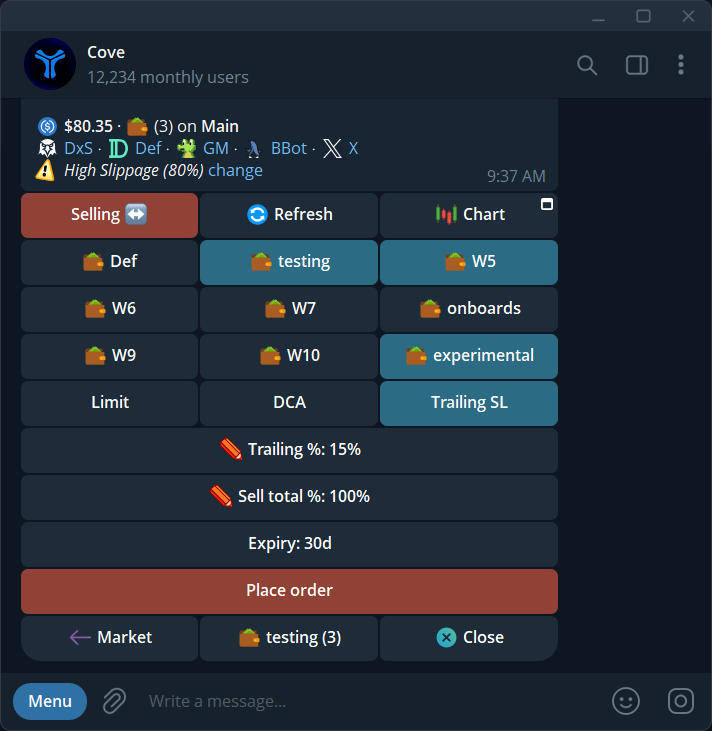
A trailing stop tracks the highest price since you placed it. It attempts to sell when the price falls by the **Trailing %** from that peak.
For example, a 20% trail begins at a peak of 1m market cap with an illustrative 800k threshold. If the peak rises to 1.5m, the threshold rises to about 1.2m. It does not move down just because the price falls.
## Create from the panel
In the intended profile, open the token and select the wallets whose holdings you want covered.
Tap **Limit**, then **Trailing SL**.
Enter **Trailing %** from **1–99** and **Sell total %** from **1–100**.
Check the displayed settings and expiry, then **Place order**. Default expiry is 30 days, within a 1 minute–30 day range.
Look for **Trailing stop order placed** and open `/orders` in that profile.
## Use the reply command
Sending the complete reply command places the order immediately. The message itself is the confirmation. The numbers below are illustrative, not a recommended setup.
Reply to a **fresh token panel**, rather than sending an unrelated message:
```text theme={null}
/trailing 50 100
```
This example trails the peak by **50%** and sells **100%** of selected wallets' holdings. Both numbers are required.
Send `/trailing` alone for the bot's tutorial. If it reports duplicate delivery or uncertain partial creation, check `/orders` before resending.
## Change or cancel
Open `/orders`, select the pending trailing stop, and use **Edit** or **Cancel**. You can edit the trail, sell size, and expiry while pending.
If a trail is too tight and would trigger immediately, widen it. A trigger is not a guaranteed fill; read any **Didn't Fire**, fee, or failed-order notice in [Manage orders](/features/managing-orders).