> ## Documentation Index
> Fetch the complete documentation index at: https://docs.cove.trade/llms.txt
> Use this file to discover all available pages before exploring further.
# Wallet Marketplace
> Choose and buy wallets with existing on-chain history, where available.
Wallet Marketplace offers wallets with existing funding or transaction history. Purchased wallets are added to the **profile used for the purchase**.
Open it from `/wallets` → **Wallet Marketplace** → **Open Marketplace**, if the button is available. It is not offered in Paper mode.
## Choose wallets
Choose the intended profile in Telegram before opening the marketplace. It needs enough free slots.
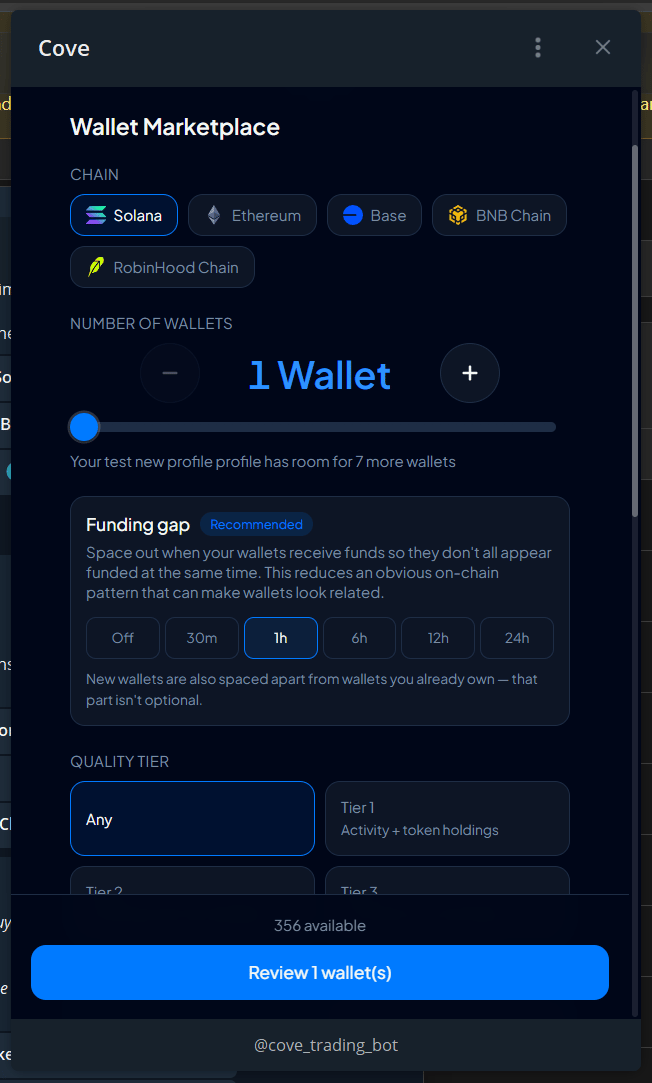
Select a chain and the number of wallets. Where offered, choose **Pair with a Solana wallet**.
Adjust quality tier, persona, activity timezone, funding source, balance, transactions, funding age, and funding gap. The available inventory updates to match.
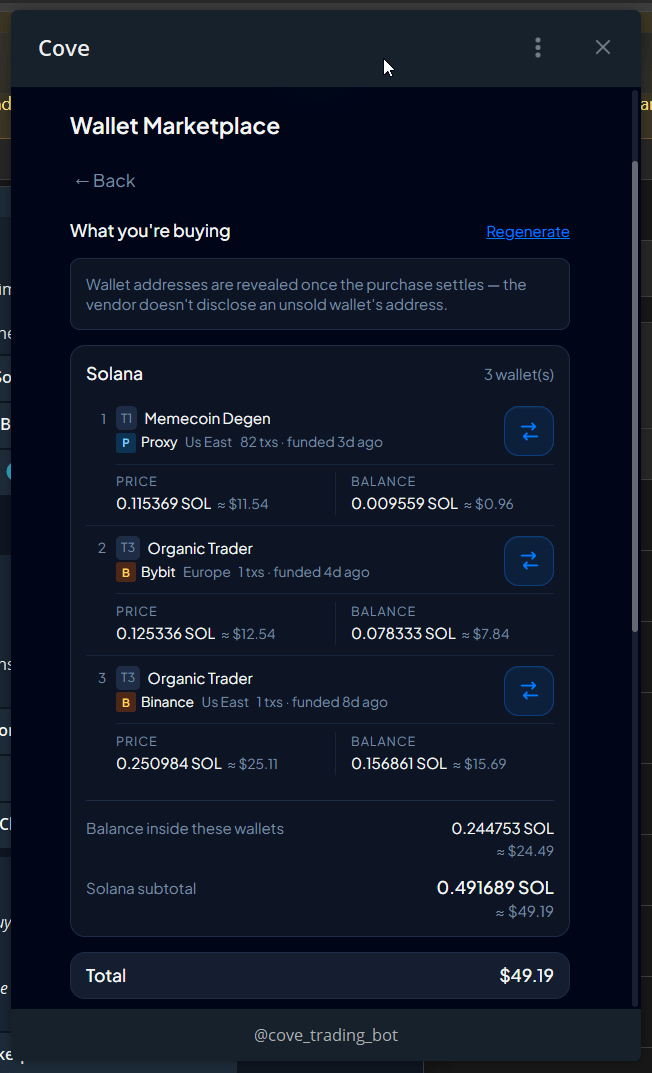
Tap **Review N wallets**. Inspect every wallet's price, balance, activity, age, and tier. **Swap this wallet** replaces one choice; **Regenerate** produces another selection.
Check **Total** and **Pay from**, including network costs. Tap **Buy N wallets** only after reviewing the whole order.
## Filter reference
| Control | What it changes |
| --------------------------------------------------------- | --------------------------------------------------------------------------------------- |
| **Chain** | The chain on which the wallet's history was created |
| **Number of wallets** | Quantity, limited by stock and profile space |
| **Quality tier** | Tier 0: funding only; Tier 1: funding and activity; Tier 2: activity and token holdings |
| **Persona / Activity timezone** | Offered activity-pattern filters |
| **Funding source / Balance / Transactions / Funding age** | Restrict the wallet history and holdings you want |
| **Funding gap** | Requested spacing; choices include Off, 30m, 1h, 6h, 12h, and 24h |
The default recommended gap is **1h**. Existing-wallet spacing rules may still apply even with the optional gap off.
The documented marketplace chains are **Solana, Ethereum, Base, BNB Chain, and RobinHood Chain**. An EVM wallet can be used on other supported EVM chains, but its history remains on the chain where it occurred.
## After purchase
Progress moves through reservation, payment, vendor processing, and import. Addresses are revealed once the purchase settles. The completion notification confirms which profile received the wallets; they show **Bought** or 🛒.
Balances inside purchased wallets belong to you and are separate from the fee. Prices are quoted in the native coin with an approximate USD value.
Purchased wallets start in **manual bridge mode**. Review [Auto-bridge](/funds/bridge) before expecting other-chain funds in your trading balance.
## If a purchase is interrupted
| Status | Next step |
| -------------------------------------- | ------------------------------------------------------- |
| **Purchase complete — import pending** | Open the purchase and choose **Finish import** |
| **This purchase needs a hand** | **Copy reference and open chat**, then contact support |
| **No wallets match** | Broaden a filter or choose another chain |
| **Profile full** | Switch profiles or free a slot |
| **Cannot cover network costs** | Choose another paying wallet or reduce quantity |
| **Paused / Refunded / Cancelled** | Read the actual status before starting another purchase |
Buying a wallet does not establish that its history or past owner is trustworthy. Review the offered information and keep control of your wallet access. The limit remains **10 wallets per profile**; a paired EVM/Solana purchase occupies one slot.