> ## Documentation Index
> Fetch the complete documentation index at: https://docs.cove.trade/llms.txt
> Use this file to discover all available pages before exploring further.
# Withdraw funds
> Send USDC or an offered stablecoin to an external wallet.
Use **Withdraw** for money going to an external address. Use [Transfer](/features/transfers) between your Cove wallets or to a Cove user. To send another token, use [Token transfers](/funds/token-transfers).
## Make a withdrawal
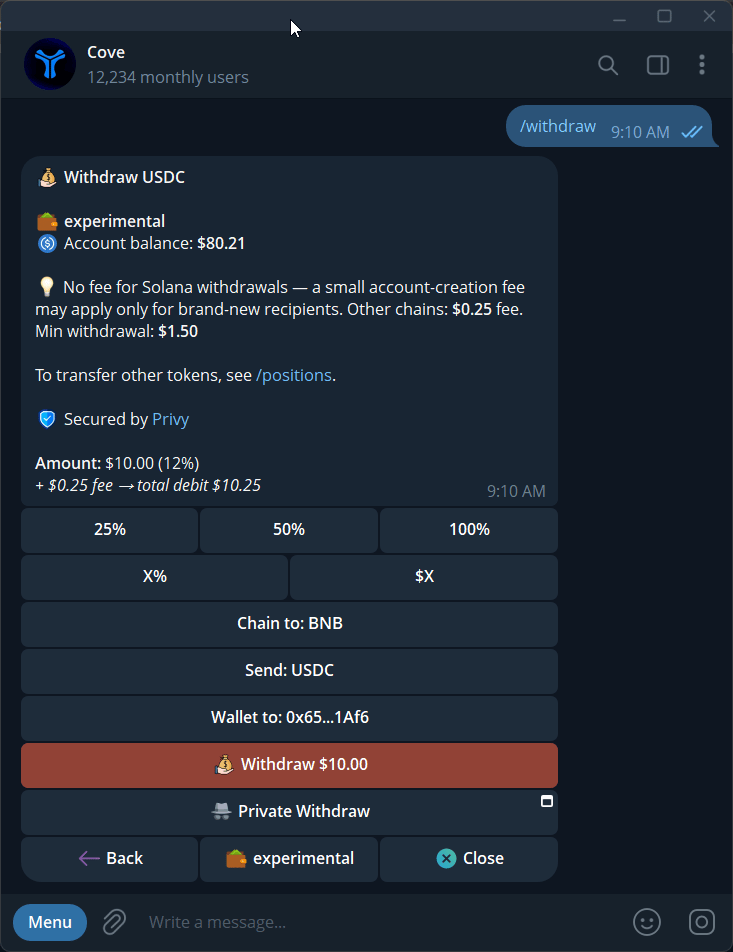
Choose the intended profile and send `/withdraw`. Check the source wallet and available balance.
Select the destination chain. Solana and BNB Chain may also offer **Send: USDT**. Make sure the recipient accepts the exact asset and network.
Paste the external wallet address. Review any address warning and check the full address yourself.
Choose a USD amount or percentage. The minimum withdrawal is **\$1.50**. Leave room for any fee when entering an amount below Max.
Check the source, destination, chain, asset, fee, and recipient amount. If a fee confirmation appears, review it before **Withdraw anyway** or the final action shown.
**Withdrawal Submitted!** means processing has started. Wait for the completion or failure message and check the explorer link where provided.
## Fees and Max
Standard Solana withdrawals have no flat Cove withdrawal fee; a new recipient token account may have an account-creation cost. Other supported withdrawal chains have a documented **\$0.25** flat fee. Check the current prompt for the final amount.
* Below **100%**, the fee is added on top of the entered amount.
* At **100% / Max**, it is taken from the amount, reducing what arrives.
* **Withdrawal Too Large to Sponsor** asks you to split the withdrawal into smaller amounts.
See [Fees and minimums](/essentials/fees-structure).
## Supported destinations
Open **Withdraw** to see the destination networks currently offered. The [Supported chains](/essentials/supported-chains) page lists trading networks, including **Arc**; trading support does not automatically mean a chain is available as a withdrawal destination.
## If a withdrawal is blocked
| Message or situation | Next step |
| ----------------------------------- | -------------------------------------------------------------- |
| Destination is your own Cove wallet | Use **Transfer** |
| Invalid or unsupported destination | Recheck the address, network, and recipient requirements |
| Address looks like a token contract | Use the recipient's wallet address |
| Insufficient balance | Reduce the amount or add spendable funds |
| Signing access lost | Restore access in Cove Wallets |
| Submitted or pending | Follow the existing receipt before starting another withdrawal |
[Private Withdraw](/funds/private-withdraw), where available, has a separate flow and fee quote.