> ## Documentation Index
> Fetch the complete documentation index at: https://docs.cove.trade/llms.txt
> Use this file to discover all available pages before exploring further.

# Cove Buy

> Turn every token scan in your group/channel into a 1-click buy experience.
<Frame>
  <img src="https://mintlify.s3.us-west-1.amazonaws.com/cove-8695a88b/assets/cove_buy/current%20look.png" alt="Cove Buy Main" />
</Frame>

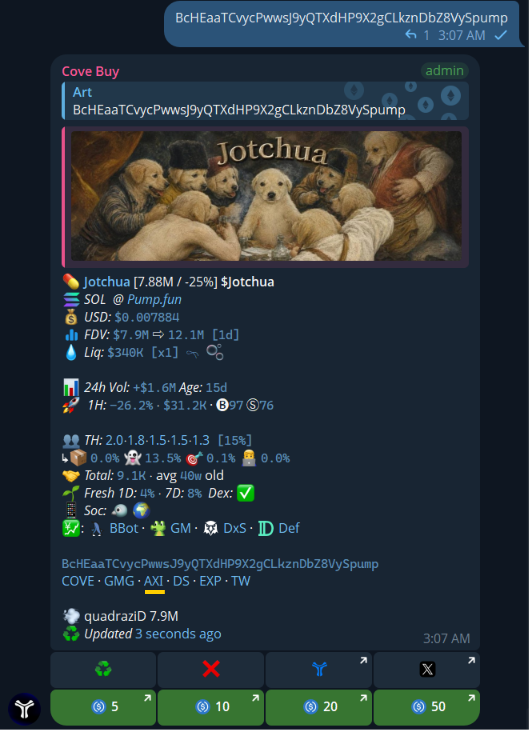
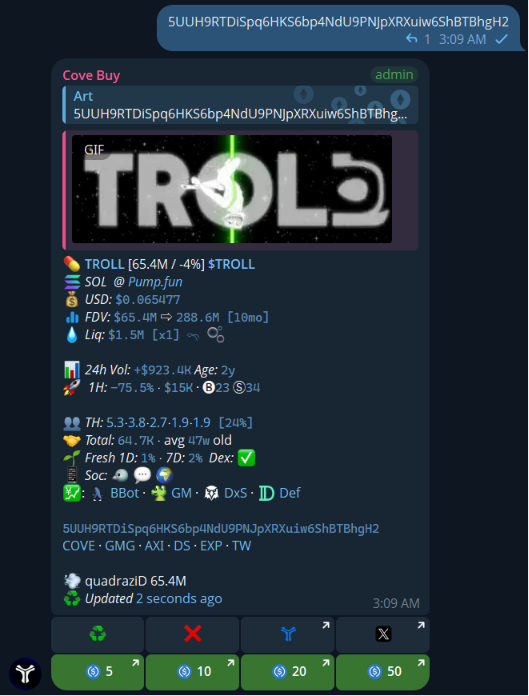
Cove Buy turns every token scan in your group/channel into a 1-click buy experience (no copy-paste, no switching apps). Cove Buy is a Telegram tool that adds Quick Buy buttons under scanned tokens so your members can enter faster — and you can earn from the activity in your community.

<CardGroup cols={2}>
  <Card title="For Group Owners" icon="crown" color="#f59e0b">
    * 💸 Earn from buys and sells
    * 🔗 Add custom ref links
    * ⬆ Increase Engagement
  </Card>

  <Card title="For Group Members" icon="users" color="#3b82f6">
    * 🚀 Faster entries
    * 📊 All-in-one token data
    * 🏆 Group Leaderboard
    * 🧼 Cleaner trading UX for groups
  </Card>
</CardGroup>

***

## Available Features

Explore the extensive toolset Cove Buy brings directly to your Telegram community. We've organized the commands into categories so you can quickly find what you need.

### 🔎 Discovery & Search

<AccordionGroup>
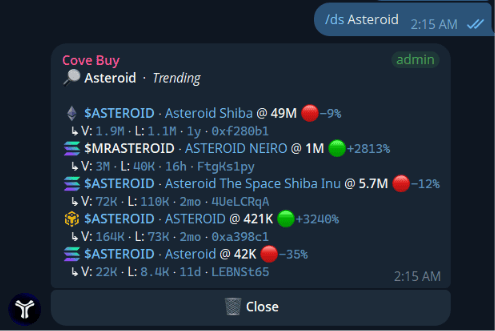
  <Accordion title="/ds <query> — Search pairs by name/ticker" icon="magnifying-glass">
    Search pairs by name or ticker. Includes data on chain, volume, new pairs, and market cap.
    <Frame>
      <img src="https://mintcdn.com/cove-8695a88b/-v2kRfnyOBZHKiEV/assets/cove_buy/ds.png?fit=max&auto=format&n=-v2kRfnyOBZHKiEV&q=85&s=b4d7d18597118c113b82f4c4a7fcdedb" alt="Discovery Search" width="495" height="331" data-path="assets/cove_buy/ds.png" />
    </Frame>
  </Accordion>

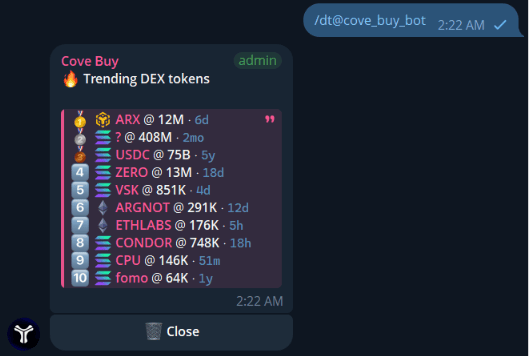
  <Accordion title="/dt — Trending tokens by recent scans" icon="fire">
    See the most scanned and trending tokens in the last 24 hours.
    <Frame>
      <img src="https://mintcdn.com/cove-8695a88b/-v2kRfnyOBZHKiEV/assets/cove_buy/dt.png?fit=max&auto=format&n=-v2kRfnyOBZHKiEV&q=85&s=1e5dc94dff637c2dd0b601d5cb235360" alt="Daily Trends" width="529" height="357" data-path="assets/cove_buy/dt.png" />
    </Frame>
  </Accordion>

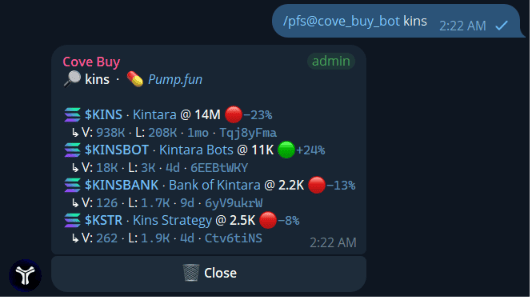
  <Accordion title="/pfs <query> — Search Pump.fun tokens" icon="pump-soap">
    Find newly created tokens specifically on Pump.fun.
    <Frame>
      <img src="https://mintcdn.com/cove-8695a88b/AqdWwyxYUpKpES1q/assets/cove_buy/pfs.png?fit=max&auto=format&n=AqdWwyxYUpKpES1q&q=85&s=9d6e3d0f05f67b17f2de92411a5a5fd7" alt="Pump.fun Search" width="530" height="297" data-path="assets/cove_buy/pfs.png" />
    </Frame>
  </Accordion>

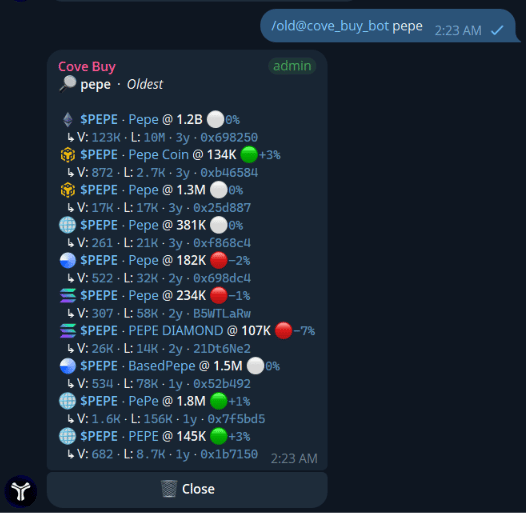
  <Accordion title="/old & /new — Search by age" icon="clock">
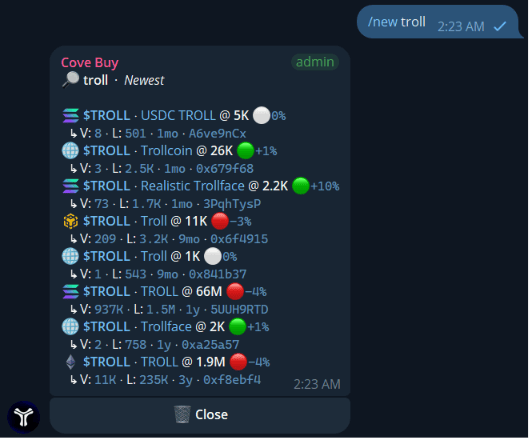
    Search the oldest or newest tokens by ticker, with chain, volume, and fuzzy matching.
    <Tabs>
      <Tab title="/old <ticker>">
        <Frame>
          <img src="https://mintcdn.com/cove-8695a88b/AqdWwyxYUpKpES1q/assets/cove_buy/old.png?fit=max&auto=format&n=AqdWwyxYUpKpES1q&q=85&s=e02e8e59dc3b552bb815eb88d9b1ec7e" alt="Old Ticker Search" width="526" height="513" data-path="assets/cove_buy/old.png" />
        </Frame>
      </Tab>

      <Tab title="/new <ticker>">
        <Frame>
          <img src="https://mintcdn.com/cove-8695a88b/AqdWwyxYUpKpES1q/assets/cove_buy/new.png?fit=max&auto=format&n=AqdWwyxYUpKpES1q&q=85&s=4588a3022ecee364e7217e3b5994e6be" alt="New Ticker Search" width="529" height="438" data-path="assets/cove_buy/new.png" />
        </Frame>
      </Tab>
    </Tabs>
  </Accordion>

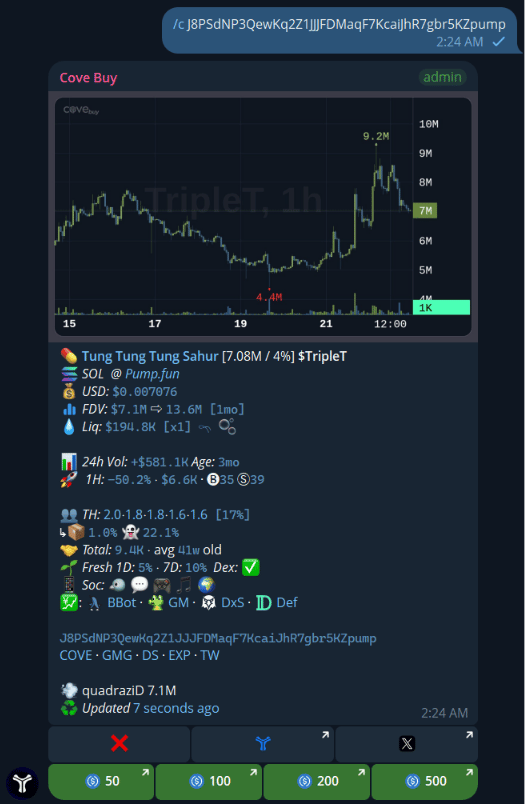
  <Accordion title="/c 0x… — Token card + chart" icon="chart-line">
    View a detailed token card and a price chart with 15m and 4h intervals.
    <Frame>
      <img src="https://mintcdn.com/cove-8695a88b/-v2kRfnyOBZHKiEV/assets/cove_buy/c.png?fit=max&auto=format&n=-v2kRfnyOBZHKiEV&q=85&s=6c337c1d343c2fe520b26f2129902f6f" alt="Token Card" width="525" height="804" data-path="assets/cove_buy/c.png" />
    </Frame>
  </Accordion>

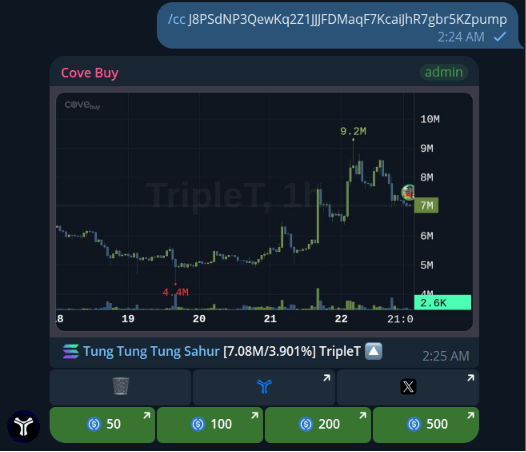
  <Accordion title="/cc 0x… — Dex chart image" icon="image">
    Get an instant snapshot of the Dex chart for a specific token.
    <Frame>
      <img src="https://mintcdn.com/cove-8695a88b/-v2kRfnyOBZHKiEV/assets/cove_buy/cc.png?fit=max&auto=format&n=-v2kRfnyOBZHKiEV&q=85&s=2e426845bde5edbe5aa04df562e1252d" alt="Dex Chart Image" width="526" height="452" data-path="assets/cove_buy/cc.png" />
    </Frame>
  </Accordion>

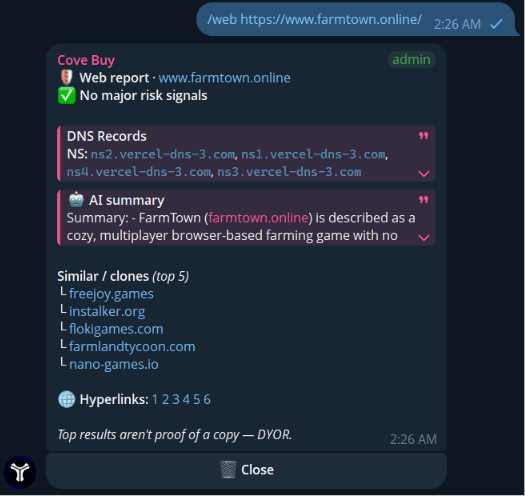
  <Accordion title="/web <url> — Scan a site" icon="globe">
    Scan a website to get WHOIS, DNS records, and perform a clone/scam check.
    <Frame>
      <img src="https://mintcdn.com/cove-8695a88b/AqdWwyxYUpKpES1q/assets/cove_buy/web.png?fit=max&auto=format&n=AqdWwyxYUpKpES1q&q=85&s=8c4d368df42e6869a95dd467d52b50b5" alt="Web Scan" width="525" height="496" data-path="assets/cove_buy/web.png" />
    </Frame>
  </Accordion>

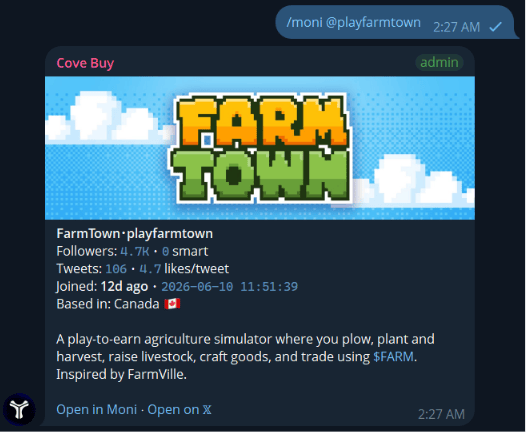
  <Accordion title="/moni <@handle> — Scan a Twitter/X profile" icon="twitter">
    Scan a Twitter/X profile to get its Moni score, smart followers, and bio.
    <Frame>
      <img src="https://mintcdn.com/cove-8695a88b/AqdWwyxYUpKpES1q/assets/cove_buy/moni.png?fit=max&auto=format&n=AqdWwyxYUpKpES1q&q=85&s=06465a2f1d9759eb51bdf2cc53dd72d1" alt="Moni Scan" width="526" height="432" data-path="assets/cove_buy/moni.png" />
    </Frame>
  </Accordion>

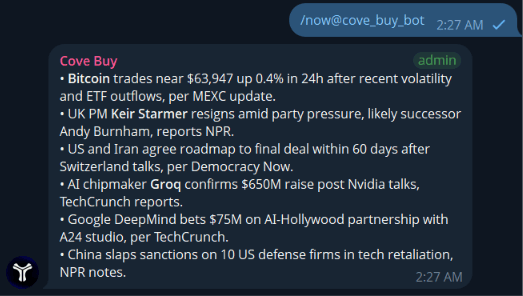
  <Accordion title="/now — Global news roundup" icon="newspaper">
    Get a roundup of the most important crypto news from the last 24 hours.
    <Frame>
      <img src="https://mintcdn.com/cove-8695a88b/AqdWwyxYUpKpES1q/assets/cove_buy/now.png?fit=max&auto=format&n=AqdWwyxYUpKpES1q&q=85&s=f252f3d748109bf34a992eb777eb5664" alt="News Roundup" width="523" height="296" data-path="assets/cove_buy/now.png" />
    </Frame>
  </Accordion>

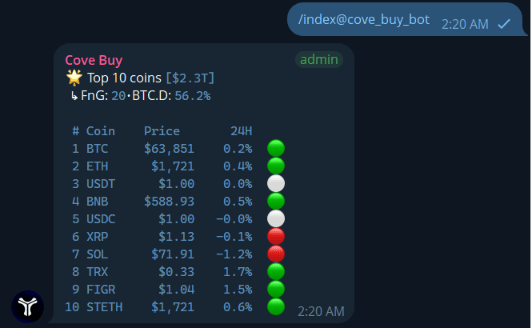
  <Accordion title="Market Overviews (/index & /vol)" icon="list-ol">
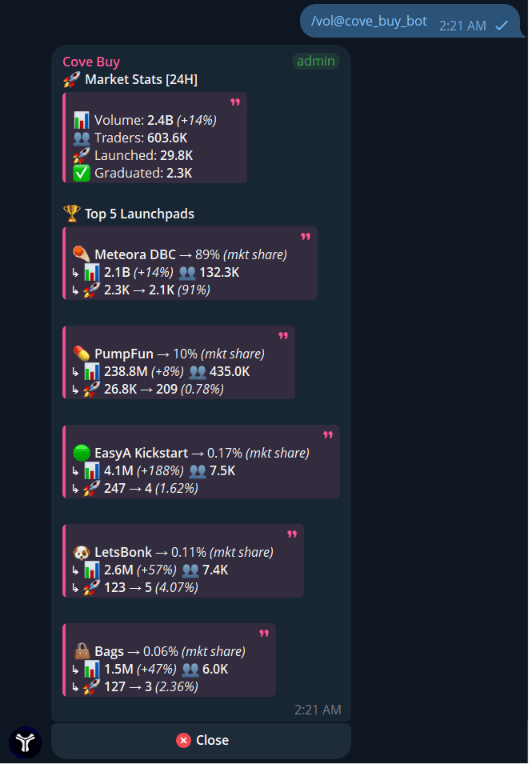
    Check the top 10 coins or see volume statistics across launchpads.
    <Tabs>
      <Tab title="/index">
        <Frame>
          <img src="https://mintcdn.com/cove-8695a88b/AqdWwyxYUpKpES1q/assets/cove_buy/index.png?fit=max&auto=format&n=AqdWwyxYUpKpES1q&q=85&s=43c2ca4113d2dc8a0f8836943f0ab310" alt="Index" width="531" height="328" data-path="assets/cove_buy/index.png" />
        </Frame>
      </Tab>

      <Tab title="/vol">
        <Frame>
          <img src="https://mintcdn.com/cove-8695a88b/AqdWwyxYUpKpES1q/assets/cove_buy/vol.png?fit=max&auto=format&n=AqdWwyxYUpKpES1q&q=85&s=8d16360bf3d9d4da4e5e62fccc358e93" alt="Volume" width="529" height="764" data-path="assets/cove_buy/vol.png" />
        </Frame>
      </Tab>
    </Tabs>
  </Accordion>
</AccordionGroup>

### 🕵️ Token Intel

<AccordionGroup>
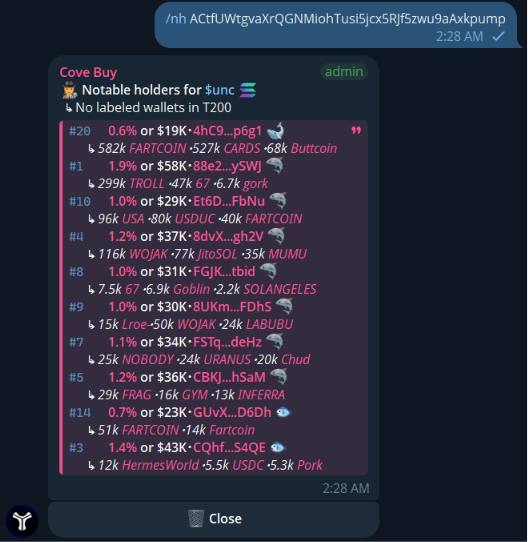
  <Accordion title="/nh 0x… — Notable holders" icon="users">
    Analyze the top and notable holders of a token.
    <Frame>
      <img src="https://mintcdn.com/cove-8695a88b/AqdWwyxYUpKpES1q/assets/cove_buy/nh.png?fit=max&auto=format&n=AqdWwyxYUpKpES1q&q=85&s=e968d7c96d61a6cc2463af68320b8357" alt="Notable Holders" width="528" height="542" data-path="assets/cove_buy/nh.png" />
    </Frame>
  </Accordion>

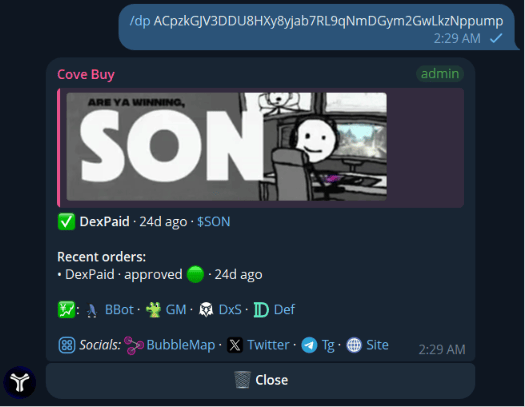
  <Accordion title="/dp 0x… — DexPaid & CTO status" icon="money-bill">
    Check if Dex is paid, view boosts, ads, and Community Takeover (CTO) status.
    <Frame>
      <img src="https://mintcdn.com/cove-8695a88b/-v2kRfnyOBZHKiEV/assets/cove_buy/dp.png?fit=max&auto=format&n=-v2kRfnyOBZHKiEV&q=85&s=b2d84b4d24785fad7b20f6866c3adf38" alt="DexPaid Check" width="525" height="407" data-path="assets/cove_buy/dp.png" />
    </Frame>
  </Accordion>

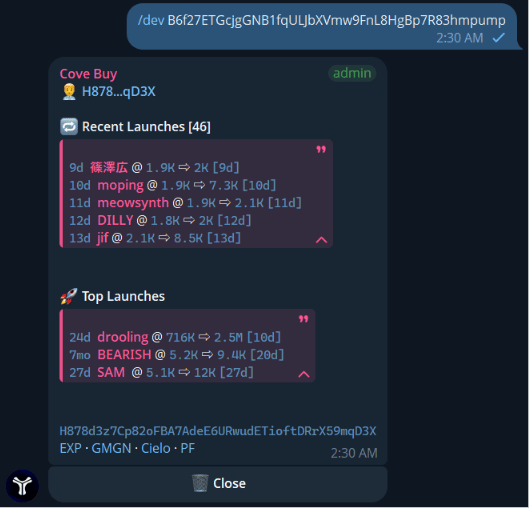
  <Accordion title="/dev <token|wallet> — Dev’s launches" icon="code">
    Investigate a developer's past launches and their all-time highs (ATHs).
    <Frame>
      <img src="https://mintcdn.com/cove-8695a88b/-v2kRfnyOBZHKiEV/assets/cove_buy/dev.png?fit=max&auto=format&n=-v2kRfnyOBZHKiEV&q=85&s=6610acdc2e69dd0b41654a0b18374e66" alt="Dev Intel" width="529" height="508" data-path="assets/cove_buy/dev.png" />
    </Frame>
  </Accordion>

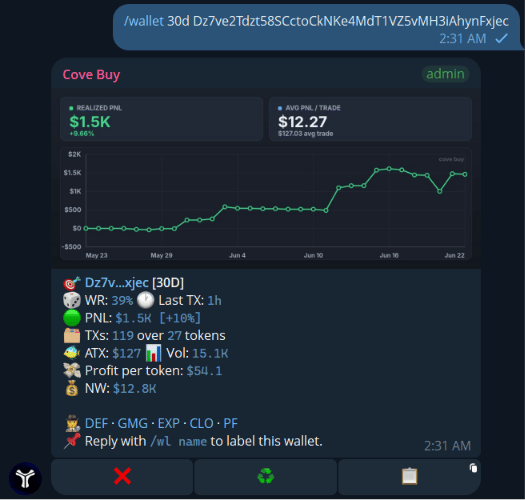
  <Accordion title="/wallet <addr> — Wallet PnL & stats" icon="wallet">
    Check a wallet's profit and loss (PnL) and other statistics over a specific timeframe.
    <Frame>
      <img src="https://mintcdn.com/cove-8695a88b/AqdWwyxYUpKpES1q/assets/cove_buy/wallet.png?fit=max&auto=format&n=AqdWwyxYUpKpES1q&q=85&s=b221d280671dd6f5b570c84a32a21383" alt="Wallet Intel" width="525" height="500" data-path="assets/cove_buy/wallet.png" />
    </Frame>
  </Accordion>

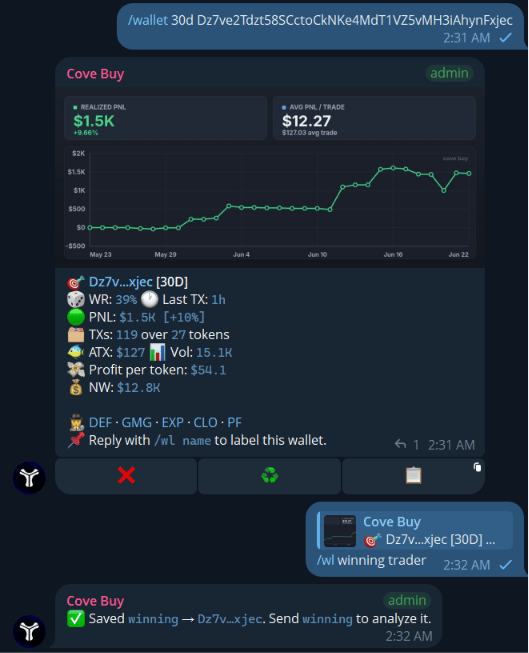
  <Accordion title="/wl <name> — Label a wallet" icon="tag">
    Label a wallet by replying to a panel, making tracking easier.
    <Frame>
      <img src="https://mintcdn.com/cove-8695a88b/AqdWwyxYUpKpES1q/assets/cove_buy/wl.png?fit=max&auto=format&n=AqdWwyxYUpKpES1q&q=85&s=14bac87d9e035fed1693a0b983be51e4" alt="Wallet Label" width="529" height="653" data-path="assets/cove_buy/wl.png" />
    </Frame>
  </Accordion>
</AccordionGroup>

### 🎨 Social & Fun

<AccordionGroup>
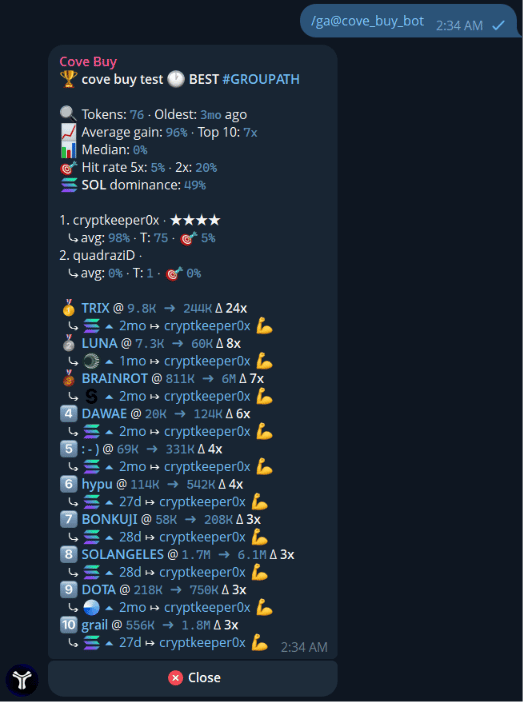
  <Accordion title="Leaderboards (/ga & /runners)" icon="trophy">
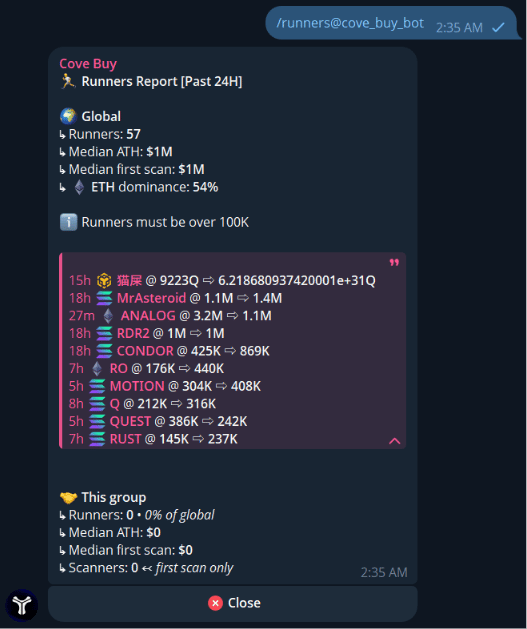
    Check the group's leaderboard and reports on tokens that ran the highest.
    <Tabs>
      <Tab title="/ga (Leaderboard)">
        <Frame>
          <img src="https://mintcdn.com/cove-8695a88b/-v2kRfnyOBZHKiEV/assets/cove_buy/ga.png?fit=max&auto=format&n=-v2kRfnyOBZHKiEV&q=85&s=d39fcea789f3ade4068b8266b38fab32" alt="Leaderboard" width="523" height="702" data-path="assets/cove_buy/ga.png" />
        </Frame>
      </Tab>

      <Tab title="/runners">
        <Frame>
          <img src="https://mintcdn.com/cove-8695a88b/AqdWwyxYUpKpES1q/assets/cove_buy/runners.png?fit=max&auto=format&n=AqdWwyxYUpKpES1q&q=85&s=28813adac3a7672d791e1cff5712244e" alt="Runners Report" width="527" height="629" data-path="assets/cove_buy/runners.png" />
        </Frame>
      </Tab>
    </Tabs>
  </Accordion>

  <Accordion title="/flex 0x… — Flexcard" icon="sparkles">
    Create a custom flex card to show off your wins. Use `/fleximg` and `/flexfont` to customize it.
    *(Requires a winning trade to generate)*
  </Accordion>

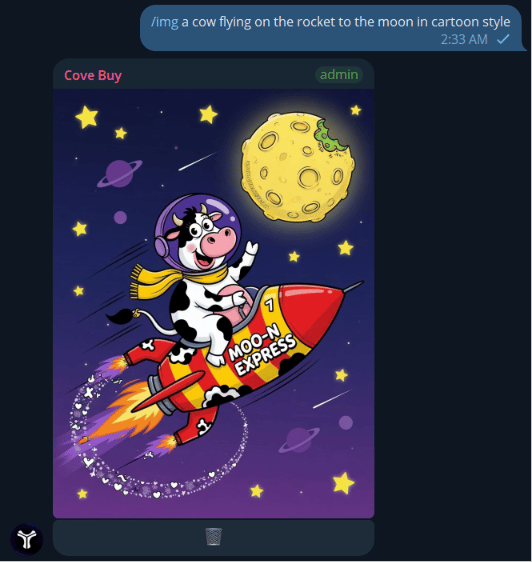
  <Accordion title="/img <prompt> — Generate an image" icon="image">
    Generate images using AI directly in the chat.
    <Frame>
      <img src="https://mintcdn.com/cove-8695a88b/AqdWwyxYUpKpES1q/assets/cove_buy/img.png?fit=max&auto=format&n=AqdWwyxYUpKpES1q&q=85&s=1855378ade71f9d1c9bcd13188836b7c" alt="Generate Image" width="532" height="562" data-path="assets/cove_buy/img.png" />
    </Frame>
  </Accordion>

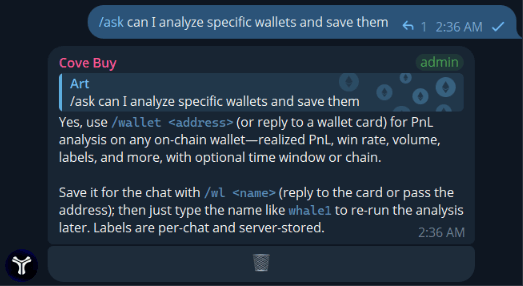
  <Accordion title="/ask — Ask a question" icon="circle-question">
    Ask general questions right in the chat.
    <Frame>
      <img src="https://mintcdn.com/cove-8695a88b/-v2kRfnyOBZHKiEV/assets/cove_buy/ask.png?fit=max&auto=format&n=-v2kRfnyOBZHKiEV&q=85&s=a0bdd38e416ba07379cb2fd4b99aa5b1" alt="Ask Question" width="523" height="286" data-path="assets/cove_buy/ask.png" />
    </Frame>
  </Accordion>

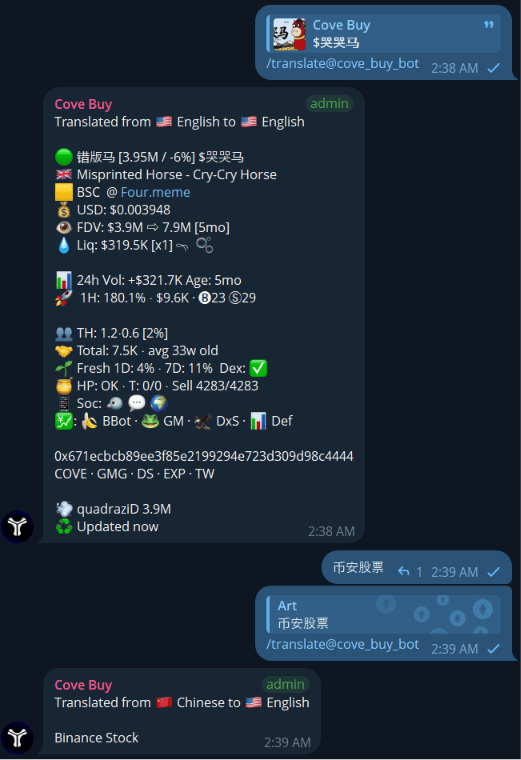
  <Accordion title="/translate — Translate text" icon="language">
    Quickly translate text by replying to a message with the command.
    <Frame>
      <img src="https://mintcdn.com/cove-8695a88b/AqdWwyxYUpKpES1q/assets/cove_buy/translate.png?fit=max&auto=format&n=AqdWwyxYUpKpES1q&q=85&s=d13577f04dc68d9c224da97be7aa7674" alt="Translate" width="521" height="760" data-path="assets/cove_buy/translate.png" />
    </Frame>
  </Accordion>
</AccordionGroup>

### ⚙️ Group Admin

<AccordionGroup>
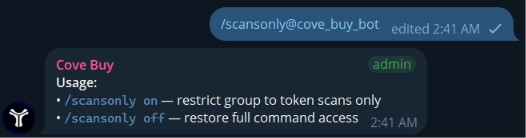
  <Accordion title="/scansonly on|off" icon="shield-halved">
    Limit the group functionality to token scans only, keeping the chat clean.
    <Frame>
      <img src="https://mintcdn.com/cove-8695a88b/AqdWwyxYUpKpES1q/assets/cove_buy/scansonly.png?fit=max&auto=format&n=AqdWwyxYUpKpES1q&q=85&s=a71d80b59835d8ec342b115a7da166b3" alt="Scans Only" width="526" height="138" data-path="assets/cove_buy/scansonly.png" />
    </Frame>
  </Accordion>

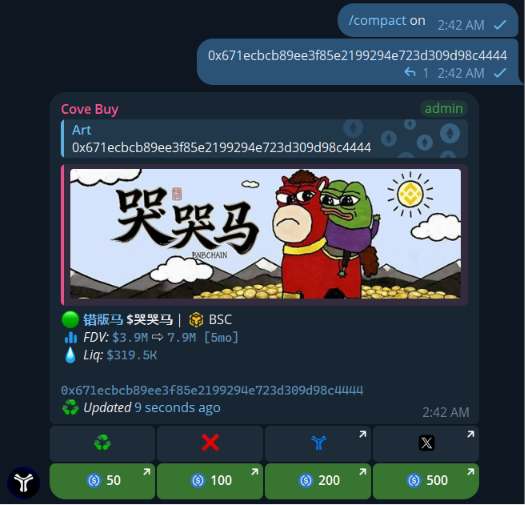
  <Accordion title="/compact on|off" icon="compress">
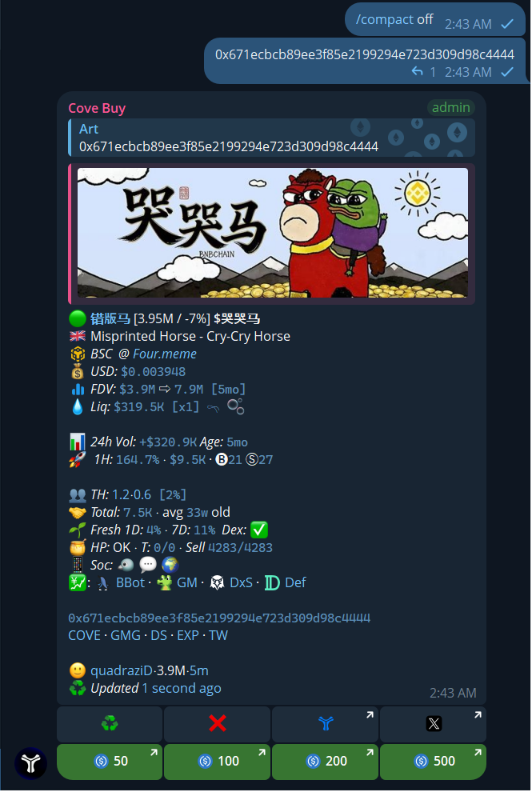
    Make scan panels smaller to save space in the chat.
    <Tabs>
      <Tab title="Compact ON">
        <Frame>
          <img src="https://mintlify.s3.us-west-1.amazonaws.com/cove-8695a88b/assets/cove_buy/compact%20on%20.png" alt="Compact On" />
        </Frame>
      </Tab>

      <Tab title="Compact OFF">
        <Frame>
          <img src="https://mintlify.s3.us-west-1.amazonaws.com/cove-8695a88b/assets/cove_buy/compact%20off.png" alt="Compact Off" />
        </Frame>
      </Tab>
    </Tabs>
  </Accordion>

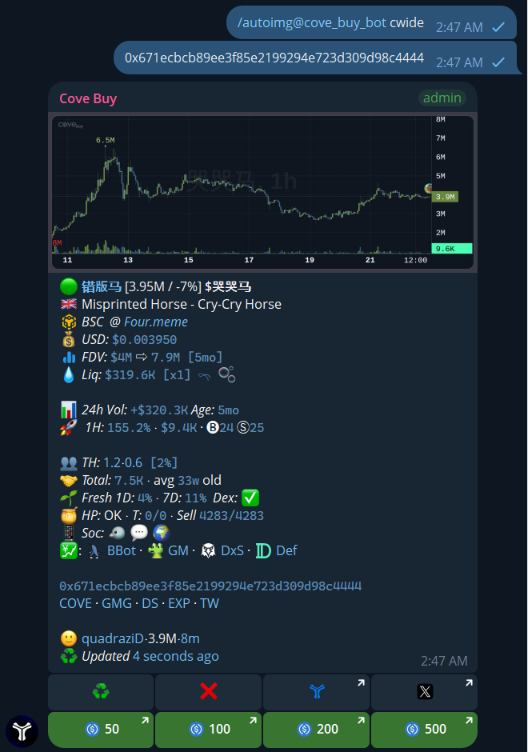
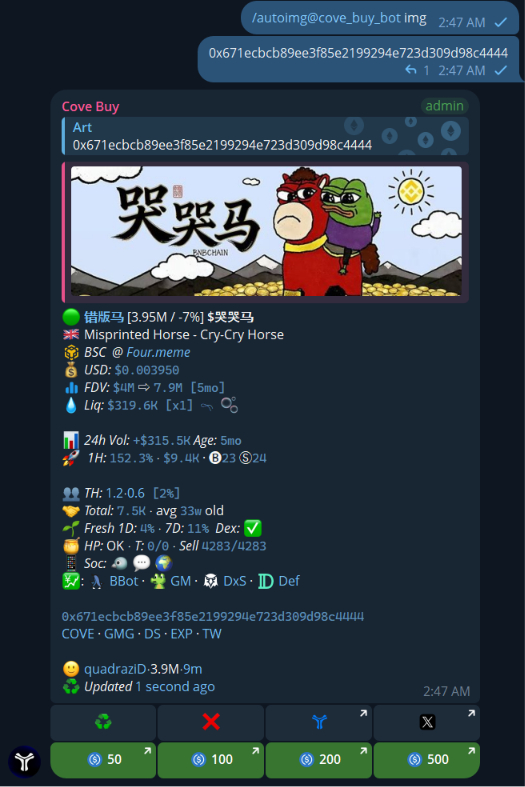
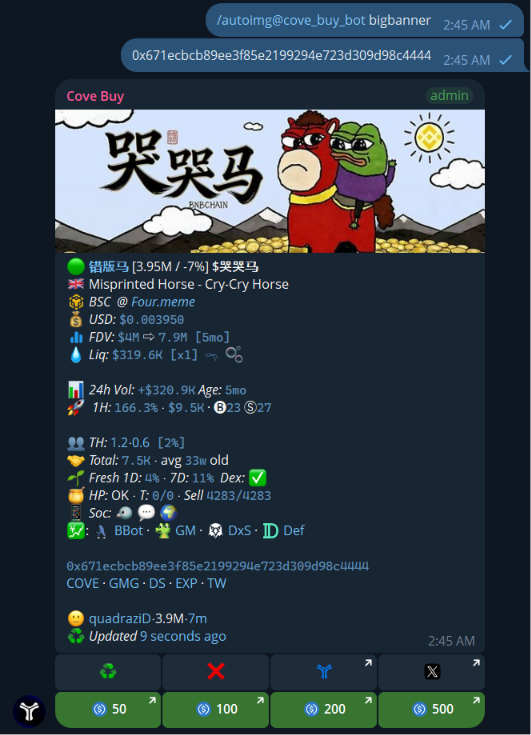
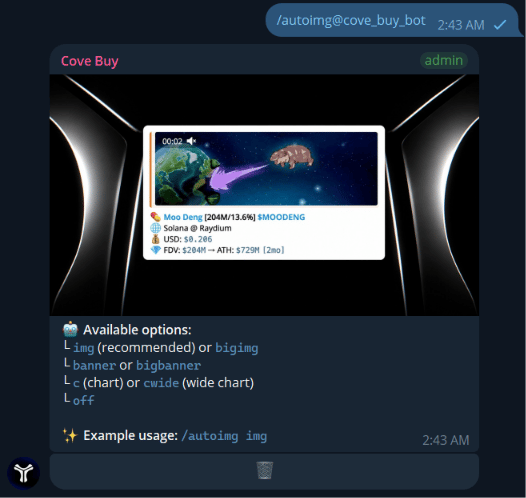
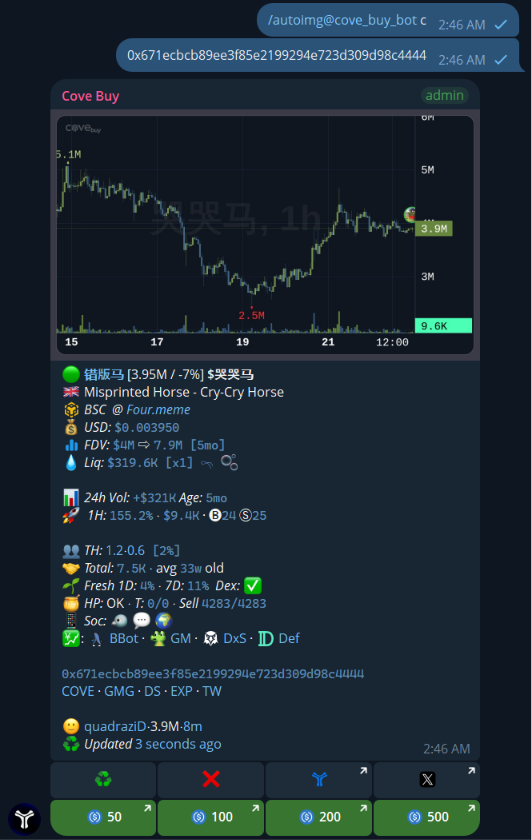
  <Accordion title="/autoimg — Default banners & charts" icon="image">
    Configure what images automatically appear with token scans.
    <Tabs>
      <Tab title="Chart (c)">
        <Frame>
          <img src="https://mintlify.s3.us-west-1.amazonaws.com/cove-8695a88b/assets/cove_buy/autoimg%20c.png" alt="Autoimg Chart" />
        </Frame>
      </Tab>

      <Tab title="Wide Chart (cwide)">
        <Frame>
          <img src="https://mintlify.s3.us-west-1.amazonaws.com/cove-8695a88b/assets/cove_buy/autoimg%20cwide.png" alt="Autoimg Wide Chart" />
        </Frame>
      </Tab>

      <Tab title="Image (img)">
        <Frame>
          <img src="https://mintlify.s3.us-west-1.amazonaws.com/cove-8695a88b/assets/cove_buy/autoimg%20img.png" alt="Autoimg Image" />
        </Frame>
      </Tab>

      <Tab title="Big Banner">
        <Frame>
          <img src="https://mintlify.s3.us-west-1.amazonaws.com/cove-8695a88b/assets/cove_buy/autoimg%20bigbanner.png" alt="Autoimg Big Banner" />
        </Frame>
      </Tab>

      <Tab title="Menu">
        <Frame>
          <img src="https://mintcdn.com/cove-8695a88b/-v2kRfnyOBZHKiEV/assets/cove_buy/autoimg.png?fit=max&auto=format&n=-v2kRfnyOBZHKiEV&q=85&s=c7b8b4995336c2d56437ce032612ba2b" alt="Autoimg Menu" width="526" height="498" data-path="assets/cove_buy/autoimg.png" />
        </Frame>
      </Tab>
    </Tabs>
  </Accordion>

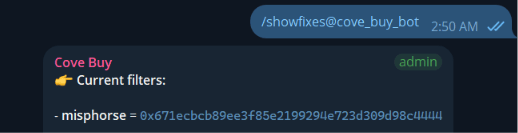
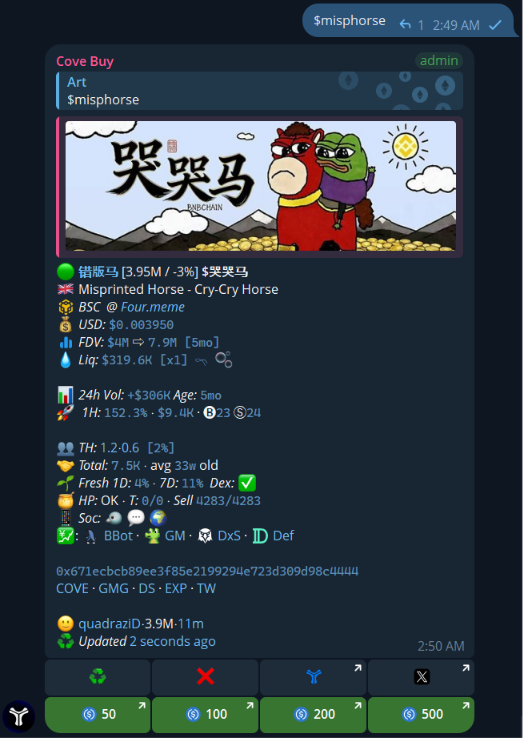
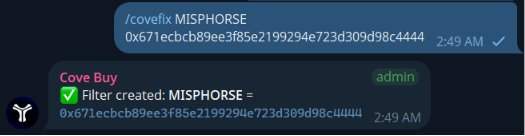
  <Accordion title="/covefix & /showfixes — Token filters" icon="filter">
    Fix specific contract addresses for tickers to prevent wrong token scans.
    <Tabs>
      <Tab title="/covefix">
        <Frame>
          <img src="https://mintcdn.com/cove-8695a88b/-v2kRfnyOBZHKiEV/assets/cove_buy/covefix.png?fit=max&auto=format&n=-v2kRfnyOBZHKiEV&q=85&s=c8496fd25791b33d291bc599681dc6aa" alt="Covefix" width="525" height="136" data-path="assets/cove_buy/covefix.png" />
        </Frame>
      </Tab>

      <Tab title="/showfixes">
        <Frame>
          <img src="https://mintcdn.com/cove-8695a88b/AqdWwyxYUpKpES1q/assets/cove_buy/showfixes.png?fit=max&auto=format&n=AqdWwyxYUpKpES1q&q=85&s=efeb75f7e4b2afd889fbf2ac3594e981" alt="Show Fixes" width="518" height="133" data-path="assets/cove_buy/showfixes.png" />
        </Frame>
      </Tab>

      <Tab title="Misphorse Fix">
        <Frame>
          <img src="https://mintlify.s3.us-west-1.amazonaws.com/cove-8695a88b/assets/cove_buy/covefix%20misphorse.png" alt="Misphorse Fix" />
        </Frame>
      </Tab>
    </Tabs>
  </Accordion>

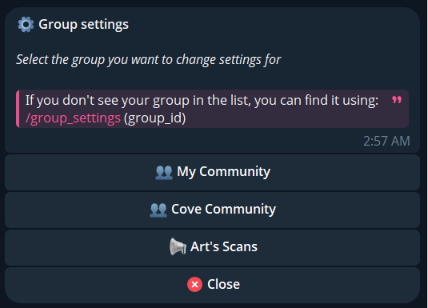
  <Accordion title="/group_settings" icon="gear">
    Open the group settings panel directly from the group.
    <Frame>
      <img src="https://mintlify.s3.us-west-1.amazonaws.com/cove-8695a88b/assets/cove_buy/group%20settings.png" alt="Group Settings" />
    </Frame>
  </Accordion>
</AccordionGroup>

***

## 🛠️ How to Set Up Cove Buy

<Steps>
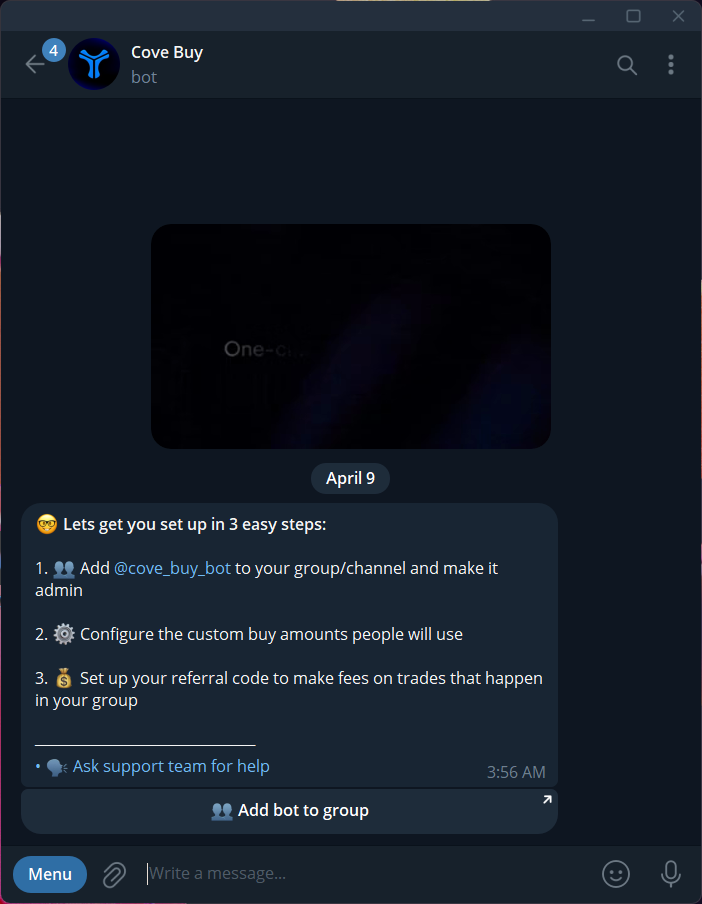
  <Step title="Start the Bot">
    Go to [https://t.me/cove\_buy\_bot](https://t.me/cove_buy_bot) to open the bot in Telegram. Once you press start, it will load the default menu of Cove Bot. Open Cove Buy.
    <Frame>
      <img src="https://mintlify.s3.us-west-1.amazonaws.com/cove-8695a88b/assets/cove_buy/cove%20start%20menu.png" alt="Start Bot" />
    </Frame>
  </Step>

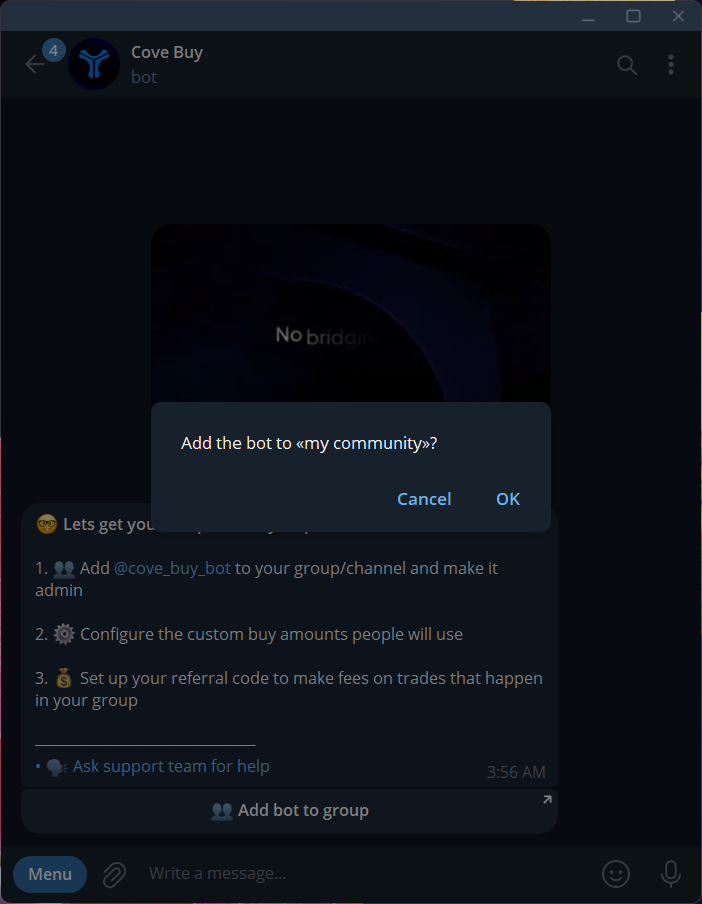
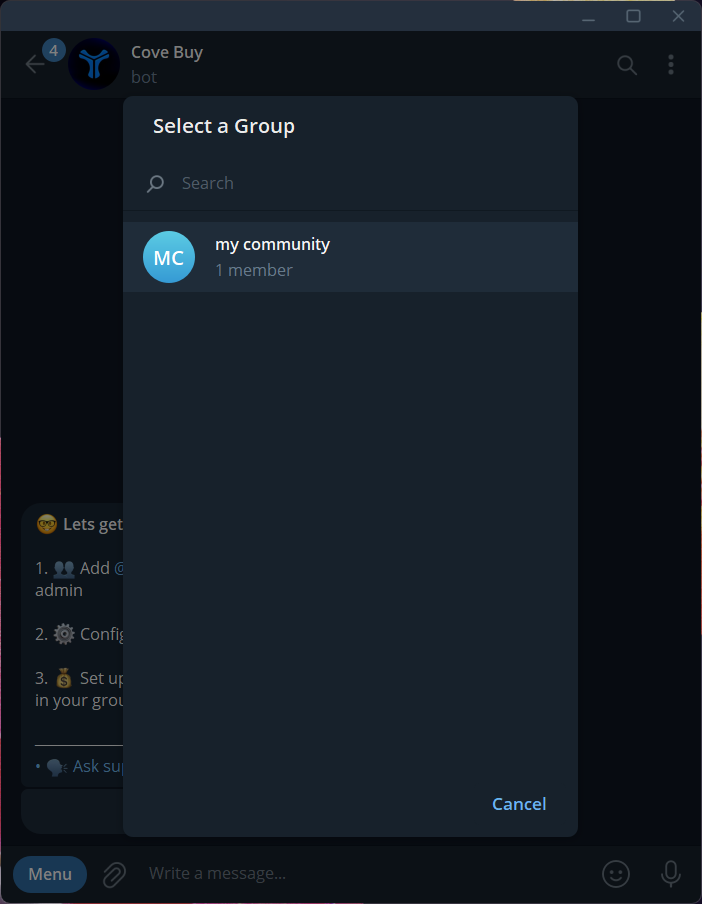
  <Step title="Add to your group/channel">
    <Tabs>
      <Tab title="Select Group">
        <Frame>
          <img src="https://mintlify.s3.us-west-1.amazonaws.com/cove-8695a88b/assets/cove_buy/select%20group%20to%20where%20to%20add%20cove.png" alt="Select Group" />
        </Frame>
      </Tab>

      <Tab title="Confirm">
        <Frame>
          <img src="https://mintlify.s3.us-west-1.amazonaws.com/cove-8695a88b/assets/cove_buy/add%20cove%20to%20community_ok.png" alt="Add to Group OK" />
        </Frame>
      </Tab>
    </Tabs>
  </Step>

  <Step title="Give it an Admin role">
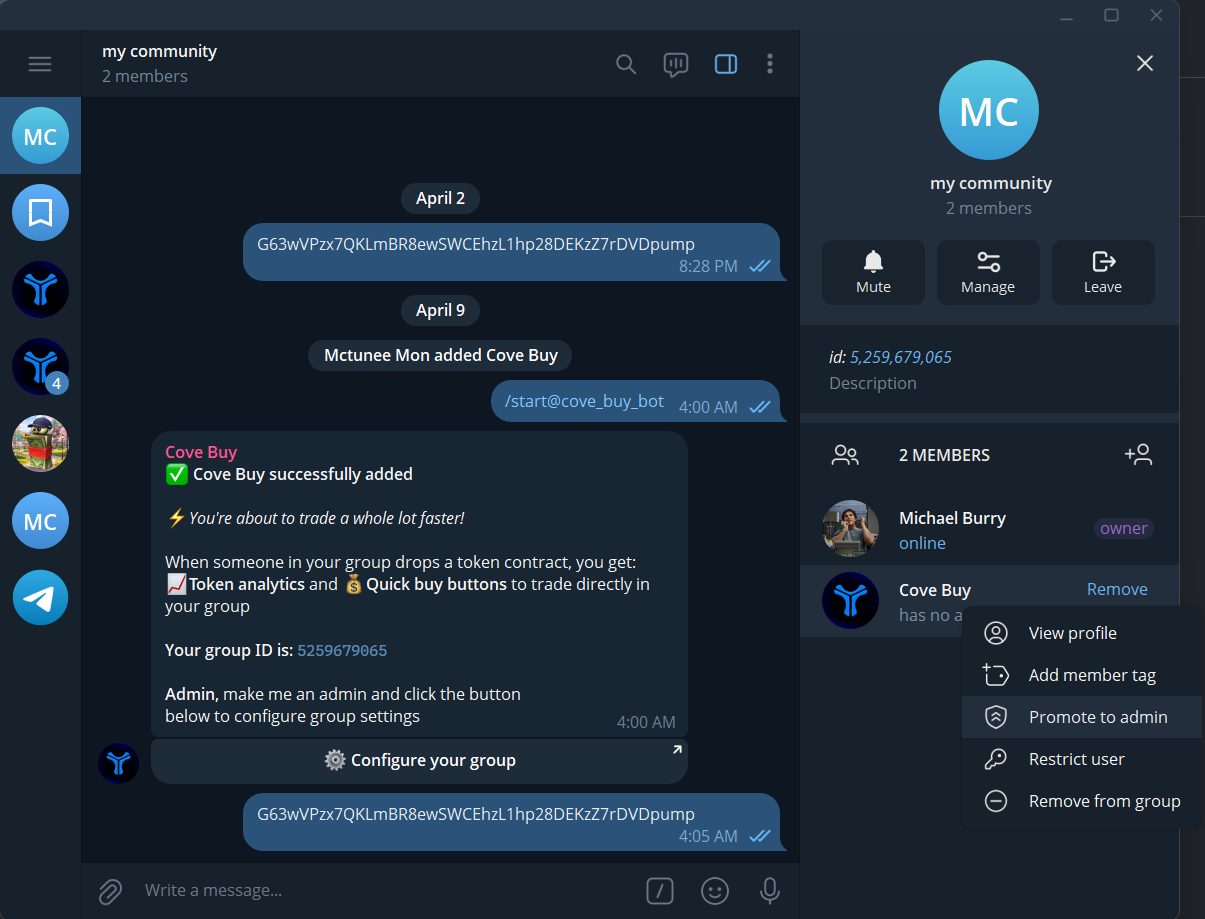
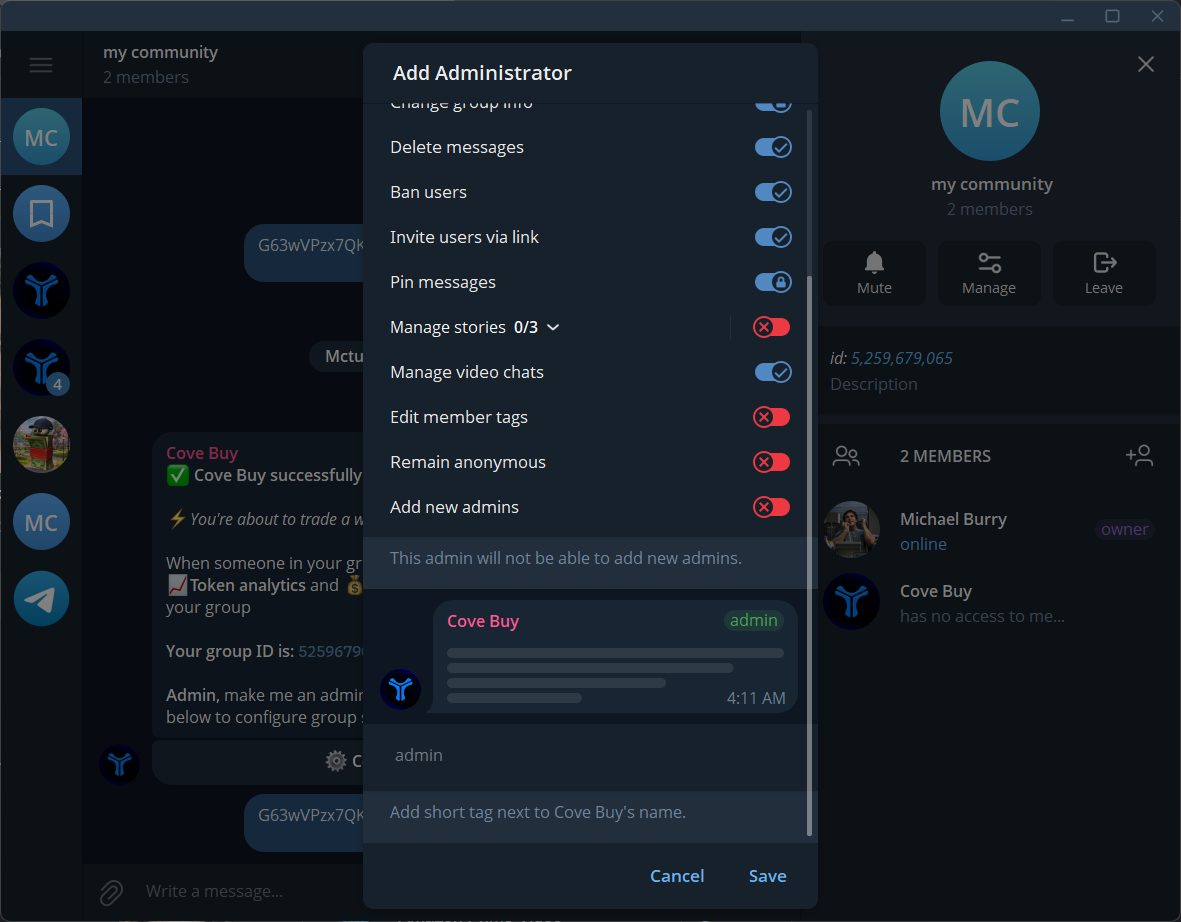
    Right click on the bot's profile and Promote to admin. Configure the rules and click **Save**. You can give it a Custom title if you want.
    <Tabs>
      <Tab title="Promote to Admin">
        <Frame>
          <img src="https://mintlify.s3.us-west-1.amazonaws.com/cove-8695a88b/assets/cove_buy/promote%20cove%20to%20admin.png" alt="Promote to Admin" />
        </Frame>
      </Tab>

      <Tab title="Save Rights">
        <Frame>
          <img src="https://mintlify.s3.us-west-1.amazonaws.com/cove-8695a88b/assets/cove_buy/save%20admin%20rights.png" alt="Save Admin Rights" />
        </Frame>
      </Tab>
    </Tabs>
  </Step>

  <Step title="Configure your Group">
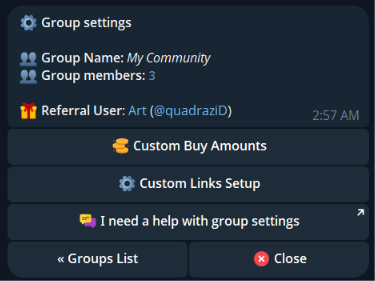
    Use `/group_settings` to open the settings interface.
    <Tabs>
      <Tab title="Settings">
        <Frame>
          <img src="https://mintlify.s3.us-west-1.amazonaws.com/cove-8695a88b/assets/cove_buy/group%20settings.png" alt="Group Settings" />
        </Frame>
      </Tab>

      <Tab title="Select Community">
        <Frame>
          <img src="https://mintlify.s3.us-west-1.amazonaws.com/cove-8695a88b/assets/cove_buy/group%20settings_community%20selected.png" alt="Community Selected" />
        </Frame>
      </Tab>
    </Tabs>

    <Check>
      Cove Buy is now added to your community. To increase your user experience even more, you can configure your group in Bot Settings.
    </Check>
  </Step>
</Steps>

***

## 💰 Custom Buy Amounts

You can set custom Buy Amounts for your group that better suit your members. Everyone in this group will see the same.

<Steps>
  <Step title="Open Group Settings">
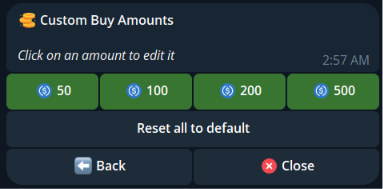
    Use `/group_settings` command from Bot menu to launch your Group Settings. Here, click **Custom Buy Amounts**.
    <Frame>
      <img src="https://mintlify.s3.us-west-1.amazonaws.com/cove-8695a88b/assets/cove_buy/group%20settings_community%20selected_custom%20buy%20amount.png" alt="Open Group Settings" />
    </Frame>
  </Step>

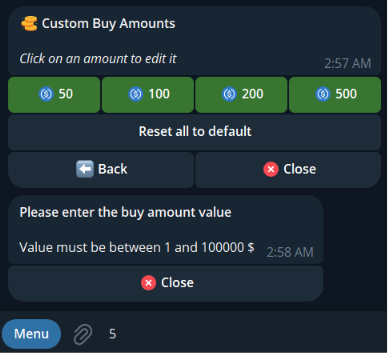
  <Step title="Select amount to change">
    Each chain has its own custom Buy Amounts. Make sure to select a proper chain before editing.
    <Frame>
      <img src="https://mintlify.s3.us-west-1.amazonaws.com/cove-8695a88b/assets/cove_buy/group%20settings_community%20selected_custom%20buy%20amount_change.png" alt="Select Amount" />
    </Frame>
  </Step>

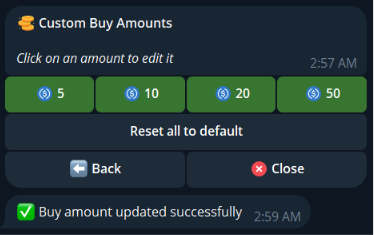
  <Step title="Apply the new amount">
    Your group Buy Amounts have been changed successfully. Now your members will see the updated amount once you send a new contract address in your group.
    <Frame>
      <img src="https://mintlify.s3.us-west-1.amazonaws.com/cove-8695a88b/assets/cove_buy/group%20settings_community%20selected_custom%20buy%20amount_change_updated.png" alt="Amount Changed" />
    </Frame>
  </Step>
</Steps>

***

## 🔗 Custom Links Setup

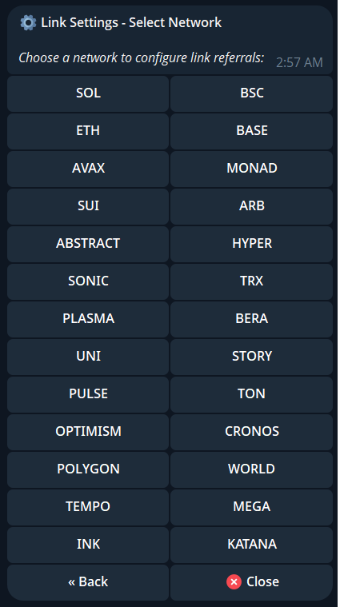
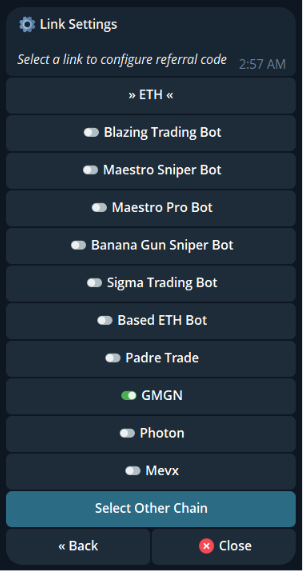
We understand that people prefer different trading bots. With Cove Buy, you decide which bots you want to keep as quick buy links, and all referral fees from these links will go straight to your account.

Cove Buy lets you set your own referral links for each scan in your community.
<Frame>
  <img src="https://mintlify.s3.us-west-1.amazonaws.com/cove-8695a88b/assets/cove_buy/group%20settings_custom%20links.png" alt="Custom Links Setup" />
</Frame>

<Steps>
  <Step title="Select a chain to find a trading bot">
    <Frame>
      <img src="https://mintlify.s3.us-west-1.amazonaws.com/cove-8695a88b/assets/cove_buy/group%20settings_custom%20links_select%20other%20chain.png" alt="Select Chain" />
    </Frame>
  </Step>

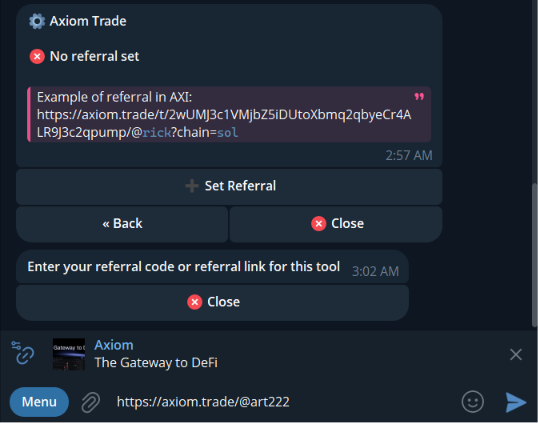
  <Step title="Select trading bot">
    Tap on the trading bot name to launch a custom ref link setup menu.
    <Frame>
      <img src="https://mintlify.s3.us-west-1.amazonaws.com/cove-8695a88b/assets/cove_buy/group%20settings_custom%20links_add%20custom%20link.png" alt="Select Bot" />
    </Frame>
  </Step>

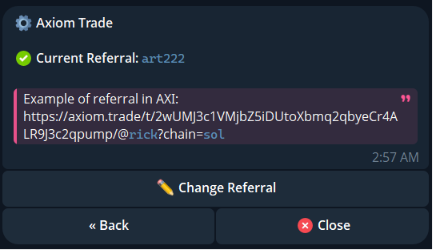
  <Step title="Set Referral & Get your Referral code">
    Enter your referral code for the selected bot.
    <Tabs>
      <Tab title="Setup">
        <Frame>
          <img src="https://mintlify.s3.us-west-1.amazonaws.com/cove-8695a88b/assets/cove_buy/group%20settings_custom%20links_add%20custom%20link_done.png" alt="Referral Set Successfully" />
        </Frame>
      </Tab>

      <Tab title="How It Looks">
        <Frame>
          <img src="https://mintlify.s3.us-west-1.amazonaws.com/cove-8695a88b/assets/cove_buy/group%20settings_custom%20links_add%20custom%20link_done_how%20it%20looks.png" alt="Ref Link in Scans" />
        </Frame>
      </Tab>
    </Tabs>
  </Step>
</Steps>

***

## FAQ

<AccordionGroup>
  <Accordion title="I already have other scanners in my group — why do I need Cove Buy?" icon="circle-question">
    Cove Buy routes trades through Cove, and referral fees go directly to your account. Let your users buy via their favourite trading bot, ref fees will still go to your account. Make people trade without leaving your group. Organize contests, reward the best traders and scanners with your referral rewards.
  </Accordion>

  <Accordion title="Can I buy tokens using Cove Buy without a Cove account?" icon="circle-question">
    To buy tokens via Cove Buy, a user needs a Cove Bot account (it takes \~2 clicks to create).
  </Accordion>
</AccordionGroup>