

- A Global token reaches every real wallet in every profile you own, including wallets and profiles you add later.
- A Profile token is pinned to one profile and only the wallets you pick in it.
/profiles — each profile is its own set of up to 10
wallets, and you can have up to 5 live real profiles (plus a paper profile). See
Global vs Profile tokens for how to choose.
/agent: which kind of
token, which wallets, whether money can leave, and how much an agent may spend.
See Requesting access.- Global tokens covering your whole account, alongside per-profile tokens.
- Self-serve controls in
/agent: pick wallets, switch Money-out on per wallet, and set your own spending limits — no support ticket needed. - Connect AI apps (OAuth): connect apps that support MCP sign-in without pasting a token, approved from Telegram.
- New tools:
get_capabilities,reconcile_market_order,get_trade_surplus_offer, profile & wallet management, bridge authorization, the wallet marketplace, and private disperse — 66 tools in total. - Stronger trade safety: high-impact confirmations are now tied to the exact quote you saw, and every market order can be reconciled to an authoritative fill.
Contents
- What your agent can do
- Quick start
- Connection details
- Requesting access
- Global vs Profile tokens
- Your tokens
- Wallet permissions
- Connecting AI apps with OAuth
- Working across your wallets
- Rate limits
- Spending limits
- Staying safe
- Confirming high-impact trades
- Recovering from an uncertain result
- Trade timing across wallets
- Gas-surplus offers
- Notifications & webhooks
- Tool reference
- Errors & availability
- Need help?
What your agent can do
- See everything — USDC balance (including funds still bridging), open positions with live PnL, order status, authoritative fills, and full trading history.
- Research tokens — search, pull detailed info, and run a security report (rug checks: audit verdict, mint/freeze authority, holder concentration, liquidity locks).
- Trade — market buys and sells across up to 25 wallets in one call, with a Telegram notification to you for every wallet.
- Automate — limit buys, stop-losses, take-profits, trailing stops, and DCA ladders.
- Manage — read and update trade/position settings, check earnings, request payouts, export trade history.
- Organise (Global token) — create, rename, archive, and restore profiles; create and rename wallets; pick your primary (payout) wallet.
- Move funds (needs Money-out) — withdraw to an external wallet, send USDC to another Cove user, move tokens between your own wallets, bring USDC home from other chains, buy aged wallets from the marketplace, and privately fund your own wallets.
Quick start
Request agent access
Choose Global or Profile access
/agent in Telegram and pick a mode:- Global agent token → Create Global Tokens → confirm Enable Full Account Access; or
- Profile agent token (for the profile currently active in
/profiles) → Manage Wallets → choose wallets, set Money-out per wallet → Save.
Copy the token pair
Connect your MCP client
Authorization: Bearer <your-token> — or, for a
Global token, use Connect AI apps instead of
pasting a token.Discover the available capabilities
get_capabilities and list_accounts first. They tell it
exactly what this token can reach and do. Then try get_balance, get_positions,
and search_tokens, and buy_token / sell_token with the read-write token.Set spending limits
/agent → Set Limits before you let an agent trade
unattended.Connection details
Requesting access
MCP access is switched on per Cove account. Open a support ticket and ask for agent MCP access. Once it’s on:- You create and manage all tokens yourself in
/agent— Global or Profile, any profile. - You choose which wallets a Profile token reaches, and whether each may move money.
- You set your own spending limits.
/agent so you can pick up where
you left off if it’s switched back on.
/agent command isn’t in the bot’s command menu yet — type it directly.Global vs Profile tokens
/profiles
first, then create its token. If the pinned profile is archived, the token stops
working until you restore the profile.
Global and Profile pairs coexist. Creating a Global pair doesn’t revoke your Profile
pairs, and rotating or revoking one pair leaves the others alone.
Paper and real never mix. A Global token trades real wallets only. For paper trading,
create a Profile token from your paper profile.
Your tokens
Every token mode gives you a pair:Managing tokens in /agent
- Rotate any time you suspect a token is exposed. Your rate limit and spending history follow you, not the token, so rotating never resets them.
- New wallets aren’t added to a Profile token automatically — open Manage Wallets and select them. (A Global token picks them up by itself.)
- A wallet covered by a Profile token can’t be moved to another profile until you revoke or re-scope the token.
- Requirements: agent access enabled on your account, and a Cove account linked to Telegram (that’s where agent notifications go).
Managing tokens programmatically
The HTTP token API is still available (authenticated with your normal Cove/Privy login, 30 requests/minute):Wallet permissions
Each wallet a token reaches carries a capability, worked out fresh on every call:/agent → Profile agent token → Manage
Wallets → select the wallet → toggle Money-out → Save. A wallet has to be
selected before Money-out can be switched on. There is no waiting period — it applies as
soon as you save.
Wallets that can’t be used right now (a lost signer, a deleted wallet, an archived
profile) are listed under unavailableWallets in list_accounts and get_capabilities
rather than silently disappearing.
Connecting AI apps with OAuth
Apps that support MCP sign-in can connect to Cove without you pasting a token. The connection is approved from your Telegram chat. Requirements: a Global read-write token with Connect AI apps switched on. Profile tokens and paper tokens are Bearer-only. If you don’t see Connect AI apps in the Global tab, it isn’t available on your account yet.Set up an OAuth connection
Create a Global token pair
/agent → Global agent token and create the pair if you haven’t.Enable AI app connections
Add Cove to the AI app
Check the browser code
Open the request in Telegram
Approve the matching request
Finish connecting
Step-by-step visual walkthrough: Connecting Cove MCP to an AI agent
Step-by-step visual walkthrough: Connecting Cove MCP to an AI agent
1. Enable AI App Connections in Telegram and copy your MCP URL
/agent. Select the Global agent token tab. Toggle Connect AI apps: ON. Tap Copy URL to copy your global MCP server endpoint.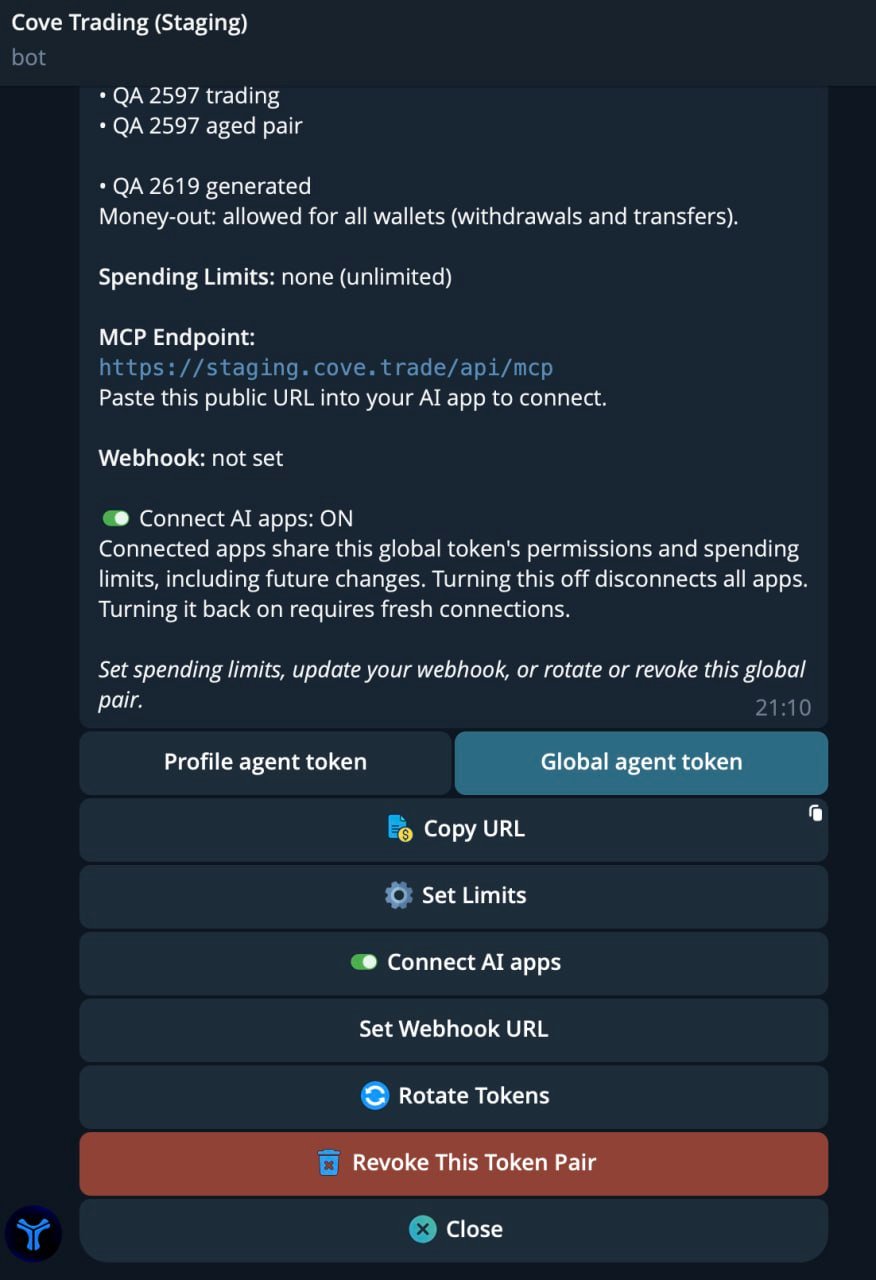
Enable Connect AI apps: ON in the Global agent token tab and copy your MCP URL.
2. Open Plugins or Connectors in your AI application
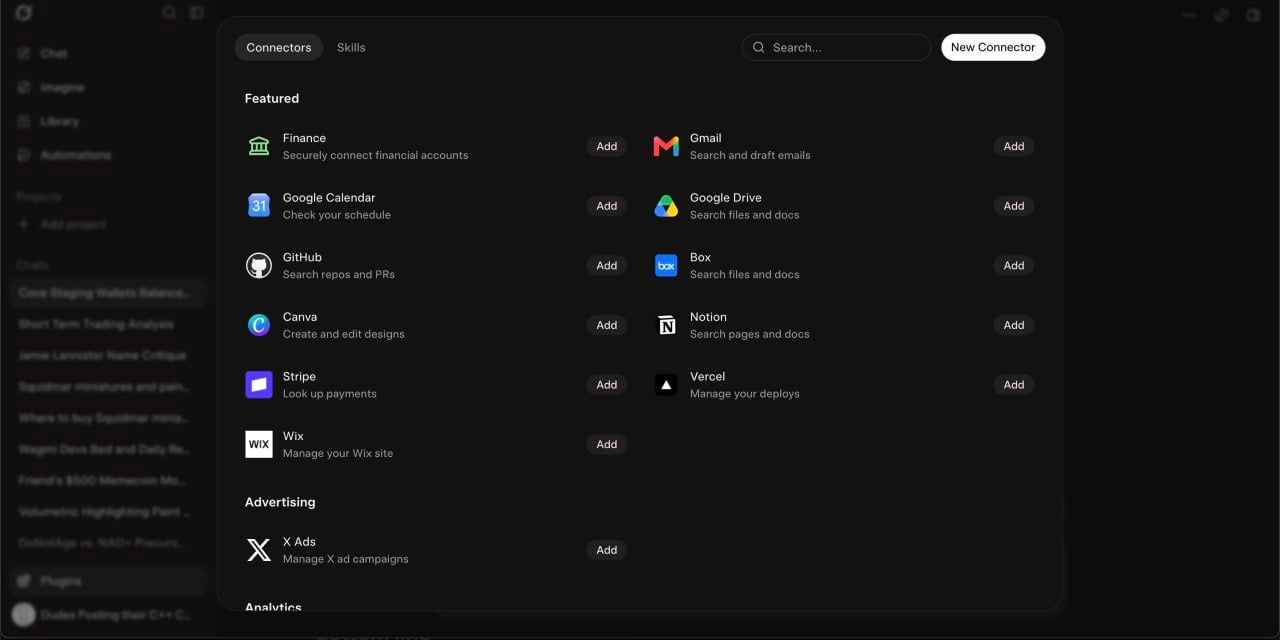
Navigate to Connectors in your AI client settings and click New Connector.
3. Add a custom connector
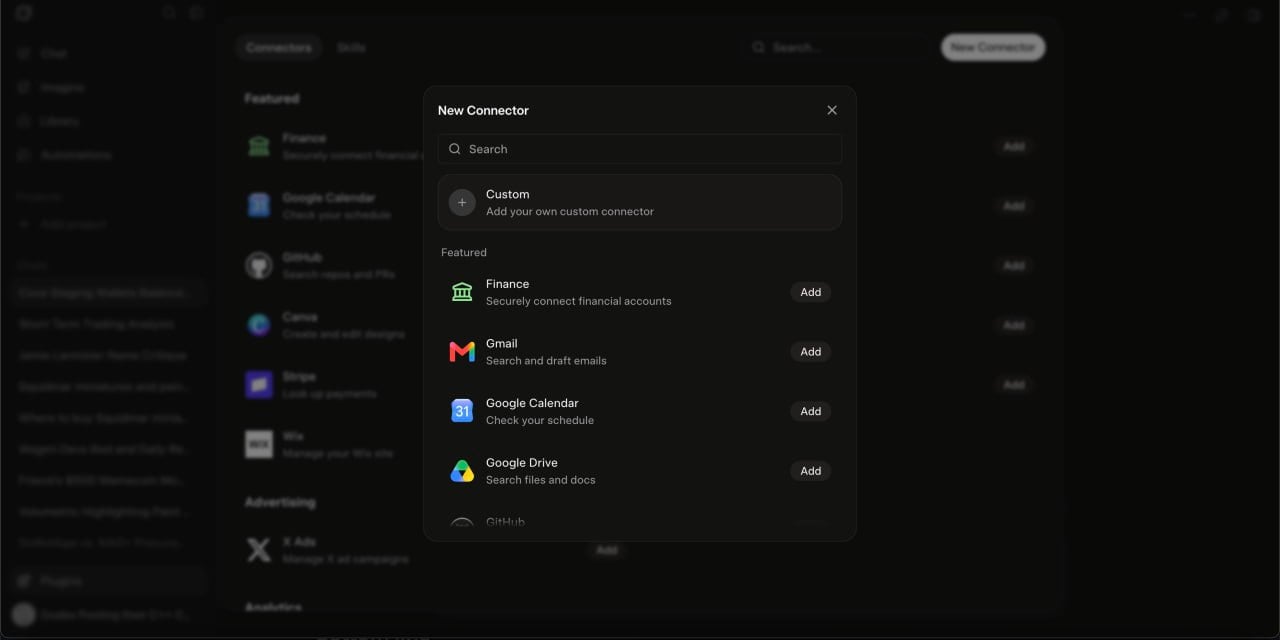
Select Custom to configure a new manual MCP server endpoint.
4. Name the connector and paste your MCP server URL
https://cove.trade/api/mcp) into the Server URL input box, then click Add Connector.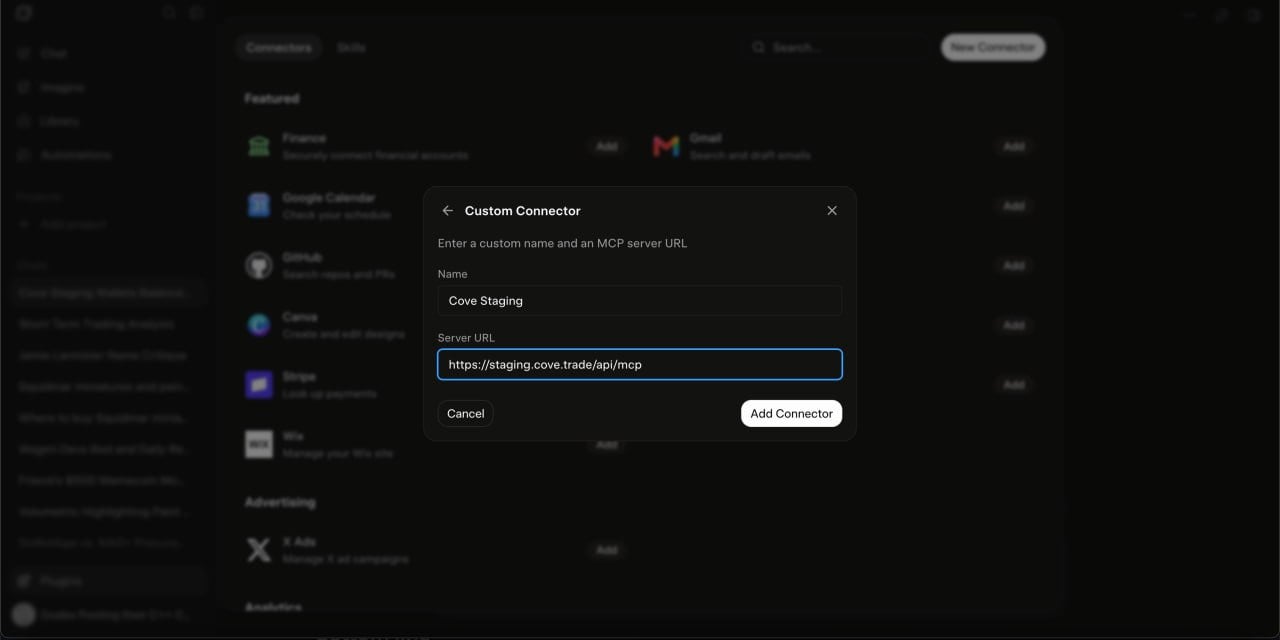
Enter your custom connector name and paste your copied Cove MCP URL.
5. Initiate OAuth authorization
ASHM-U) displayed on screen.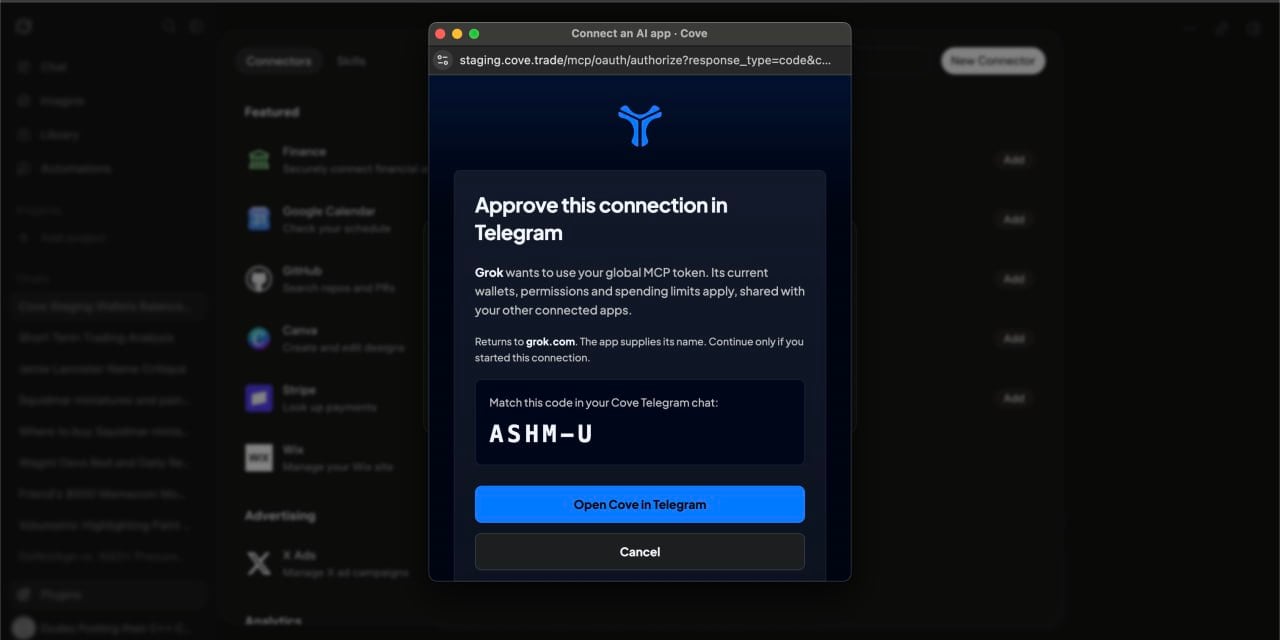
The Cove OAuth window displays the requesting application name and verification code.
6. Click Open Cove in Telegram
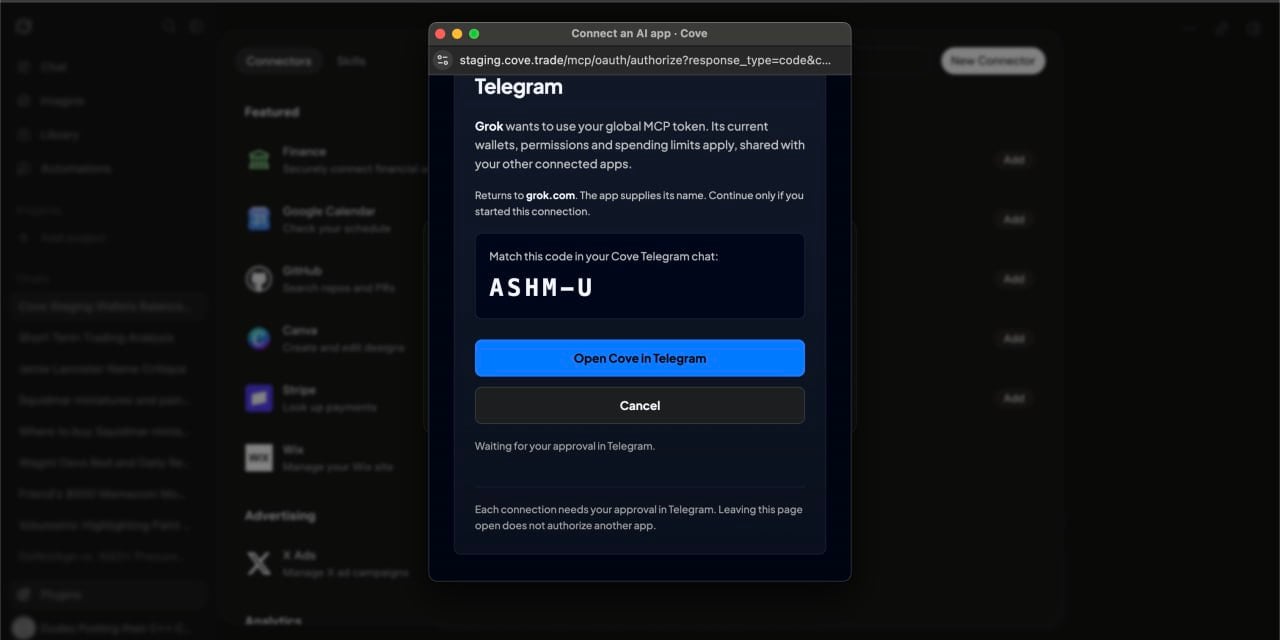
Click Open Cove in Telegram to send the approval request to your Telegram app.
7. Verify the code and approve in Telegram
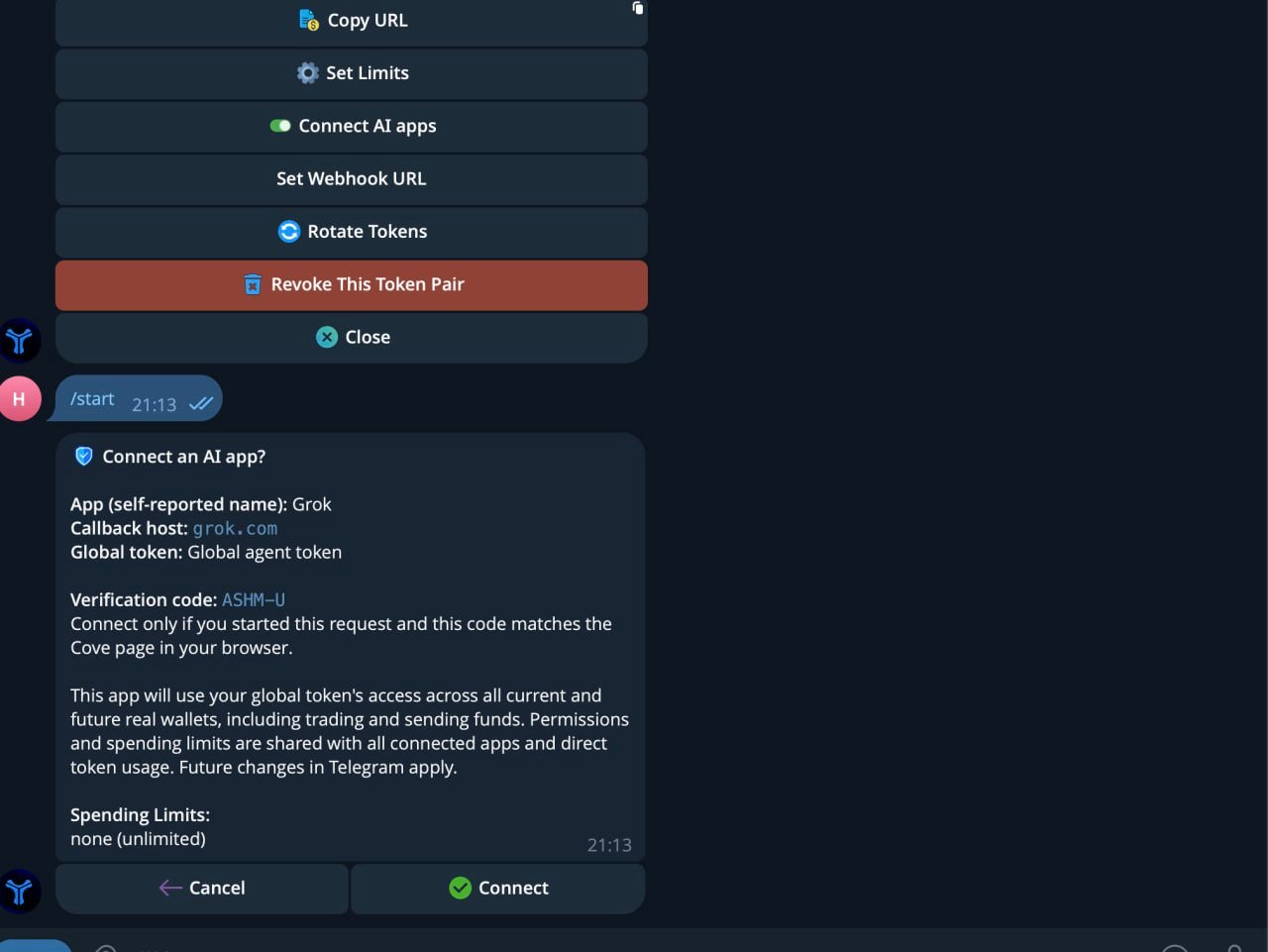
Check that the verification code matches your browser window, then tap Connect in Telegram.
8. Receive Telegram confirmation
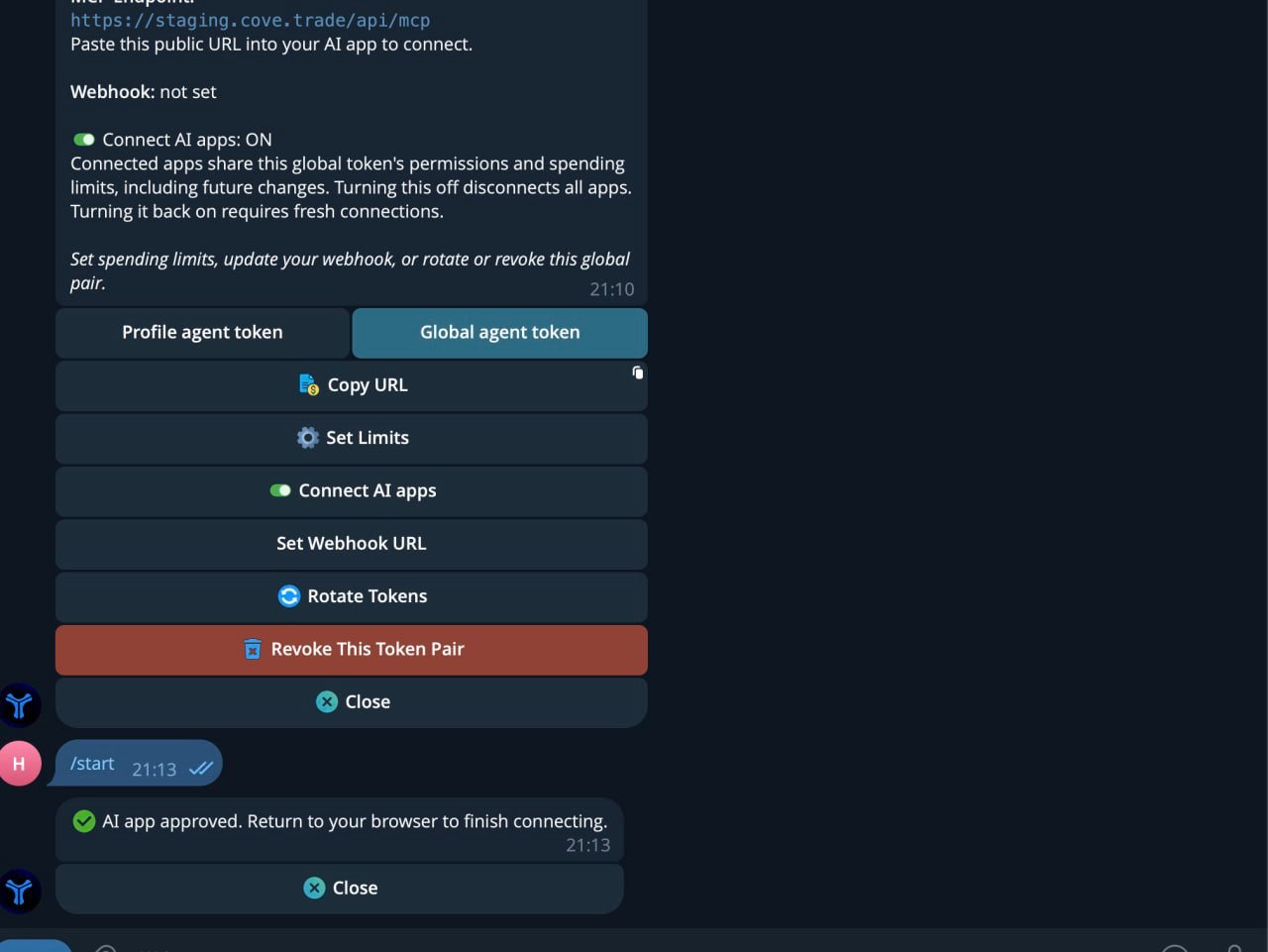
Telegram confirms the AI app connection approval.
9. Confirm active connection status in your AI app
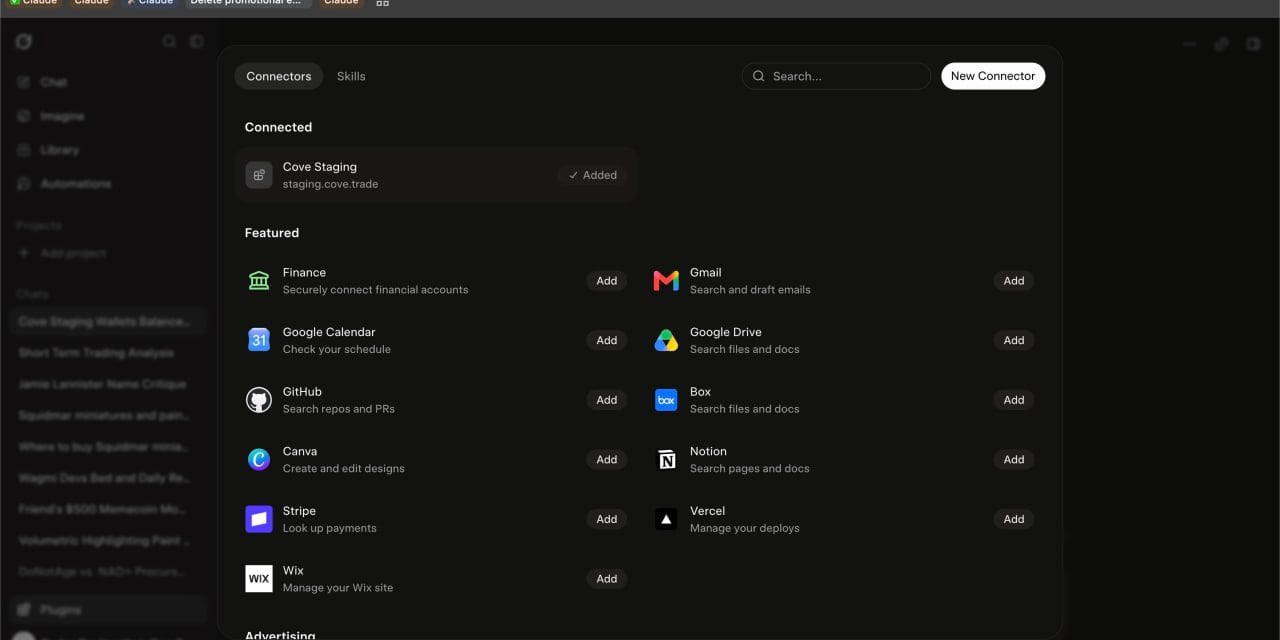
The Cove connector appears as connected with a ✓ Added indicator in your AI client.
10. Execute trade commands using plain text prompts
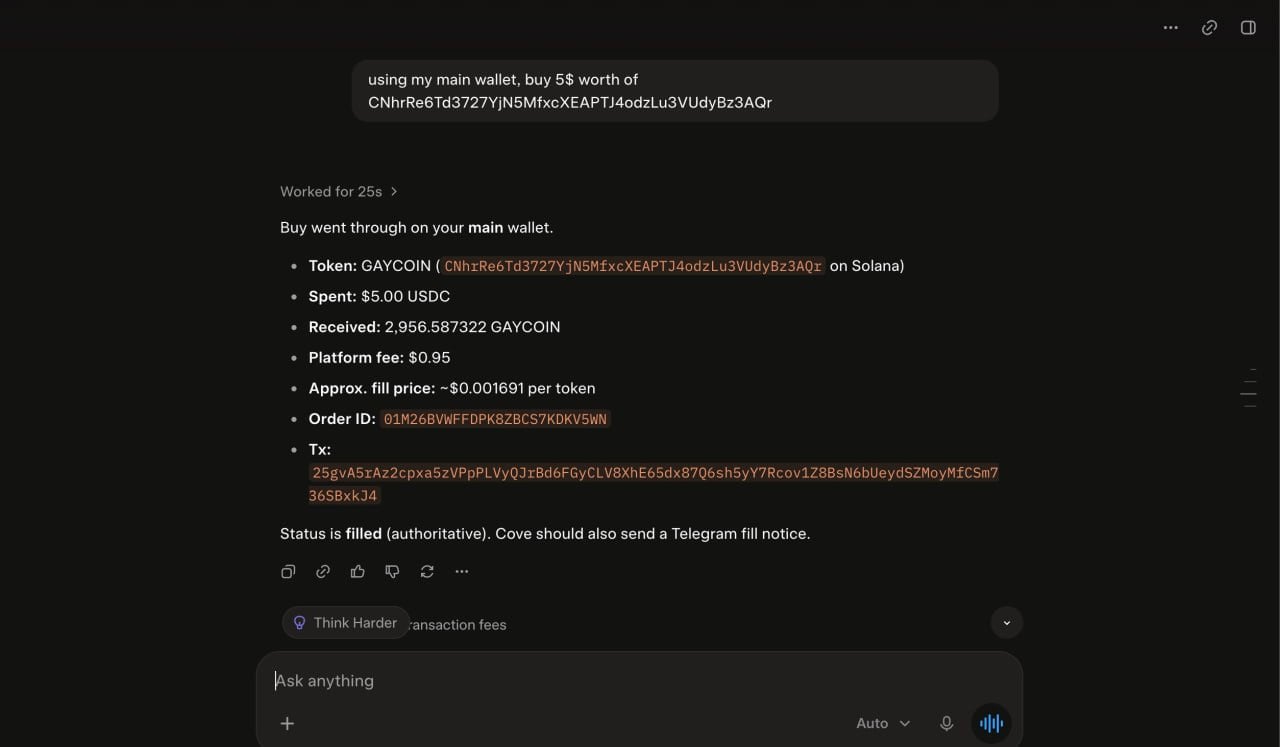
Prompt your AI agent to execute market buys and inspect the structured fill output.
11. Review real-time Telegram execution alerts
🤖 Agent Buy / Buy Executed), updating your position card, PnL, and active order guardrails.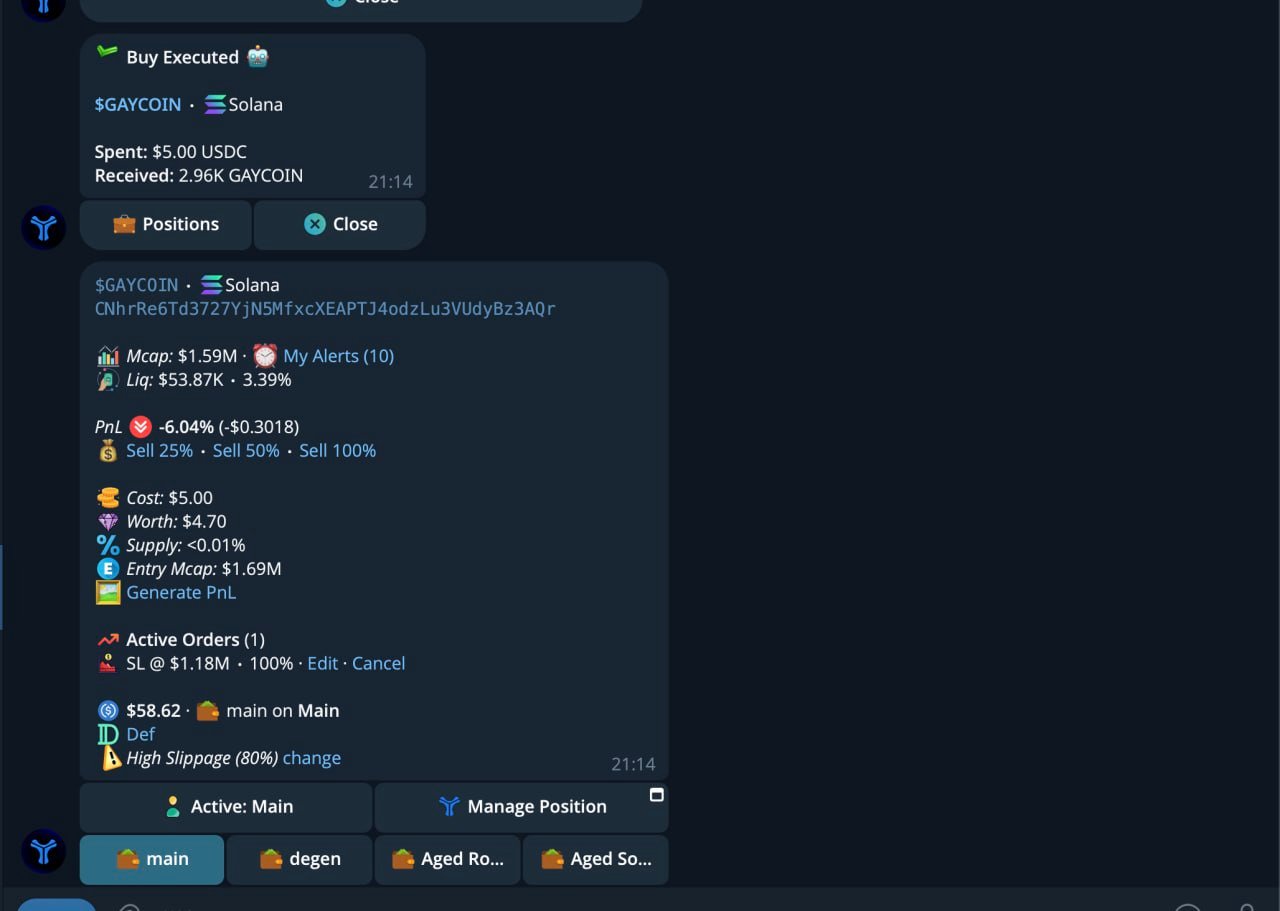
Cove sends real-time execution receipts and live position tracking cards to Telegram.
12. Manage and exit positions through conversation
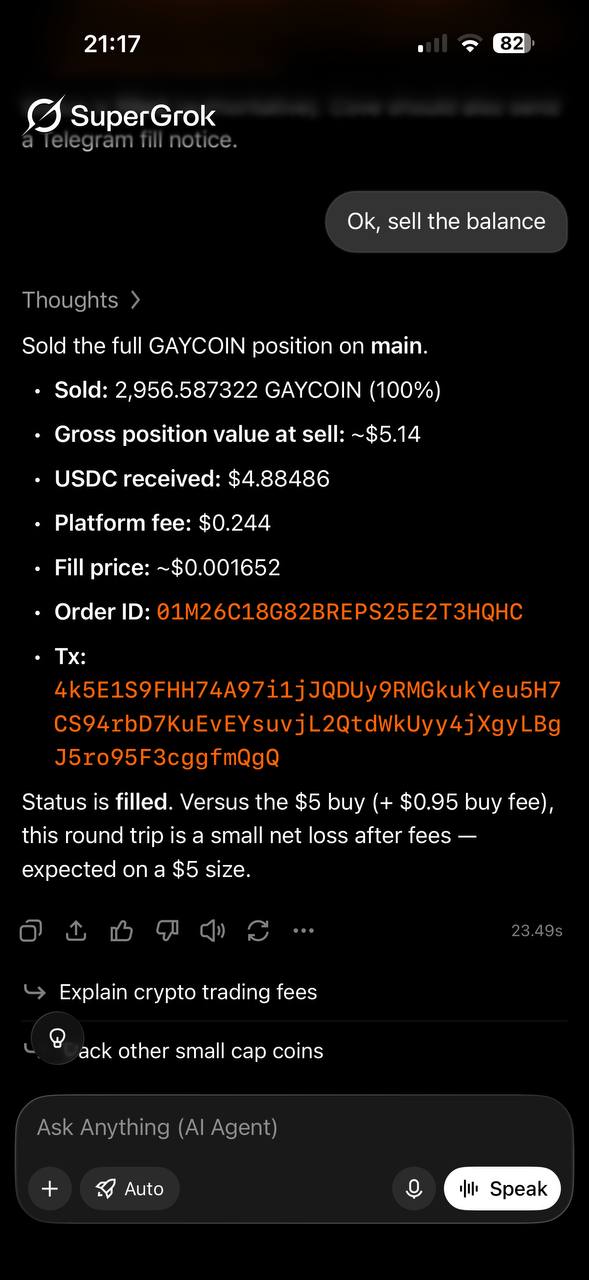
Chat with your agent to sell balances and manage positions conversationally over MCP.
- Connect AI apps → OFF disconnects every connected app. Turning it back on requires fresh approvals.
- Rotating or revoking the Global pair also disconnects every app, and turns Connect AI apps off again.
- There’s no per-app disconnect yet — turn the toggle off and reconnect the apps you want.
cove:agent (plus optional
offline_access). Discovery starts from the WWW-Authenticate header on an
unauthenticated POST /mcp and /.well-known/oauth-protected-resource. Clients can
register with a Client ID Metadata Document, dynamic client registration (with
token_endpoint_auth_method: "none"), or a pre-configured client ID. Redirect URIs must
match exactly: HTTPS, or HTTP on a loopback address. OAuth tokens work only on the MCP
endpoint, not on the token-management API.
Working across your wallets
A single token reaches one or more wallets — you don’t need a token per wallet. Calllist_accounts at any time to see the wallets a token can use, with their ids,
capabilities, auto-bridge mode, addresses, and balances.
There is no default wallet for anything that spends. Every write tool must name its
target, so adding a wallet in Telegram can never silently multiply a running agent’s
spend.
Seeing across wallets. Read tools that support it default to every wallet in
scope when you don’t name a target, and each row tells you which wallet it came from:
get_positions,get_trading_history, andexport_trades— omit the target to cover all in-scope wallets, or narrow withaccountIds/accountId.get_positionsreturns a flat list when you name exactly one wallet, and{ accounts: [{ accountId, positions }] }otherwise.get_trading_historyreturns up tolimit(1–100, default 20) orders per wallet, merged newest-first, optionally filtered bystatus.
get_balanceis per-wallet: pass anaccountId(it can be omitted only when the token reaches exactly one wallet).
accountId and accountIds is refused rather than guessed, so a
mismatched pair can never silently trade or export the wrong wallet set.
Trading many wallets at once. buy_token, sell_token, and batch_order take
accountIds and fan out — each wallet trades independently and gets its own
order. amountUsd is spent by each wallet (it isn’t split). The response is a
per-wallet outcome list:
status is ok (all submitted), partial, or rejected (none submitted), so a partial
fan-out is never reported as a clean success. A $ sell sized by amountUsd resolves to
a different fraction of each wallet’s own bag, and every wallet’s order sends its own
Telegram notification.
accountId) by design — place them per wallet.get_balance and list_accounts split your USDC so an agent
knows what it can spend now:
parkedUsd / stuckUsd can be null when they can’t be worked out right now — treat
that as unknown, not zero. list_accounts also breaks balances down per chain and
stablecoin (byChain), so match on tokenSymbol or sum the rows.
Rate limits
By default your agent can make 30 requests per minute, counted across all your tokens and connected apps together. Rotating tokens or creating profiles never adds more allowance.- The window is a fixed 60 seconds, not a sliding one.
- Over the limit, you get HTTP 429 with
Retry-AfterandRateLimit-*headers — back off until then. - One JSON-RPC request per HTTP call; batches are rejected.
Need a higher limit?
Open a support ticket and tell us:- How you intend to use the MCP — the kind of agent, the workload, roughly how many calls per minute you expect and when (steady, bursty, scheduled runs, etc.).
- How much of an increase you need — give us a target requests-per-minute.
Spending limits
Set your own limits in/agent → Set Limits, per token pair. Enter a USD amount for
any limit, 0 to clear one, or Clear All Limits. With no limits set, the token is
uncapped.
- A 5-wallet buy at $500 each is $2,500 of spend — it passes a $500 Per-Trade limit, but not a $1,000 Per-Batch limit.
- Hourly and daily totals count spending by all your agent tokens; each call is checked against the calling token’s limits.
- Still-open limit buys and pending workflows keep counting even after their window record ages out.
- If Cove can’t verify your open exposure, the trade is refused rather than risked.
list_accounts (spendingLimits). Refusals read
like Buy blocked: $100 exceeds per-trade limit of $50.
Staying safe
The MCP carries the same protections as trading in Telegram or the mini app, plus a few built for agents:- No accidental double-trades. Every trade, limit order, and money-out takes an
idempotencyKeyyou generate — 8–64 characters of letters, digits,_, or-(a UUID works). Retry with the same key and same parameters within 10 minutes and you get the original result back — not a second trade. A market order’s key is also remembered permanently per wallet, so it can’t be reused for a different trade later. Bridge, marketplace, and private-disperse tools take a key of 8–128 characters that is stored permanently and tied to the token that used it. - One trade per token at a time. Two buys (or two sells) of the same token within ~2 seconds are held back — including one from the mini app — so a double-tap can’t double-spend.
- High-impact trades pause for confirmation. A trade with unusually high price impact comes back asking you to confirm, and nothing is spent until you do. The confirmation is tied to the exact quote shown. See Confirming high-impact trades.
- Trades stay sellable. A buy that would leave a position too small to ever sell is refused up front — the minimum is $2.50 on Solana and $0.50 on other chains (the $1 minimum order also applies).
- Spending limits. Set them yourself in
/agent— see Spending limits. - Read tokens can’t spend. A read-only token can’t trade or move money at all.
- Money-out is opt-in on Profile tokens, per wallet.
- No keys ever leave Cove. No tool exports private keys or creates new credentials.
- You’re always told. Agent trades, holds, refusals, and money movements send a Telegram message to your linked account — see Notifications.
Confirming high-impact trades
When a wallet’s trade would have high price impact, that wallet comes back inrejected with a confirmation class and a prompt id. Nothing was created and
nothing was spent for it.
promptId, and when available quoteTerms (tokenAmount,
usdAmount), estimatedSpendUsd (buys), and a reason that spells out the impact and
exactly how to retry.
To confirm, call the same tool again with the same size, token, chain, and
transactionDelayMs, plus:
- Use the
codeexactly as returned. If wallets came back with different classes, confirm them in separate calls. - Name only the gated wallet(s) in
accountIds, and use a freshidempotencyKey— unless you’re re-sending the entire original call and none of it went through, in which case the original key is fine. - A prompt lasts 10 minutes and is single-use.
- If the new quote is more than 5% worse than the terms you confirmed, or the impact
class gets worse, the trade asks again instead of executing (
quoteChanged: true).
confirmation_expired means there’s no live prompt — call again without
confirmHighImpact to get a fresh one. confirmation_mismatch means the class or prompt
id was wrong.
You’ll get a ”🚨 Agent trade held for confirmation” message in Telegram when this
happens (at most once a minute per token and side).
Recovering from an uncertain result
Networks drop. When your agent isn’t sure whether something happened, it should look it up — never resubmit with a new key. Market orders (buy_token, sell_token, batch_order): a submit response is a
receipt, not a fill. Use reconcile_market_order with either the orderId or the
original idempotencyKey:
- Call it after a lost or ambiguous response — including any “Buy failed” / “Sell failed”
error without a
code. - Poll
foundresults until every order is terminal and every success showsfillStatus: "authoritative", with afill(amount, USD, price, fees, time). - Treat
not_foundandunavailableas uncertain — stop and tell the user. Anot_founddoes not mean it’s safe to trade again. - Market orders can’t be cancelled once submitted.
lifecycle (submitted, executing, filled, settling,
failed, cancelled, expired) and a fillStatus. A successful order stays settling
until its fees are final.
Limit, protective, and transfer orders: use get_order_status. If a limit-order
creation fails with “the order may still have been created”, check get_limit_orders
before doing anything else — and don’t retry with a fresh key.
Withdrawals and transfers: if the result is uncertain (say, a dropped connection
after signing), a retry comes back as an error, not a success. Check
get_order_status and the balance before assuming it went through.
Bridge, marketplace, and disperse: these return code: "outcome_unknown" when the
action may already have started. Read the matching status tool (get_balance,
marketplace_purchase_status, get_private_disperse_run) and retry only with the
same key. Never create a replacement.
Trade timing across wallets
buy_token, sell_token, and batch_order accept an optional transactionDelayMs
(0–10,000) — the gap between each wallet’s order, in the order you listed the wallets.
- If you leave it out: buys use each wallet’s profile Transaction delay setting; sells go out together; a single-wallet call never waits.
- Primary wallet first: if the profile has Primary wallet first on and you name the primary wallet, it goes first and the rest wait at least 250 ms.
- Delays control submission order only — fills land in whatever order the chain
settles them. All order ids come back immediately; later wallets show
pendinguntil their turn. batch_orderprotection waits for the fill. The stop-loss and take-profit are created straight away but stay dormant until that wallet’s buy actually fills. If the buy fails or its outcome is unknown, the protection waits (until recovery, cancellation, or expiry) rather than firing.- An agent buy that fails because the wallet couldn’t afford it at execution time is not automatically retried at a smaller size — reconcile, then submit a new call.
Gas-surplus offers
Some trades cost more in network fees than Cove sponsors. Instead of failing silently, the wallet comes back with asurplusOffer — the extra charge to go ahead.
- For a failed market order,
get_trade_surplus_offer({ orderId })returns the live offer:offerId,surplusUsd,expiresAt, and the exactcontinuationcall. - To accept, call that
buy_token/sell_tokencontinuation exactly as given, withsurplusOfferIdandmaxSurplusUsd(up to $1,000), for one wallet, using the suppliedidempotencyKey. You’re only ever charged the offered amount. - Offers expire within 10 minutes and are tied to your token. An accepted sell surcharge counts toward your spending limits. Paper wallets and Solana sells don’t get offers.
- Accepting doesn’t change your saved gas surplus budget setting.
Notifications & webhooks
Telegram
Every agent action you should know about lands in your linked Telegram chat. Each message has a Close button to dismiss it.Webhooks
Optionally, set a webhook on a token pair in/agent → Set Webhook URL. Cove POSTs
JSON to it for market and transfer orders:
- Headers:
X-Cove-Event(the event) andX-Cove-Signature=HMAC-SHA256(webhookSecret, rawBody)in hex — verify it before trusting the payload. - Payload:
event,orderId,accountId,status,tokenSymbol,tokenAddress,chainId,side,amountUsd,tokenAmount,priceUsd,txHashes,timestamp. A fan-out sends one delivery per wallet. - Delivery is best-effort: a 5-second timeout and no retries. Limit-order and DCA
fills don’t send webhooks. Treat
reconcile_market_order/get_order_statusas the source of truth. - Your webhook and secret carry over when you rotate tokens.
Tool reference
Everything your agent can call, grouped by what it does.tools/list (and
get_capabilities) always show the exact, current arguments.
- Needs: read = any token; RW = read-write token with trade on the target; RW + money-out = read-write with Money-out on the source wallet; Global RW = a Global read-write token.
- Wallets: all = defaults to every in-scope wallet (narrow with
accountIds/accountId); fan-out =accountIds, one independent order per wallet; one = a singleaccountId; — = not wallet-specific.
Discover
See your account
Research tokens
Trade
get_settings).
Automate (limit orders)
Orders expire afterexpirySeconds (60 seconds to 30 days); if you leave it out, they
last 30 days.
Settings & earnings
- Global tokens must pass
profileIdto read or write settings; Profile tokens use their own profile. - A Profile token can only write profile-wide settings if it covers every wallet in that profile.
- Change at most one of
slippageBps,clampToMaxBuy, orliquidityProtectionEnabledper call. Changing any of them turns degen mode off in the same write, so don’t combine them withdegenMode: true. languageneeds a Global token.tradingSelectedAccountIdsis read-only.- If an update fails part-way, trust the
observedfield in the response — it’s a fresh read of what’s actually saved.
Profiles & wallets
create_profile and create_wallet aren’t idempotent — after an error, check
list_profiles / list_accounts before trying again.
Move funds
All of these are irreversible, act on one wallet (accountId), take an
idempotencyKey, count toward your spending limits, and send you a Telegram receipt.
Bridge
Cove keeps trading USDC on its main chain (Solana). USDC that lands on another chain is either brought back automatically or left for you to approve (manual — the default for new and imported wallets, shown asparkedUsd).
Wallet marketplace
Buy pre-existing aged wallets (wallets with real on-chain history) from an outside vendor on Solana, Ethereum, Base, BNB Chain, and Robinhood Chain. Cove pays from the wallet you choose and imports the wallets straight into the profile you name — no private key is ever shown to you or your agent.maxSpendUsd covers buying the native token, the vendor
payment, fees, and gas — a budget that only covers the catalog price can stop a purchase
part-way. If a purchase stops, check marketplace_purchase_status; never raise the
ceiling or buy again automatically. New real wallets join a Global token’s reach
automatically; add them to a Profile token in Manage Wallets.
Private disperse
Fund up to 10 of your own wallets in one profile from a single Solana USDC payment. An outside service routes each share through a different exchange, with an optional delay per share (up to 7 days), instead of sending straight from your source wallet. Fees come out of what each destination receives —quote_private_disperse shows the exact numbers.
Errors & availability
Tools return acode alongside a readable message. The ones your agent will see most:
errorCategory (for example slippage,
insufficient_balance, price_impact, liquidity, network, gas_exceed,
token_migrating, signer_access_lost) in get_order_status, get_trading_history,
and reconcile_market_order.
Some refusals come back as plain text rather than a coded object — for example a read-only
token trying to write, a wallet outside the token’s scope (“This token is not allowed to
trade on that wallet…”), a Money-out refusal (“Enable Money-out for this wallet in
Telegram’s Agent panel.”), or a spending-limit block (“Buy blocked: …”).
Availability:
- Cove can pause the MCP globally for maintenance or emergencies; you’ll get a clear “temporarily paused” / “disabled” response if so.
- A feature that’s switched off on the deployment still appears in
tools/listand refuses when called — checkget_capabilitiesto see what’s enabled. - Over the rate limit you’ll get HTTP 429 with
Retry-After.
Need help?
Open a support ticket for anything — enabling agent access on your account, raising your rate limit, or help wiring up your agent. Wallet selection, Money-out, spending limits, webhooks, and connected apps are all self-serve in/agent.