

Configure auto-buy
1
Open the setting
Send
/autobuy, or open Settings → Trade panel settings → Auto-buy on paste.2
Set the amount
Choose an offered preset such as $10 / $25 / $50 / $100, or Custom. Check whether selected wallets use Split Total or Per Wallet.
3
Review optional guards
Set any Min/Max Mcap and Min/Max Liq bounds. Skip holdings can prevent an auto-buy when any wallet in this profile already holds the token, including hidden or dust positions. Review all saved values before enabling.
4
Turn it on
Check the active profile and toggle Auto-buy on paste on. The next eligible token paste can start a purchase.
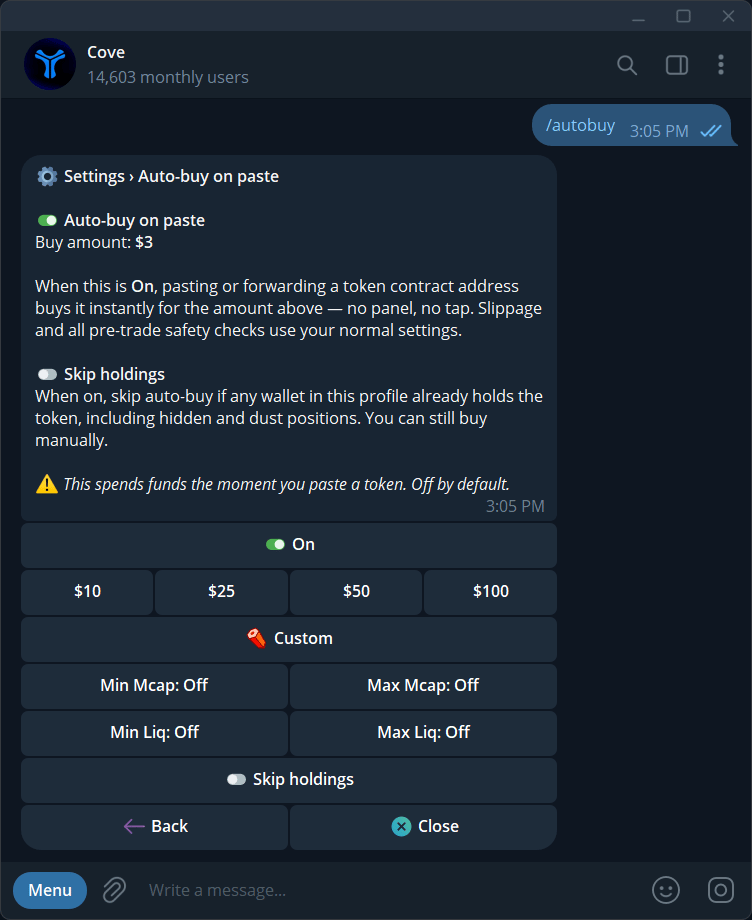
Amount, min/max market cap and liquidity, Skip holdings, and enabled state.
What still applies?
Slippage and pre-trade checks still apply. If Scam warning is on, a flagged token is refused rather than bought without a panel confirmation. The message can say the auto-buy amount was not spent. If a trade is pending or fails, check the receipt before pasting again. Repeated deliberate submissions can be new trading instructions.Turn it off
Open/autobuy and switch the feature off. Verify the state in each profile where you used it. This stops future paste-triggered buys; it does not cancel existing automated orders.
See Trading and Guardrails.