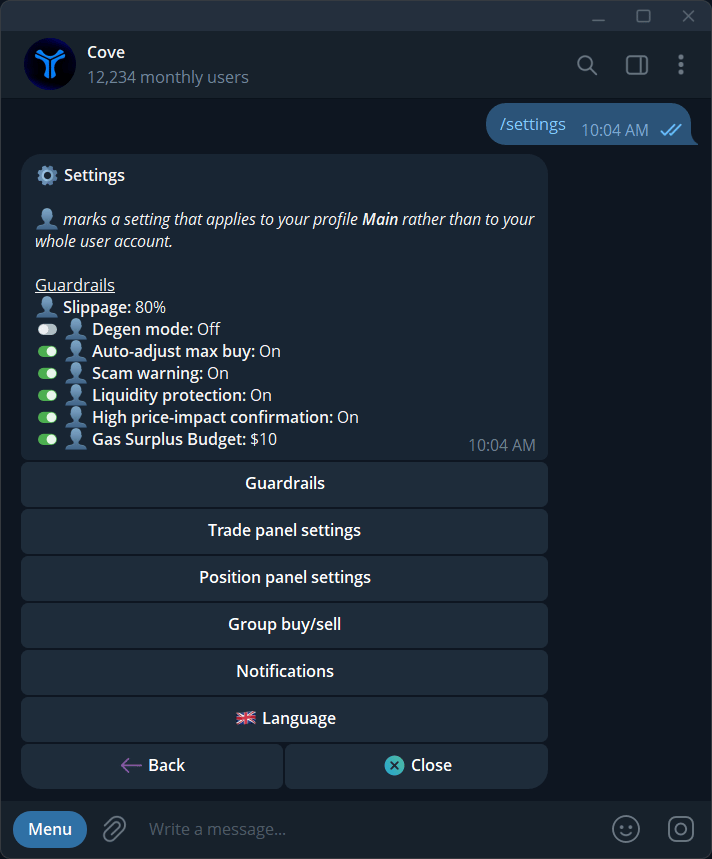
Settings let you tune how Cove behaves before, during, and after every trade. Use this page when you want to change default amounts, add confirmations, automate exits, or control how shared group links execute.
Cove Settings panel

At a glance

Trade Panel

Configure buy/sell presets, confirmations, post-buy behavior, degen mode, and extra trading links.

Protection

Control slippage, liquidity protection, max-buy adjustment, and gas surplus behavior.

Automation

Automatically attach take-profit and stop-loss orders to future market buys.

Group Links

Set limits for group buys and enable or disable group sell links.

Trade panel settings

Trade panel settings control how the token trading panel behaves after you paste a contract address or open a token link.
Trade panel settings in Cove
OptionWhat it controls
Buy PresetsQuick buy amounts shown on the buy panel
Sell PresetsQuick sell percentages shown on the sell panel
Buy ConfirmRequires confirmation before a buy executes
Sell ConfirmRequires confirmation before a sell executes
Capital at Risk / Profit TakenShows capital-at-risk and profit-taken information in the panel
Stay on buy after buyingKeeps the panel on the buy side after a buy completes
Auto-buy on pasteAutomatically starts the buy flow when a token address is pasted
Extra linksShows additional token links in the panel

Buy presets

Buy presets are the quick amount buttons shown on the buy panel. Tap a preset in settings to change its value, or reset the full preset set to defaults.
Buy preset amounts in Cove

Degen mode

Degen mode is a fast-execution mode for users who intentionally want fewer protections.
Degen mode forces 100% slippage, turns liquidity protection off, and keeps auto max-buy clamp on. Your stored slippage, liquidity protection, and clamp settings are restored when degen mode is turned off.

Auto TP/SL

Auto TP/SL automatically creates matching limit orders for future market buys across supported chains. When enabled, every new market buy can attach a take-profit order, a stop-loss order, or both.
Auto TP SL overview in Cove
Auto take profit creates a sell order once the token moves up by your selected profit percentage.In the example below, Cove sells 50% of the position when the token is up 100%.
Auto take profit settings
Auto TP/SL applies to future market buys. Existing positions are not changed retroactively.

Execution protection

These options help keep execution predictable during volatile markets and unusual liquidity conditions.
Slippage is the maximum price movement Cove will tolerate between submission and execution.Use presets such as 10%, 20%, 40%, or 80%, or set a custom value. The custom range is 1% to 100% with up to 2 decimals.
Slippage settings
Liquidity protection blocks buys that would consume too much of the token’s reported liquidity pool.Cove blocks a trade when your buy is more than roughly 33% of the pool’s reported liquidity. For example, a $30 pool blocks buys above $10.
Liquidity protection settings
Auto-adjust max buy reduces your order to the contract’s maximum allowed buy amount when you try to buy more than the token allows.
Auto-adjust max buy settings
Gas surplus budget lets Cove cover network fees above the sponsored cap up to a per-trade limit from your USDC balance instead of failing the trade.Set it to Off to always ask before charging surplus. Presets include $1, $3, $5, $10, and custom.
Gas surplus budget settings
Group link controls define how shared buy and sell links behave when someone opens them from a group, channel, or external post.
Group buy sets the maximum amount that can execute instantly from a shared group buy link.Trades above your limit ask for confirmation first. Set the option to Off to disable group buys entirely.
Group buy settings

Position panel settings

Position panel settings control which quick sell actions appear in the Positions screen and generated position links.
Position panel settings
OptionWhat it does
Sell 100% in PositionsShows a one-tap full-sell action from the Positions panel
Sell 100% LinksEnables full-sell links for position actions