

1
Open Paper
Send
/paper in your private Cove chat. This opens the Paper profile.2
Create a practice wallet
Choose Create Paper Account if needed. Some labels still use “Account.”
3
Check the mode and practice
Verify the ⚠️ 📄 PAPER label. Paste a token, choose a buy amount, and follow the result in
/positions. Try the bot’s trading and order controls.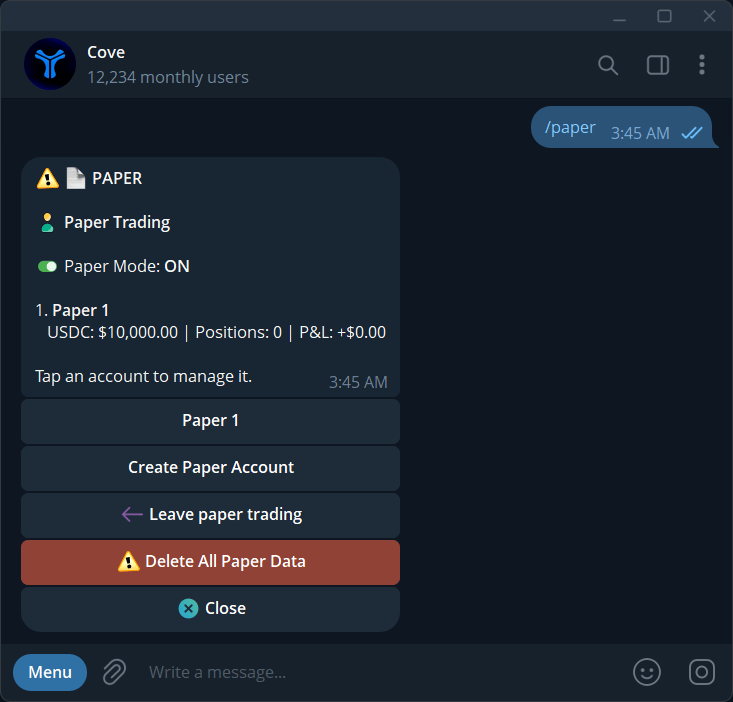
Paper trading mode with a virtual balance and paper-account controls.
Add funds or reset
Return to/paper. Funding choices include +$5k, +$10k, +$25k, and +$50k. Reset to $10k resets the practice balance; follow any confirmation shown.
Paper results are simulated and do not establish that a real trade would fill at the same price.
Return to real trading
Open/profiles, choose a real profile such as Main, and check your wallet selection.
Paper wallets cannot deposit, withdraw, transfer, or use money products. They are excluded from Mini Apps and CSV exports. They count toward the total wallet limit, not the five-real-profile limit.
For a practice exercise using a verified meme-coin contract and a clear comparison with real fills, read Paper trade meme coins with Cove.