

/pnl in your private chat with cove to create a report for real wallets in the current profile. This command appears only when the feature is enabled for your account. It is separate from Generate PnL on a single token panel.
Generate a report
- Send
/pnl. The panel starts with 30d selected. - Tap wallets selected to include or exclude wallets. The picker can include deleted wallets so their past trades count.
- Choose 7d, 15d, 30d, or Custom. Custom accepts a whole-day period from 1 to 365 days; for example,
30,2w,1m, or1y. - Tap Generate PnL and wait for the image. A direct command such as
/pnl 300dgenerates a report for all real wallets in the current profile.
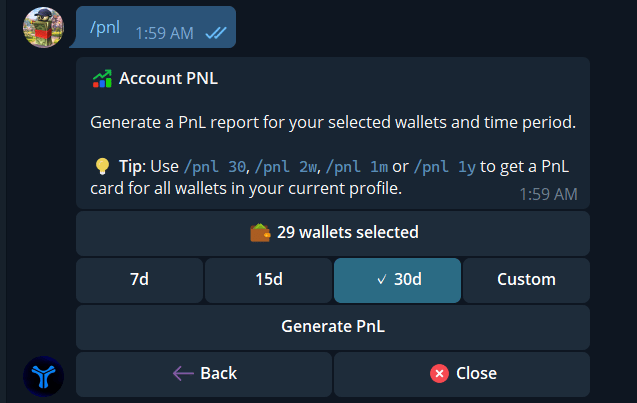
Select wallets and a rolling time period before generating the report.
Read the card
The headline is realized PnL on sells in the period. The percentage compares that realized PnL with the cost basis assigned to those sells. The card also shows total bought, total sold, and a by-chain breakdown when there is activity. Unsold holdings are not marked to their current value here. Sells without a usable cost basis are excluded; if the missing basis prevents a reliable report, cove may say the report is unavailable.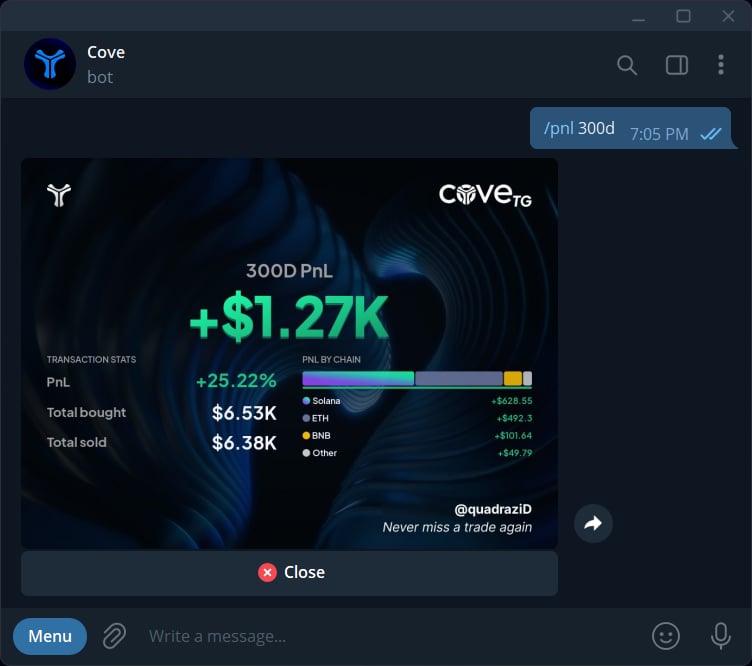
A 300-day report shows realized PnL, return, bought and sold totals, and a breakdown by chain. These are the example account's figures.
/pnl and choose them again.