

Create from the panel
1
Open a position
In the intended profile, open the token and select the wallets whose holdings you want covered.
2
Open Trailing SL
Tap Limit, then Trailing SL.
3
Set the trail and amount
The form opens with Trailing -40% and Sell total 100%. Choose a preset or enter your own trail from 1–99% and sell size from 1–100%. These are starting values, not a recommendation.
4
Review expiry and place
Check the displayed settings and expiry, then Place order. Default expiry is 30 days, within a 1 minute–30 day range.
5
Verify the stop
Look for Trailing stop order placed and open
/orders in that profile.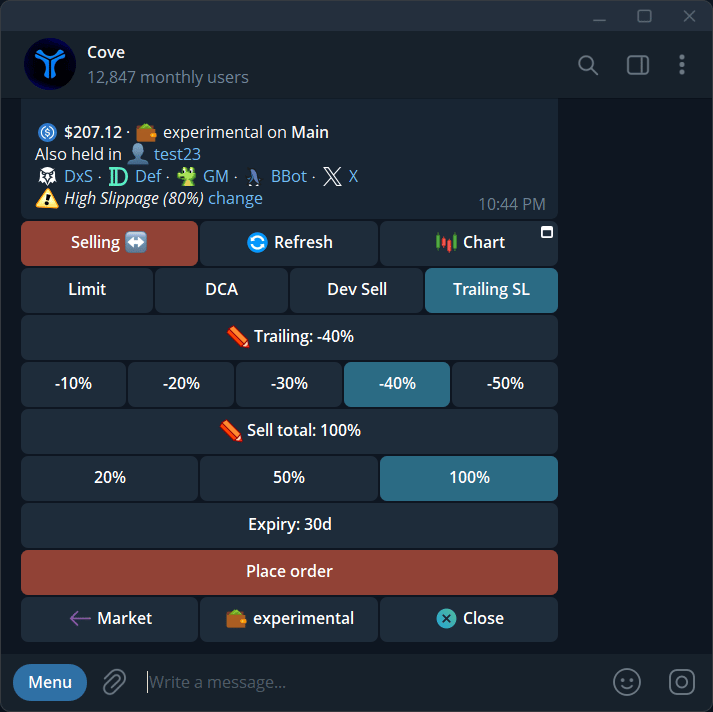
Trailing SL opens with editable -40% trail and 100% sell size.
Use the reply command
Reply to a fresh token panel, rather than sending an unrelated message:/trailing alone for the bot’s tutorial. If it reports duplicate delivery or uncertain partial creation, check /orders before resending.
Change or cancel
Open/orders, select the pending trailing stop, and use Edit or Cancel. You can edit the trail, sell size, and expiry while pending.
If a trail is too tight and would trigger immediately, widen it. A trigger is not a guaranteed fill; read any Didn’t Fire, fee, or failed-order notice in Manage orders.