

Create a buy ladder
1
Open the token and wallets
Paste the token address in the intended profile and check the selected wallets.
2
Choose DCA and Buying
Open Limit → DCA, then choose Buying.
3
Set the market-cap range
Enter From mcap and To mcap. You can use shorthand such as 800k or 1.5m.
4
Set the order count and total
Choose 2–10 orders and enter Total spend in USD. This is the budget for the whole ladder, not each rung.
5
Review targets and expiry
Check the preview, selected wallets, and expiry. The default is 30 days; the allowed range is 1 minute–30 days.If the range crosses the current market cap, review the mixed-ladder warning: some rungs buy dips and others buy breakouts.
6
Place and verify
Tap Place N buy orders. Check the receipt, then open
/orders to verify the rungs.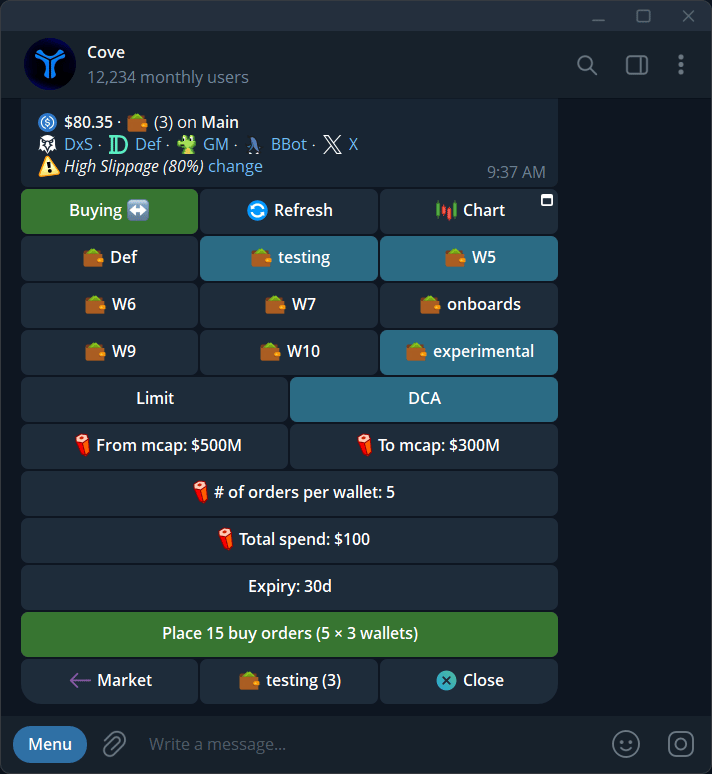
Example buy ladder: market-cap range, orders per wallet, total budget, and expiry.
Example: buy in three steps
Assume the current market cap is 1m. You choose 600k to 900k, 3 orders, and $300 total.
The targets are evenly spaced. Each rung waits for its own condition; the highest dip target may execute first.
With multiple wallets, DCA buys always split the total across wallets, even if ordinary buys use Per Wallet. The rung count is per wallet: three rungs across two wallets can create six orders. Check the actual preview for allocation and any minimum-size restriction.
Create a sell ladder
- Open Limit → DCA → Selling on a holding.
- Enter From mcap and To mcap.
- Choose 2–10 orders.
- Set Sell total %, from 1–100, for the whole ladder.
- Review targets, wallets, expiry, and any skipped rungs.
- Tap Place up to N sell orders and verify the receipt.
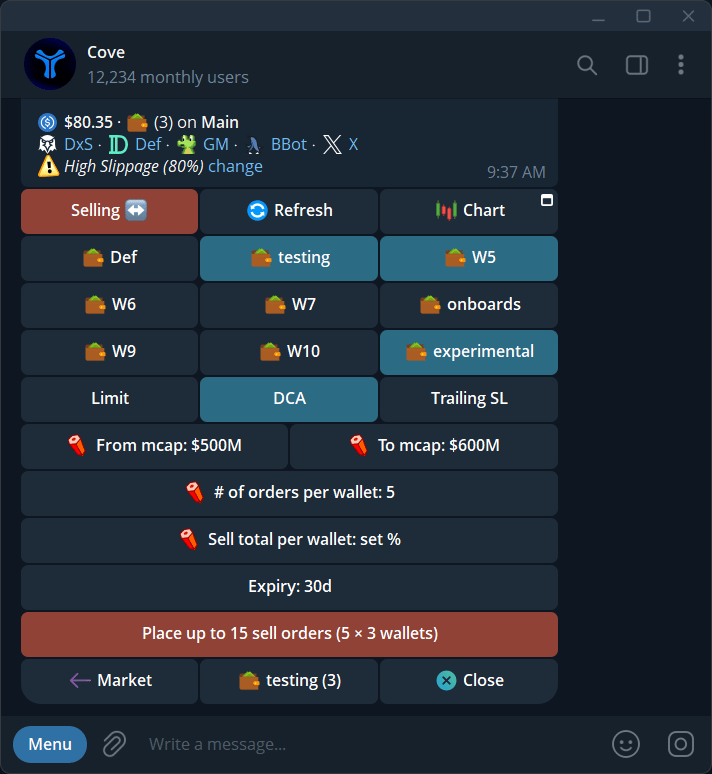
Sell-ladder setup: choose the range, order count, and total percentage to sell.
Create by replying to a panel
Reply to the token’s live panel:/dca alone for the tutorial. Use B or S, a range, a count from 2–10, then USD for buys or a holdings percentage for sells.
Edit, cancel, and follow results
Open/orders. Edit a pending rung or cancel it individually. Cancel DCA group cancels the ladder’s remaining orders; already executed trades are not undone.
All rungs can trigger close together if the market moves through the range. A rung whose target is never met remains pending until expiry. Each fill has trading costs and can fail independently.
For a duplicate-command warning, expired panel, or uncertain partial creation, check existing orders before retrying. See Manage orders.