

Export a private key
1
Open wallet management
In the primary Cove bot, choose the intended profile, then
/wallets → Export Wallet.2
Select the wallet
In Cove Wallets → Active, check the label and address. If it is in another profile, switch in Telegram and reopen the app.
3
Export securely
Tap Export Private Key. If 2FA is on, complete the authenticator prompt. Follow the Privy-hosted secure window and save the backup somewhere only you can access.
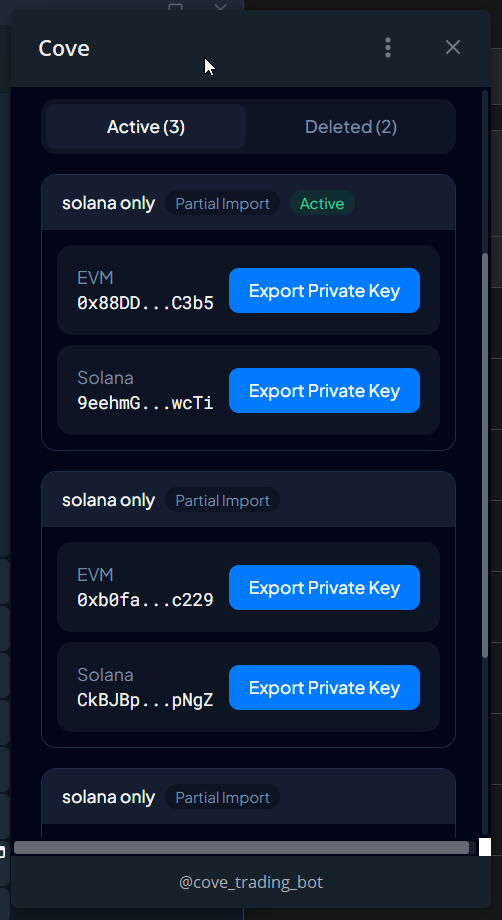
Active wallets with export controls. No private keys are displayed.
Delete a wallet from Cove
Review its funds and orders first. Your primary wallet and only wallet cannot be deleted.- Open
/wallets→ its ⚙️ → Delete Wallet. - Open Manage Wallets.
- Review the wallet, then Yes, Delete & Revoke if you intend to remove access.
Recover a deleted wallet
Open Cove Wallets → Deleted, find the wallet, tap Recover, then Yes, Recover. Return to/wallets and check the wallet selection.
Re-importing its key does not restore a deleted wallet; use Recover.
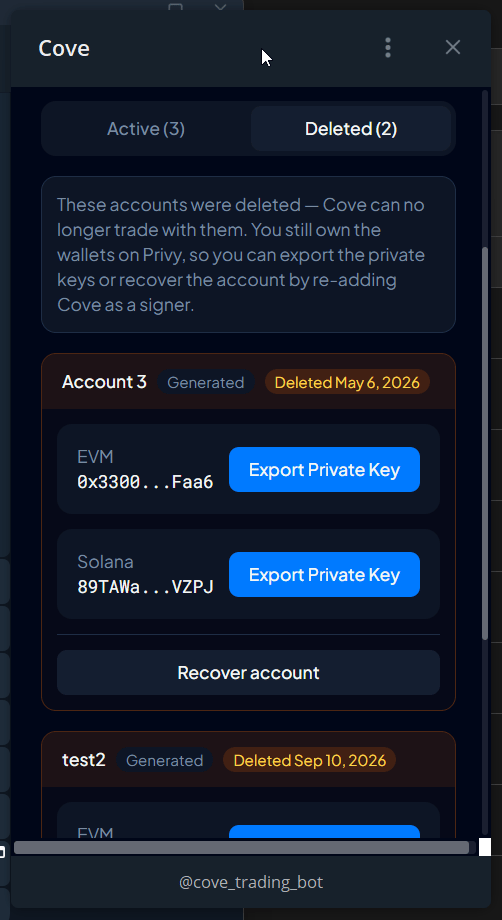
Deleted wallets with the Recover account option. No private keys are displayed.
Restore lost access
If a wallet shows Signing access lost, open Cove Wallets → Restore access and confirm. Wait for Signing access restored before retrying. Until then, trades, transfers, and withdrawals may fail. If every wallet loses access, deposits may also be unavailable.Downgrade a smart wallet
Where available,/wallets → ⚙️ → Downgrade Smart Wallet removes the smart-wallet authorization used on applicable chains. Review the prompt. A later Cove trade may enable it again. This differs from deleting the wallet and revoking Cove’s access.
Wrong Telegram account in a Mini App
Tap Switch to this Telegram account. If that fails, close the app and reopen it from the intended Telegram account. Use/bots to find the primary bot when a secure operation is unavailable on a backup.
Manage external agents using the MCP guide. Support never needs your keys or access tokens.