

Check a wallet’s bridge mode
Ordinary new and individually imported wallets now start with Auto-bridge on. Eligible other-chain stablecoin deposits can move into the trading balance automatically. If you want to approve those movements yourself, turn Auto-bridge off for that wallet before depositing. Admin bulk-imported wallets are a separate exception and start with Auto-bridge off. For any other wallet type, check its displayed setting rather than assuming a default. Auto-bridge ✅ means eligible deposits can move automatically. Manual ✋ leaves them on the receiving chain until you approve a bridge. An existing wallet keeps its own saved preference unless you change it.Approve parked funds once
1
Open Bridge
Send
/bridge, or tap Parked on other chains on the main menu, Positions, or Deposit.2
Find the wallet and chain
Check the wallet header and the row showing the amount, token, and network.
3
Approve the movement
Tap Approve on that row. It moves that chain’s eligible balance once; it does not turn on automatic bridging for later deposits.
4
Wait for completion
Follow the moving-funds status and Bridge complete notification. The bot may estimate about a minute; network conditions can change the wait.
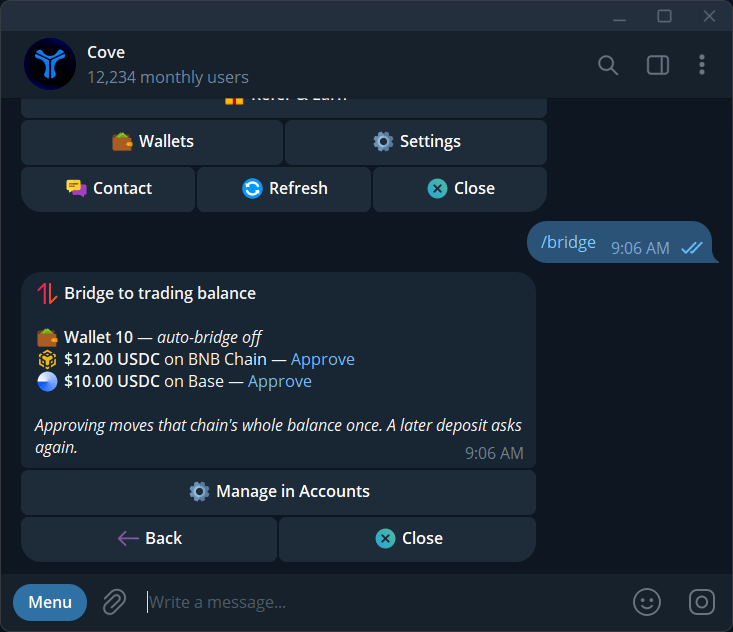
Parked funds awaiting approval, with the wallet and network shown.
Change the standing preference
Open/wallets → the wallet’s ⚙️ → Auto-bridge. You can also use the controls in /bridge or the Deposit Mini App. Check the resulting 🔁 or ✋ state.
The preference belongs to the wallet. Changing it affects how eligible funds are handled, so check the wallet name first.