

Deposit from another wallet or exchange
1
Choose the receiving wallet
Open the intended profile, then Deposit or
/deposit. Check the wallet shown before copying an address.2
Choose the correct network and address
Use the Solana address for Solana assets and Deposit EVM for the listed standard EVM networks.HyperEVM and Avalanche, when available, have separate wallet addresses behind Show HyperEVM wallet and Show Avalanche wallet. Deposit only the matching chain’s assets to those addresses.
3
Review the asset, minimum, and bridge mode
Check the live deposit panel. Other-chain stablecoins normally need at least $25 on Ethereum or $1 on other supported chains to bridge.🔁 means auto-bridge is on. ✋ means you approve bridges yourself.
4
Send from your external wallet
In the sending wallet or exchange, use the same network and asset as the deposit route. Review the address and any sender-side fees before sending.
5
Check arrival and trading balance
Look for Deposit received. For other-chain stablecoins, wait for Bridge complete, or open
/bridge and Approve if the wallet is manual.Return to /start and refresh Balance.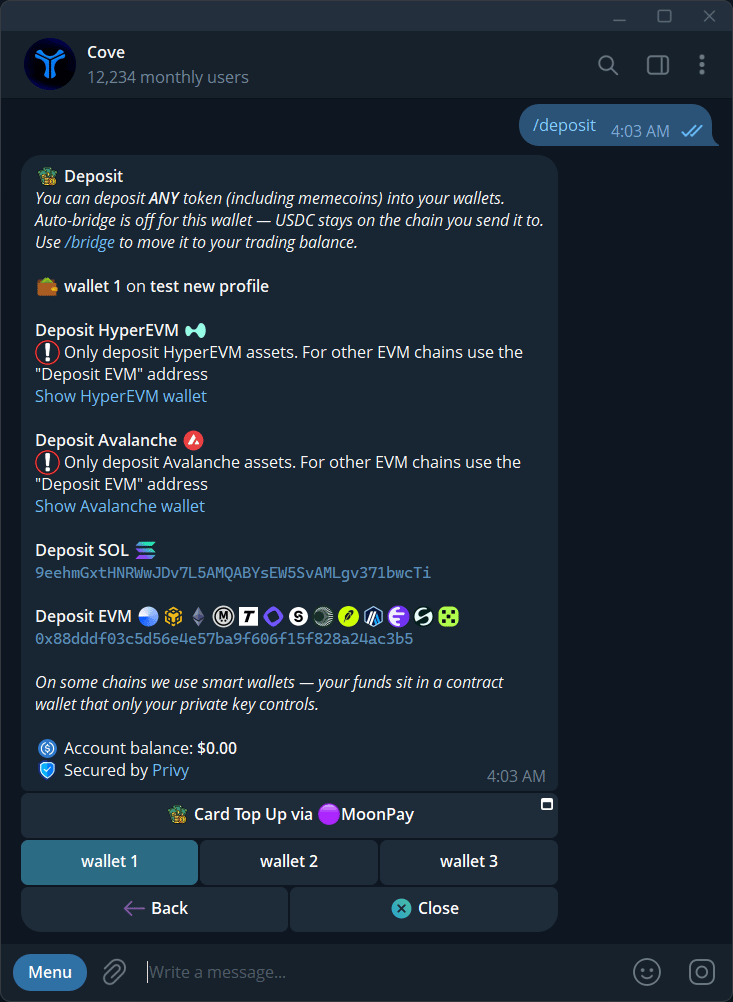
Deposit addresses, the selected wallet, and the auto-bridge preference.
Deposit another token
A non-stablecoin deposit can appear as a holding and offer Convert to USDC. Review the token and any conversion quote before acting; conversion is a trade, with its own fees and liquidity limits. For USDT or other stablecoin routes, check the current conversion and credited amount. Choose Solana USDC if you want to avoid an additional stablecoin conversion step.Top up by card
- Open
/depositand select Card Top Up via MoonPay, when offered. - In the Deposit Mini App, check the receiving wallet.
- Choose the purchase amount and follow MoonPay’s checkout.
- Review the provider’s fees, eligibility requirements, and delivery details.
- Return to Cove and check the deposit receipt and balance.
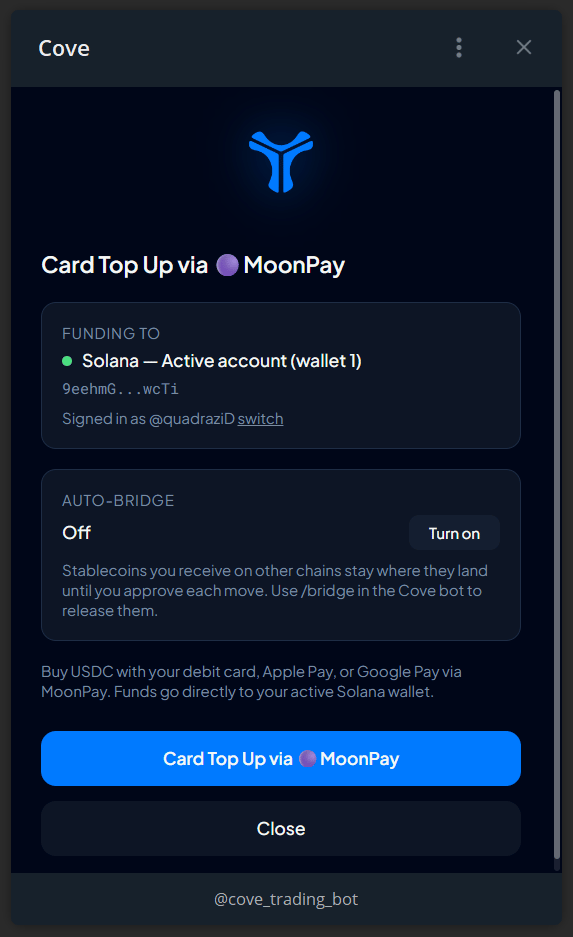
The Deposit Mini App with wallet selection, card top-up, and auto-bridge controls.
Why is my balance unchanged?
See Fees and minimums and Troubleshooting.