

Make a withdrawal
1
Open Withdraw
Choose the intended profile and send
/withdraw. Check the source wallet and available balance.2
Choose the network and asset
Select the destination chain. Solana and BNB Chain may also offer Send: USDT. Make sure the recipient accepts the exact asset and network.
3
Enter the destination
Paste the external wallet address. Review any address warning and check the full address yourself.
4
Enter an amount
Choose a USD amount or percentage. The minimum withdrawal is $1.50. Leave room for any fee when entering an amount below Max.
5
Review and submit
Check the source, destination, chain, asset, fee, and recipient amount. If a fee confirmation appears, review it before Withdraw anyway or the final action shown.
6
Track completion
Withdrawal Submitted! means processing has started. Wait for the completion or failure message and check the explorer link where provided.
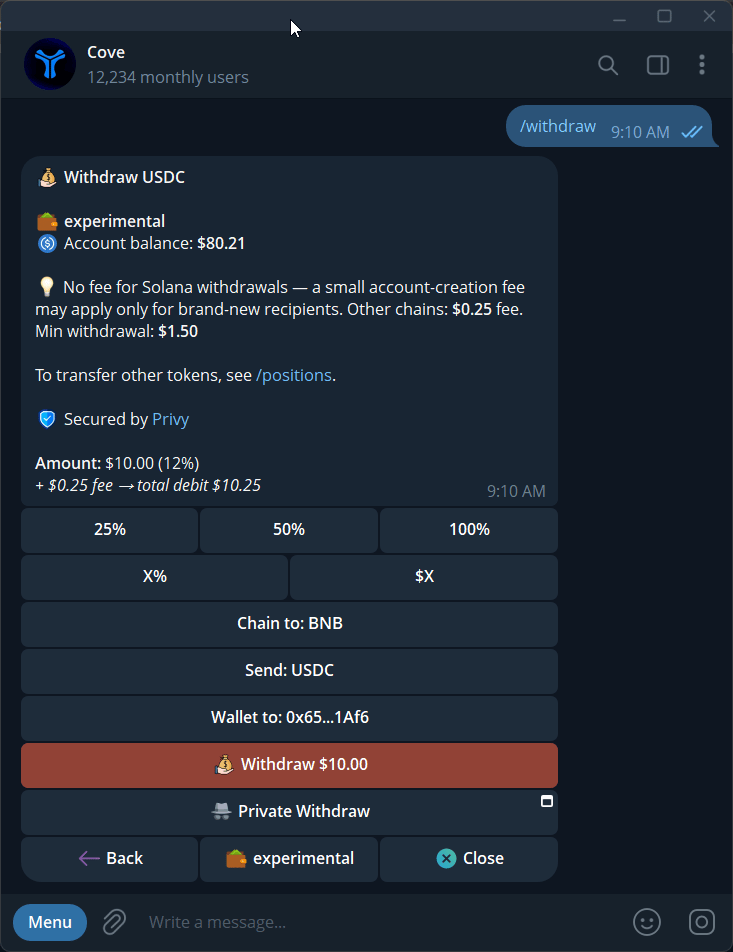
A withdrawal form with the source, network, recipient, amount, fee, and final action.
Fees and Max
Standard Solana withdrawals have no flat Cove withdrawal fee; a new recipient token account may have an account-creation cost. Other supported withdrawal chains have a documented $0.25 flat fee. Check the current prompt for the final amount.- Below 100%, the fee is added on top of the entered amount.
- At 100% / Max, it is taken from the amount, reducing what arrives.
- Withdrawal Too Large to Sponsor asks you to split the withdrawal into smaller amounts.
Supported destinations
Open Withdraw to see the destination networks currently offered. The Supported chains page lists trading networks, including Arc; trading support does not automatically mean a chain is available as a withdrawal destination.If a withdrawal is blocked
Private Withdraw, where available, has a separate flow and fee quote.